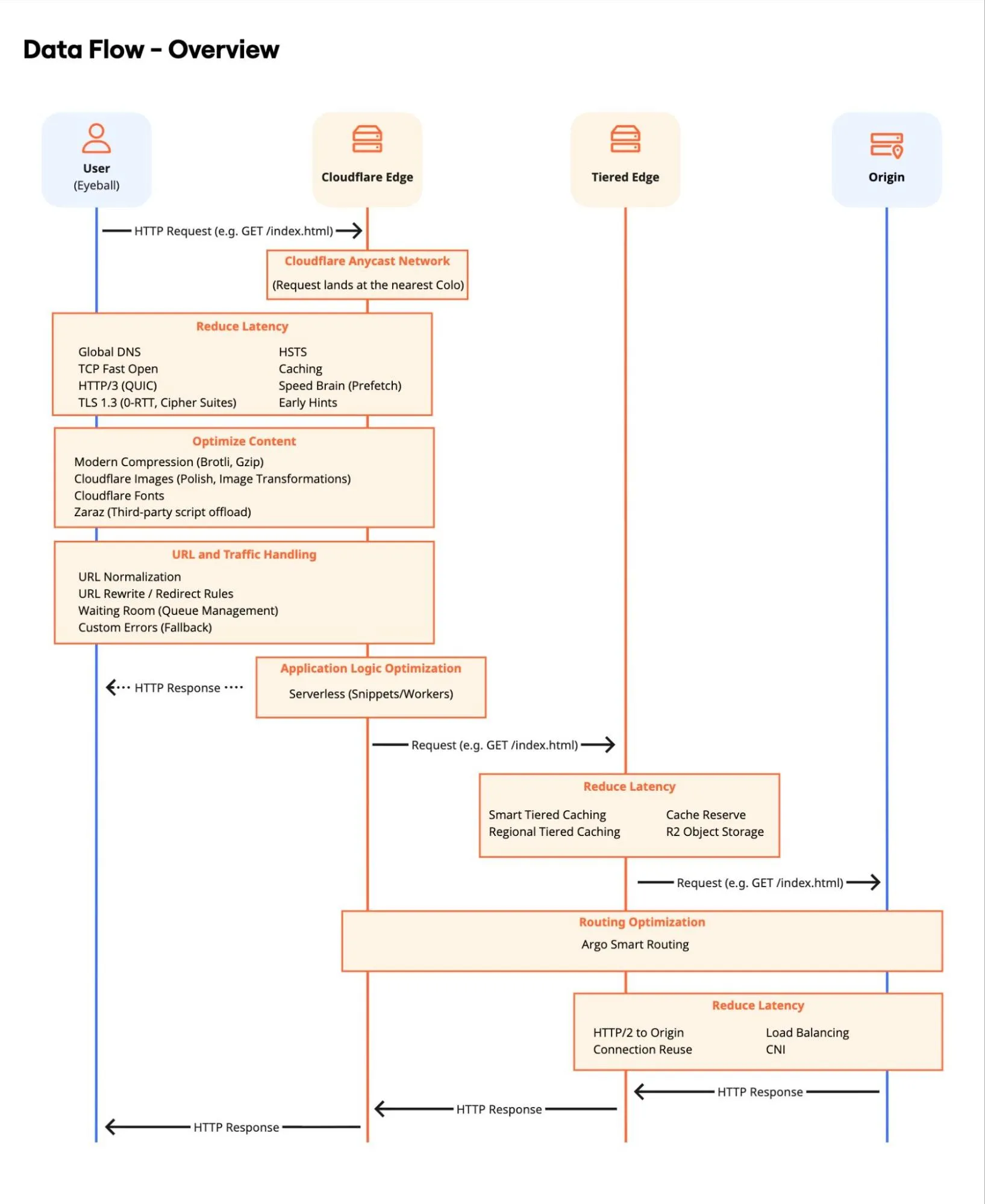
HTTPS và SSL trên Cloudflare: khóa cửa website giải thích cho người mới HTTPS and SSL on Cloudflare: locking your website door, explained for beginners HTTPS and SSL on Cloudflare: locking your website door, explained for beginners
HTTPS mã hóa đường đi giữa trình duyệt và server. Cloudflare cấp chứng chỉ miễn phí và giúp bạn chọn cách mã hóa tới origin — chọn sai dễ gặp vòng lặp redirect hoặc cảnh báo “không bảo mật”. HTTPS encrypts traffic between browser and server. Cloudflare issues free certificates and helps you choose how to encrypt to origin — wrong choices cause redirect loops or “not secure” warnings. HTTPS encrypts traffic between browser and server. Cloudflare issues free certificates and helps you choose how to encrypt to origin — wrong choices cause redirect loops or “not secure” warnings.
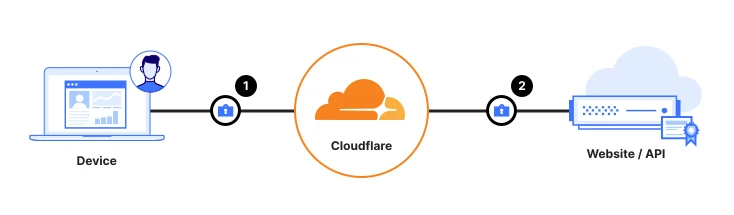
Bảo vệ dữ liệu đang truyền (data in transit) Securing data in transit Securing data in transit
Bảo vệ data in transit với Gateway/DLP — inspect TLS traffic trước khi tới SaaS hoặc Internet. Data in transit is often considered vulnerable to interception or tampering during transmission. Data Loss Prevention (DLP) technologies can be used to inspect the contents of network traffic and block sensitive data from going to a risky destination. Data in transit is often considered vulnerable to interception or tampering during transmission. Data Loss Prevention (DLP) technologies can be used to inspect the contents of network traffic and block sensitive data from going to a risky destination.
Thuật ngữ: Concepts: Concepts: Gateway · DLP · TLS · CASB · Inline inspection
Sơ đồ chính thức ↗ Official diagram ↗ Official diagram ↗ · Bảo mật Security Security
HTTPS giải quyết vấn đề gì — nói không cần chứng chỉ kỹ thuật? What does HTTPS fix — without certificate jargon? What does HTTPS fix — without certificate jargon?
HTTP gửi dữ liệu dạng văn bản thuần — ai ngồi giữa mạng Wi‑Fi công cộng và server có thể đọc hoặc sửa (đặc biệt nguy hiểm với mật khẩu và cookie đăng nhập). HTTPS bọc traffic trong TLS: trình duyệt và server thỏa thuận khóa, nội dung đi “kín” trên đường truyền. HTTP sends plain text — anyone between a public Wi‑Fi and your server can read or tamper (especially dangerous for passwords and login cookies). HTTPS wraps traffic in TLS: browser and server agree on keys, and content travels encrypted on the wire. HTTP sends plain text — anyone between a public Wi‑Fi and your server can read or tamper (especially dangerous for passwords and login cookies). HTTPS wraps traffic in TLS: browser and server agree on keys, and content travels encrypted on the wire.
Thanh địa chỉ hiện ổ khóa không chỉ là “cho đẹp”. Google và trình duyệt hiện đại ưu tiên site HTTPS; form trên HTTP có thể bị cảnh báo. Các bài trên blog.cloudflare.com về SSL thường nhắc: mã hóa in-transit là lớp cơ bản trước WAF hay bot management. The address-bar padlock is not decoration. Modern browsers favor HTTPS sites; forms on HTTP may trigger warnings. SSL posts on blog.cloudflare.com often note: encrypting data in transit is the baseline before WAF or bot management. The address-bar padlock is not decoration. Modern browsers favor HTTPS sites; forms on HTTP may trigger warnings. SSL posts on blog.cloudflare.com often note: encrypting data in transit is the baseline before WAF or bot management.
Cloudflare proxy (đám mây cam) tự cấp chứng chỉ edge cho tên miền của bạn — visitor tới Cloudflare đã HTTPS mà không cần bạn mua cert đắt tiền cho từng subdomain thử nghiệm. With Cloudflare proxy (orange cloud), edge certificates for your domain are issued automatically — visitors hit HTTPS to Cloudflare without you buying expensive certs for every trial subdomain. With Cloudflare proxy (orange cloud), edge certificates for your domain are issued automatically — visitors hit HTTPS to Cloudflare without you buying expensive certs for every trial subdomain.
Bảo vệ dữ liệu đang truyền (data in transit) Securing data in transit Securing data in transit
Bảo vệ data in transit với Gateway/DLP — inspect TLS traffic trước khi tới SaaS hoặc Internet. Data in transit is often considered vulnerable to interception or tampering during transmission. Data Loss Prevention (DLP) technologies can be used to inspect the contents of network traffic and block sensitive data from going to a risky destination. Data in transit is often considered vulnerable to interception or tampering during transmission. Data Loss Prevention (DLP) technologies can be used to inspect the contents of network traffic and block sensitive data from going to a risky destination.
Thuật ngữ: Concepts: Concepts: Gateway · DLP · TLS · CASB · Inline inspection
Sơ đồ chính thức ↗ Official diagram ↗ Official diagram ↗ · Bảo mật Security Security
Flexible, Full và Full (strict): chọn sai là redirect loop Flexible, Full, and Full (strict): wrong choice means redirect loops Flexible, Full, and Full (strict): wrong choice means redirect loops
SSL/TLS encryption mode mô tả đoạn Cloudflare ↔ origin (server gốc). Flexible: visitor → Cloudflare là HTTPS, Cloudflare → origin là HTTP. Dễ bật nhanh nhưng origin không được mã hóa — không khuyến nghị lâu dài. SSL/TLS encryption mode describes the Cloudflare ↔ origin leg. Flexible: visitor → Cloudflare is HTTPS, Cloudflare → origin is HTTP. Quick to enable but origin traffic is not encrypted — not recommended long term. SSL/TLS encryption mode describes the Cloudflare ↔ origin leg. Flexible: visitor → Cloudflare is HTTPS, Cloudflare → origin is HTTP. Quick to enable but origin traffic is not encrypted — not recommended long term.
Full: Cloudflare → origin cũng HTTPS, nhưng chấp nhận chứng chỉ tự ký hoặc hết hạn trên origin. Full (strict): origin phải có chứng chỉ hợp lệ (Let’s Encrypt, Origin CA của Cloudflare, hoặc CA thương mại). Đây là mục tiêu production cho hầu hết site. Full: Cloudflare → origin is also HTTPS, but accepts self-signed or expired origin certs. Full (strict): origin must present a valid certificate (Let’s Encrypt, Cloudflare Origin CA, or commercial CA). This is the production target for most sites. Full: Cloudflare → origin is also HTTPS, but accepts self-signed or expired origin certs. Full (strict): origin must present a valid certificate (Let’s Encrypt, Cloudflare Origin CA, or commercial CA). This is the production target for most sites.
Redirect loop kinh điển: origin luôn redirect HTTP → HTTPS, nhưng mode đang Flexible (Cloudflare gọi origin bằng HTTP) — vòng lặp vô hạn. Cách sửa: bật HTTPS trên origin + chuyển sang Full (strict), hoặc tạm Full nếu đang dùng cert tự ký có chủ đích. Classic redirect loop: origin always redirects HTTP → HTTPS, but mode is Flexible (Cloudflare calls origin over HTTP) — infinite loop. Fix: enable HTTPS on origin + switch to Full (strict), or temporarily Full if you intentionally use a self-signed cert. Classic redirect loop: origin always redirects HTTP → HTTPS, but mode is Flexible (Cloudflare calls origin over HTTP) — infinite loop. Fix: enable HTTPS on origin + switch to Full (strict), or temporarily Full if you intentionally use a self-signed cert.
Chứng chỉ tự động và Origin CA: việc Cloudflare làm giúp bạn Automatic certs and Origin CA: what Cloudflare does for you Automatic certs and Origin CA: what Cloudflare does for you
Universal SSL trên edge: sau khi proxy bật, Cloudflare phát hành cert cho `example.com` và thường cả wildcard `*.example.com` trên gói phù hợp — renewal tự động. Bạn không upload file `.crt` thủ công cho visitor-facing cert. Universal SSL at the edge: once proxy is on, Cloudflare issues certs for `example.com` and often `*.example.com` on eligible plans — renewed automatically. You do not manually upload visitor-facing `.crt` files. Universal SSL at the edge: once proxy is on, Cloudflare issues certs for `example.com` and often `*.example.com` on eligible plans — renewed automatically. You do not manually upload visitor-facing `.crt` files.
Giữa Cloudflare và origin, Origin CA (miễn phí trong tài khoản) tạo cert dài hạn chỉ tin bởi Cloudflare — lý tưởng khi origin không public Internet hoặc bạn chỉ muốn Cloudflare là điểm vào duy nhất. Kết hợp Full (strict) để đóng cả hai đầu. Between Cloudflare and origin, Origin CA (free in your account) issues long-lived certs trusted only by Cloudflare — ideal when origin is not public or Cloudflare is the only entry point. Pair with Full (strict) to encrypt both legs. Between Cloudflare and origin, Origin CA (free in your account) issues long-lived certs trusted only by Cloudflare — ideal when origin is not public or Cloudflare is the only entry point. Pair with Full (strict) to encrypt both legs.
HSTS (HTTP Strict Transport Security) buộc trình duyệt chỉ dùng HTTPS — tăng bảo mật nhưng khó rollback. Chỉ bật khi chắc mọi subdomain và origin đã HTTPS ổn định; hub checklist người mới gợi ý thử trên staging trước. HSTS forces browsers to use HTTPS only — stronger security, harder rollback. Enable only when every subdomain and origin is stably on HTTPS; the hub beginner checklist suggests staging first. HSTS forces browsers to use HTTPS only — stronger security, harder rollback. Enable only when every subdomain and origin is stably on HTTPS; the hub beginner checklist suggests staging first.
Baseline tuần đầu: proxy, mode, và kiểm tra nhanh First-week baseline: proxy, mode, and a quick check First-week baseline: proxy, mode, and a quick check
Bước 1: DNS record web (A/CNAME) bật proxy cam. Bước 2: SSL/TLS → Overview xem cert edge đã Active. Bước 3: chọn Full (strict) sau khi origin có HTTPS hợp lệ. Bước 4: mở site ẩn danh, kiểm tra form đăng nhập và redirect www/non-www. Bước 5: đọc bài WAF và CDN trên hub — HTTPS là lớp 1, không phải toàn bộ bảo mật. Step 1: orange-cloud proxy on web DNS (A/CNAME). Step 2: SSL/TLS → Overview, confirm edge cert is Active. Step 3: choose Full (strict) once origin has valid HTTPS. Step 4: open the site in a private window, test login forms and www/non-www redirects. Step 5: read WAF and CDN posts on this hub — HTTPS is layer one, not all security. Step 1: orange-cloud proxy on web DNS (A/CNAME). Step 2: SSL/TLS → Overview, confirm edge cert is Active. Step 3: choose Full (strict) once origin has valid HTTPS. Step 4: open the site in a private window, test login forms and www/non-www redirects. Step 5: read WAF and CDN posts on this hub — HTTPS is layer one, not all security.
Câu hỏi tự kiểm tra: “Nếu ai đó sniff traffic giữa Cloudflare và origin, họ thấy gì?” Ở Flexible, họ thấy HTTP — đổi mode trước khi xử lý dữ liệu nhạy cảm. Mở tag ssl trên blog.cloudflare.com khi cần tin TLS 1.3 hoặc cipher suite mới. Self-check: “If someone sniffed traffic between Cloudflare and origin, what would they see?” On Flexible, HTTP — change mode before handling sensitive data. Open the ssl tag on blog.cloudflare.com for TLS 1.3 or cipher updates. Self-check: “If someone sniffed traffic between Cloudflare and origin, what would they see?” On Flexible, HTTP — change mode before handling sensitive data. Open the ssl tag on blog.cloudflare.com for TLS 1.3 or cipher updates.
Hình minh họa Cloudflare Cloudflare visuals Cloudflare visuals
Sơ đồ Reference Architecture chính thức và (khi có) ảnh Dashboard — giúp đối chiếu khi học. Official Reference Architecture diagrams and (when available) Dashboard screenshots — useful while you learn. Official Reference Architecture diagrams and (when available) Dashboard screenshots — useful while you learn.
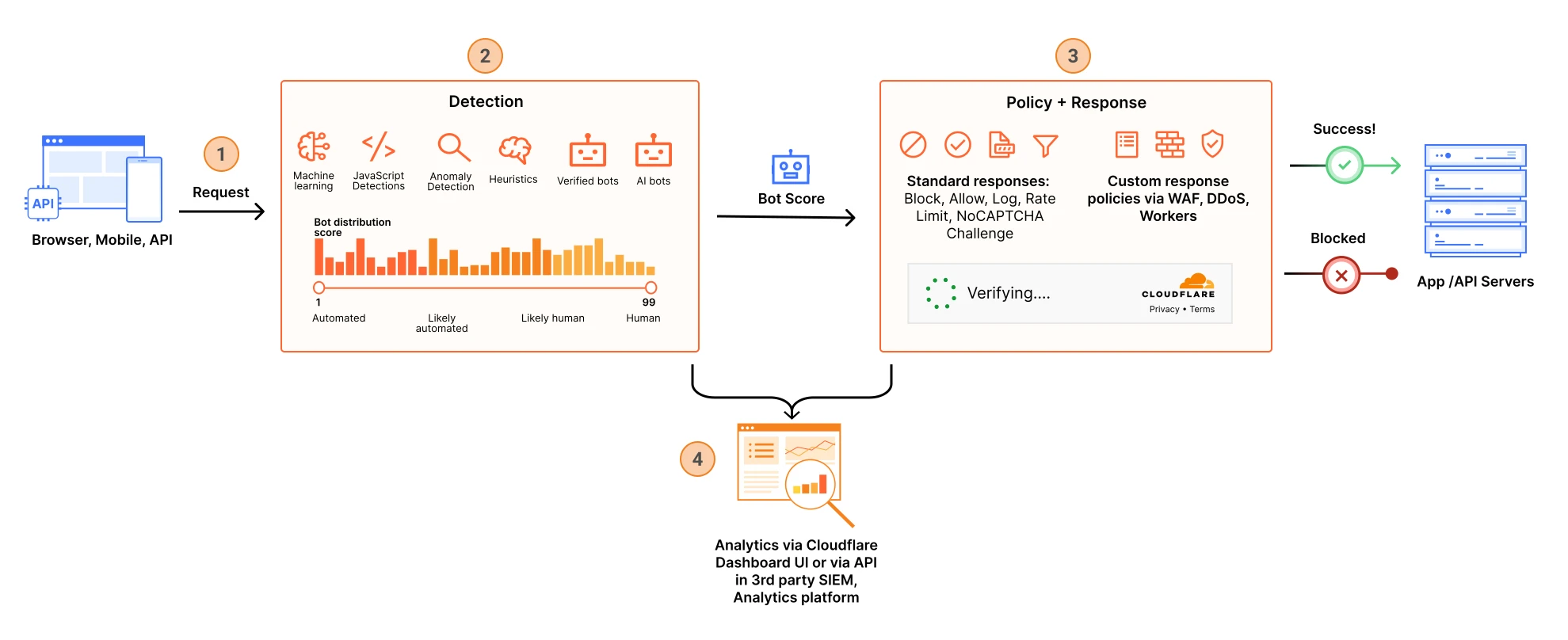
Quản lý bot Bot management Bot management
Luồng phát hiện, chấm điểm và xử lý bot traffic trên edge — nền tảng cho WAF, rate limit và Bot Management. Cloudflare has bot management capabilities to help identify and mitigate automated traffic to protect domains from bad bots. Cloudflare has bot management capabilities to help identify and mitigate automated traffic to protect domains from bad bots.
Thuật ngữ: Concepts: Concepts: Bot score · Super Bot Fight Mode · WAF · Rate limiting
Sơ đồ chính thức ↗ Official diagram ↗ Official diagram ↗ · Bot Bots Bots
Câu hỏi thường gặp Frequently asked questions Frequently asked questions
Cloudflare SSL có miễn phí không? Is Cloudflare SSL free? Is Cloudflare SSL free?
Chứng chỉ edge Universal SSL miễn phí trên plan phổ biến khi domain được proxy. Origin CA cũng miễn phí cho đoạn Cloudflare–origin. Gói trả phí thêm tính năng nâng cao, không phải HTTPS cơ bản. Universal edge SSL is free on common plans when the domain is proxied. Origin CA is also free for the Cloudflare–origin leg. Paid plans add advanced features, not basic HTTPS. Universal edge SSL is free on common plans when the domain is proxied. Origin CA is also free for the Cloudflare–origin leg. Paid plans add advanced features, not basic HTTPS.
Flexible có dùng được production không? Is Flexible OK for production? Is Flexible OK for production?
Chỉ tạm thời khi origin chưa có HTTPS. Production nên Full (strict) để mã hóa end-to-end qua Cloudflare và tránh lỗ hổng giữa edge và origin. Only temporarily while origin lacks HTTPS. Production should use Full (strict) to encrypt through Cloudflare and close the gap between edge and origin. Only temporarily while origin lacks HTTPS. Production should use Full (strict) to encrypt through Cloudflare and close the gap between edge and origin.
HTTPS xong có cần WAF không? After HTTPS, do you still need a WAF? After HTTPS, do you still need a WAF?
Có — HTTPS bảo vệ đường truyền, không chặn SQL injection hay bot xấu. WAF và bot controls bổ sung cho lớp ứng dụng; hub có bài riêng cho từng phần. Yes — HTTPS protects the wire, not SQL injection or bad bots. WAF and bot controls add application-layer defense; the hub has dedicated posts for each. Yes — HTTPS protects the wire, not SQL injection or bad bots. WAF and bot controls add application-layer defense; the hub has dedicated posts for each.
Học tiếp trên hub (on-page backlinks) Keep learning on this hub (on-page links) Keep learning on this hub (on-page links)
- SSL/TLS (trang sản phẩm) SSL/TLS (product page) SSL/TLS (product page)
- Lộ trình Application Services Application Services track Application Services track
- Use case: bảo vệ website Use case: protect a website Use case: protect a website
- Checklist người mới Beginner checklist Beginner checklist
- Cloudflare 101 Cloudflare 101 Cloudflare 101
Nguồn tham khảo (blog.cloudflare.com) Sources (blog.cloudflare.com) Sources (blog.cloudflare.com)
Nội dung được viết lại để dễ hiểu hơn; luôn đọc bài gốc trên blog.cloudflare.com và docs chính thức khi cần chi tiết kỹ thuật hoặc cập nhật mới nhất. Content is rewritten for clarity; always read the original posts on blog.cloudflare.com and official docs for technical detail or the latest updates. Content is rewritten for clarity; always read the original posts on blog.cloudflare.com and official docs for technical detail or the latest updates.