Lộ trình đang học Current learning path Current learning path

Cloudflare One Cloudflare One Cloudflare One

Bảo vệ users, access, SaaS và networks — follow-along từ tài khoản đến go-live. Secure users, access, SaaS, and networks — follow along from account to go-live. Secure users, access, SaaS, and networks — follow along from account to go-live.

Về trang lộ trình Track home Track home

Cloudflare One Cloudflare One Cloudflare One

Triển khai Zero Trust theo từng mô-đun: identity, thiết bị, ZTNA, Gateway, DLP, AI và Cloudflare WAN Deploy Zero Trust module by module: identity, devices, ZTNA, Gateway, DLP, AI, and Cloudflare WAN Deploy Zero Trust module by module: identity, devices, ZTNA, Gateway, DLP, AI, and Cloudflare WAN

Lộ trình Zero Trust / SASE bám theo hướng dẫn onboarding Cloudflare One: tài khoản, identity, Cloudflare One Client, Access (ZTNA), Gateway, DLP, kiểm soát AI và (tuỳ chọn) Cloudflare WAN. Làm theo thứ tự — mỗi mô-đun xây trên mô-đun trước. Pilot → validate → expand; dừng sau bất kỳ phần nào vẫn có giá trị. A Zero Trust / SASE path aligned with the Cloudflare One onboarding guide: account, identity, Cloudflare One Client, Access (ZTNA), Gateway, DLP, AI controls, and (optionally) Cloudflare WAN. Work in order — each module builds on the last. Pilot → validate → expand; stopping after any module still leaves something useful. A Zero Trust / SASE path aligned with the Cloudflare One onboarding guide: account, identity, Cloudflare One Client, Access (ZTNA), Gateway, DLP, AI controls, and (optionally) Cloudflare WAN. Work in order — each module builds on the last. Pilot → validate → expand; stopping after any module still leaves something useful.

Ai nên học lộ trình này? Who is this for? Who is this for?

IT admin, security, identity hoặc founder cần bảo vệ nhân viên, remote work, SaaS và app nội bộ — thay VPN hoặc bổ sung SWG/DLP. Không cần kinh nghiệm Cloudflare trước. IT admins, security, identity, or founders securing employees, remote work, SaaS, and internal apps — replacing VPN or adding SWG/DLP. No prior Cloudflare experience required. IT admins, security, identity, or founders securing employees, remote work, SaaS, and internal apps — replacing VPN or adding SWG/DLP. No prior Cloudflare experience required.

Mô hình tư duy Mental model Mental model

User/device (hoặc chi nhánh Cloudflare WAN) → Cloudflare edge: (1) Identity (2) Posture (3) Access/ZTNA (4) Gateway (5) DLP (6) AI controls → Internet / SaaS / private app (qua Tunnel). Kiểm tra mọi request; không mở toàn mạng như VPN. User/device (or a Cloudflare WAN site) → Cloudflare edge: (1) Identity (2) Posture (3) Access/ZTNA (4) Gateway (5) DLP (6) AI controls → Internet / SaaS / private app (via Tunnel). Check every request; no full-network access like VPN. User/device (or a Cloudflare WAN site) → Cloudflare edge: (1) Identity (2) Posture (3) Access/ZTNA (4) Gateway (5) DLP (6) AI controls → Internet / SaaS / private app (via Tunnel). Check every request; no full-network access like VPN.

Sơ đồ kiến trúc tham chiếu Reference architecture diagrams Reference architecture diagrams

Ba sơ đồ gốc từ hướng dẫn onboarding: kiến trúc đầy đủ, thứ tự triển khai, và bốn lớp bảo mật AI/MCP. Huy hiệu M1–M8 khớp từng module bên dưới. Three diagrams from the onboarding guide: the complete architecture, rollout order, and four AI/MCP security layers. M1–M8 badges match each module below. Three diagrams from the onboarding guide: the complete architecture, rollout order, and four AI/MCP security layers. M1–M8 badges match each module below.

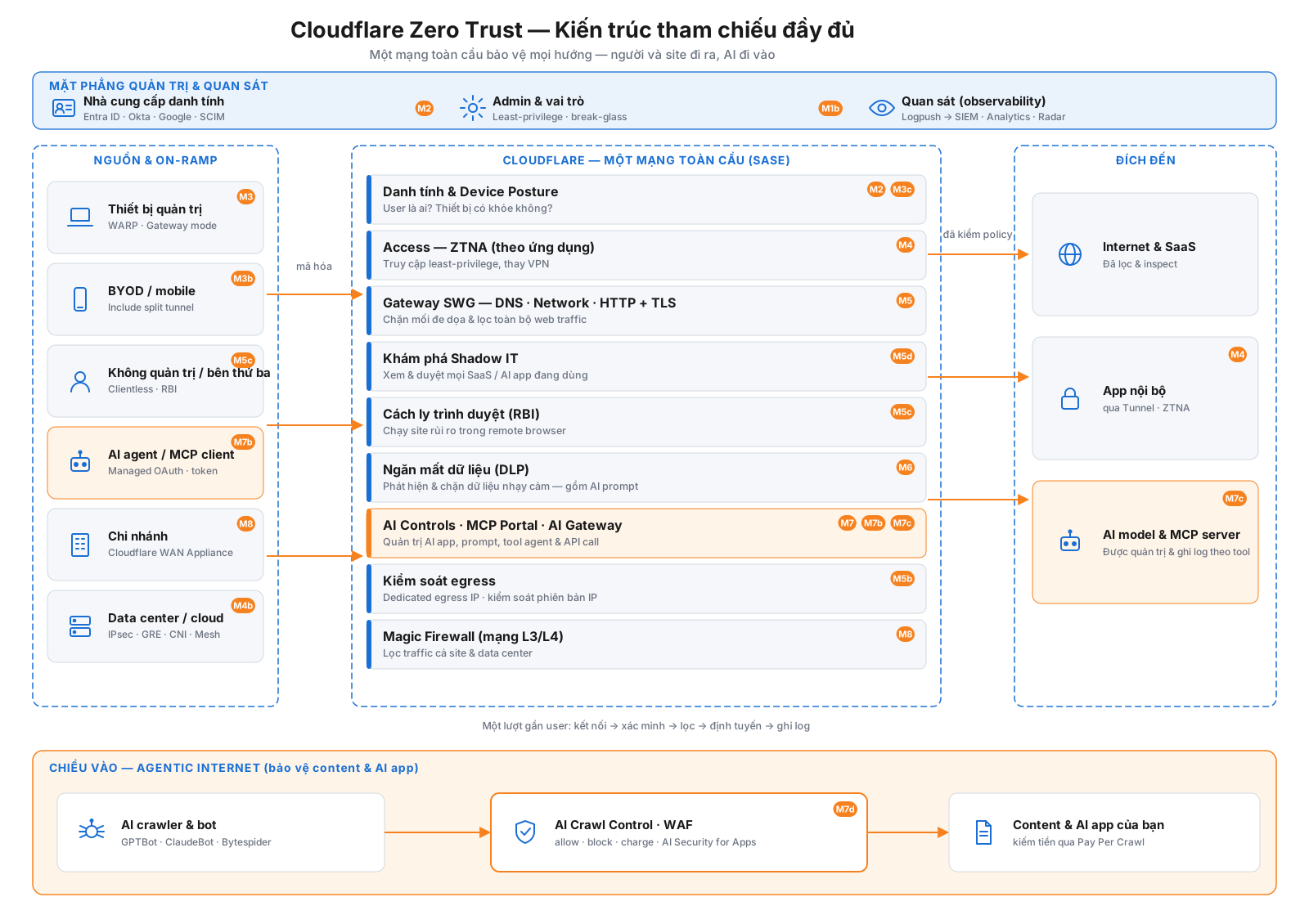
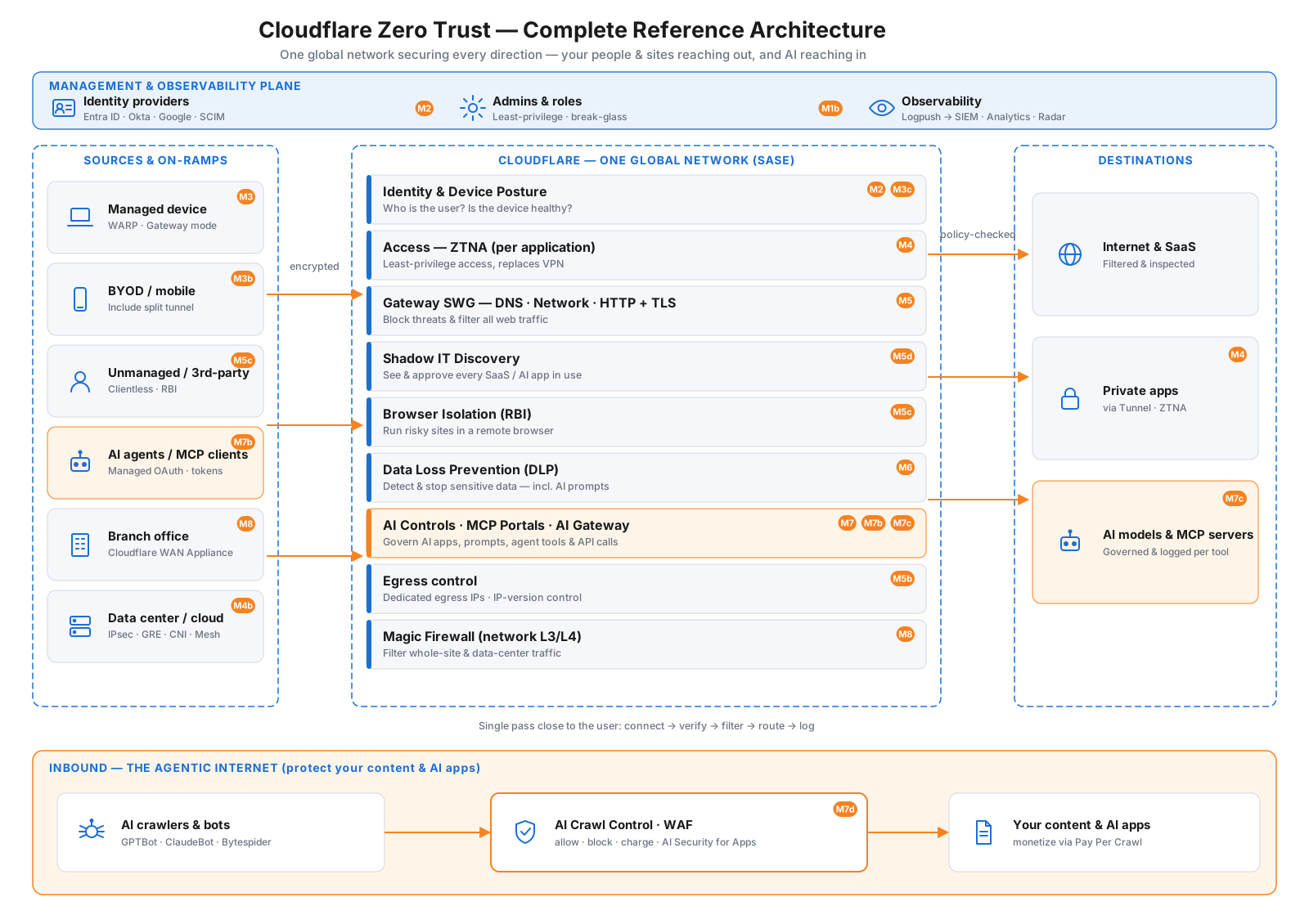
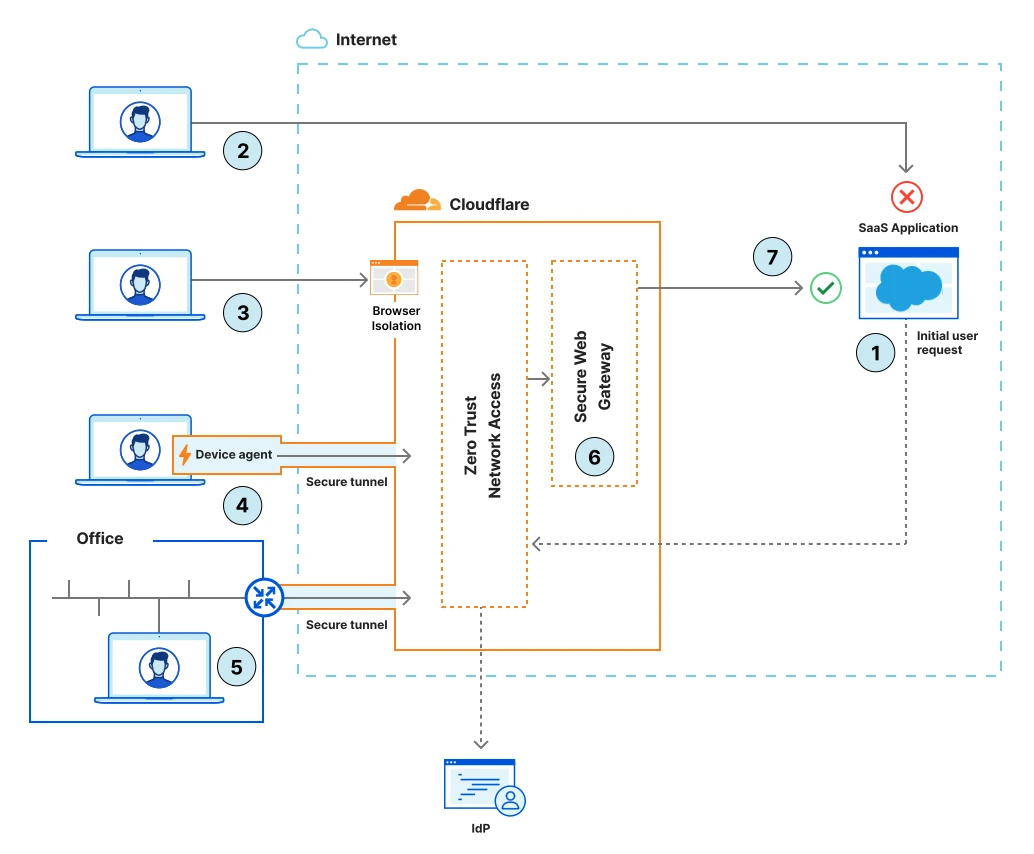
Kiến trúc tham chiếu Cloudflare Zero Trust đầy đủ: mặt phẳng quản trị và quan sát phía trên; nguồn và on-ramp bên trái đi qua lớp bảo mật SASE của Cloudflare (danh tính và posture, Access/ZTNA, Gateway SWG, Shadow IT, Browser Isolation, DLP, kiểm soát AI/MCP/AI Gateway, kiểm soát egress, Magic Firewall) tới đích bên phải; và làn Agentic Internet chiều vào phía dưới cho kiểm soát AI crawler. Cloudflare Zero Trust complete reference architecture: a management and observability plane on top; sources and on-ramps on the left connecting through Cloudflare’s SASE security stack (identity & posture, Access/ZTNA, Gateway SWG, Shadow IT, Browser Isolation, DLP, AI controls/MCP/AI Gateway, egress control, Magic Firewall) to destinations on the right; and an inbound Agentic Internet lane for AI crawler control at the bottom.

Kiến trúc tham chiếu đầy đủ — mặt phẳng quản trị (trên), xương sống Zero Trust chiều ra (giữa), và làn Agentic Internet chiều vào (dưới). Huy hiệu gắn từng khối với module tương ứng. Complete reference architecture — management plane (top), outbound Zero Trust spine (middle), and the inbound Agentic Internet lane (bottom). Badges map each element to its module. Complete reference architecture — management plane (top), outbound Zero Trust spine (middle), and the inbound Agentic Internet lane (bottom). Badges map each element to its module.

Xem hướng dẫn kèm sơ đồ → Open the diagram guide → Open the diagram guide →

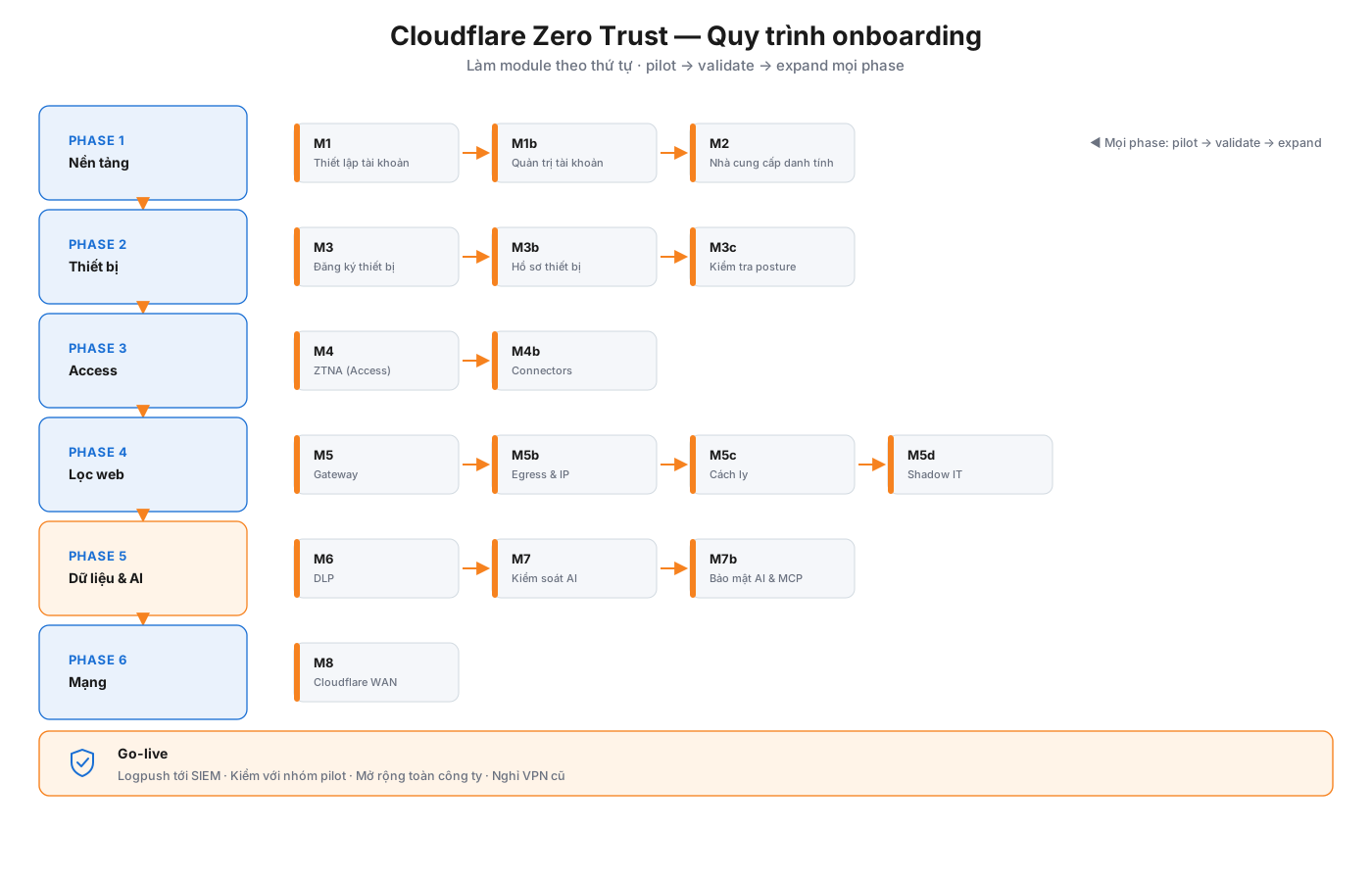
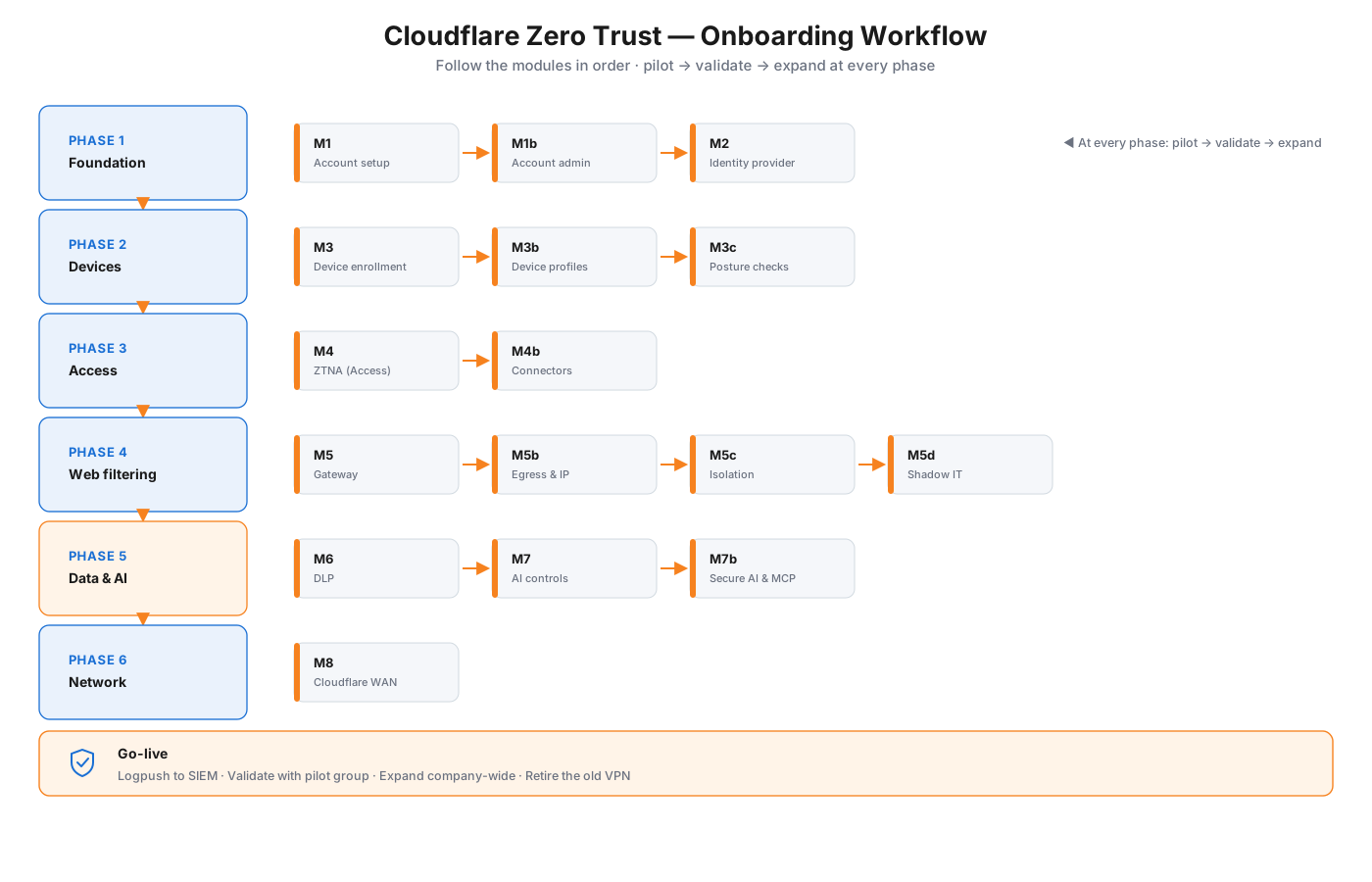
Quy trình onboarding Cloudflare Zero Trust qua sáu phase — Nền tảng, Thiết bị, Access, Lọc web, Dữ liệu và AI, Mạng — kết thúc bằng Go-live. Cloudflare Zero Trust onboarding workflow across six phases — Foundation, Devices, Access, Web filtering, Data & AI, Network — ending in Go-live.

Quy trình onboarding — sáu phase từ nền tảng tài khoản đến kết nối mạng, rồi go-live. Mọi phase: pilot → validate → expand. Onboarding workflow — six phases from account foundation to network connectivity, then go-live. At every phase: pilot → validate → expand. Onboarding workflow — six phases from account foundation to network connectivity, then go-live. At every phase: pilot → validate → expand.

Xem hướng dẫn kèm sơ đồ → Open the diagram guide → Open the diagram guide →

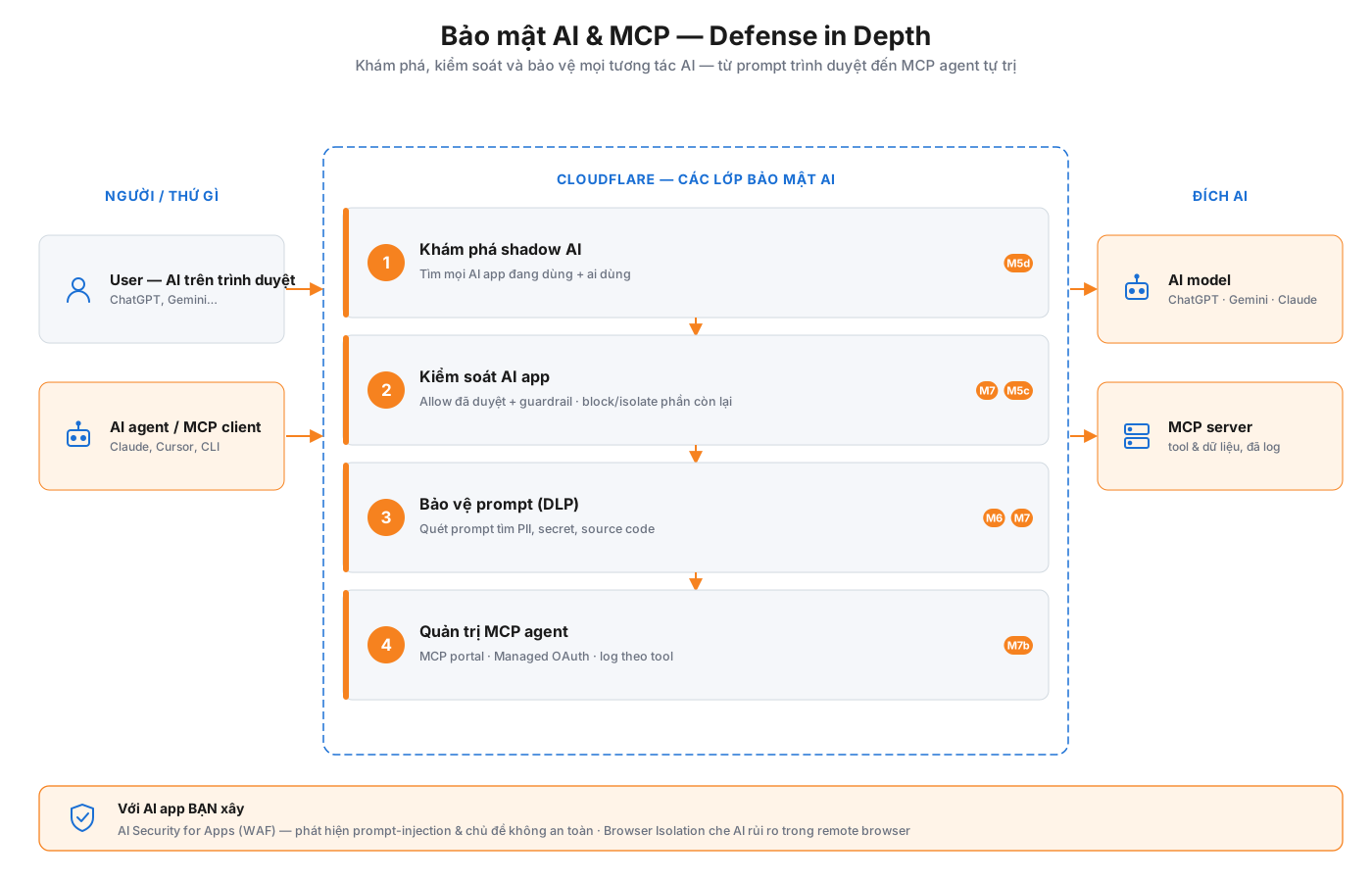
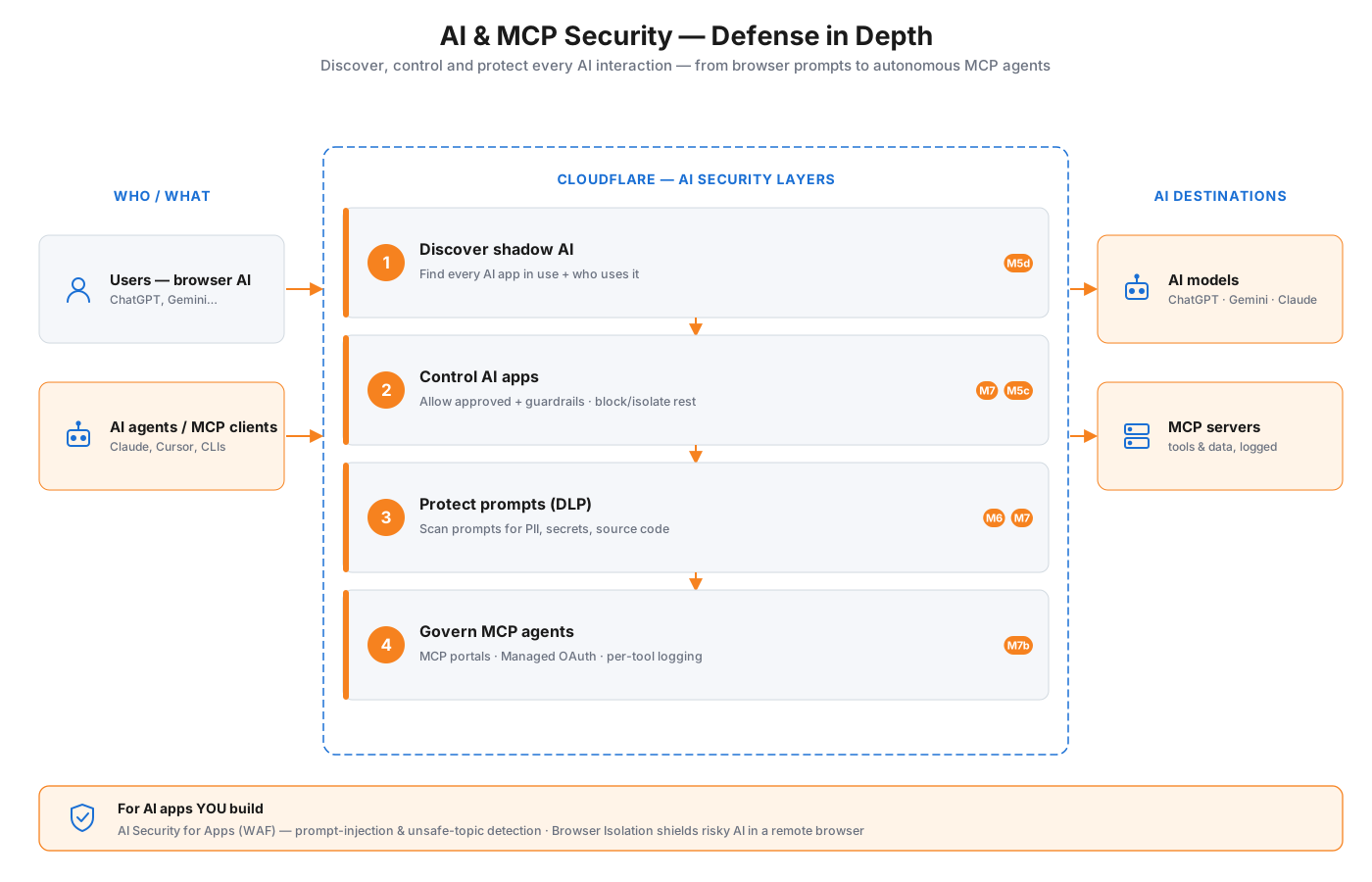
Bảo mật AI và MCP defense-in-depth: user và AI agent đi qua bốn lớp — khám phá shadow AI, kiểm soát AI app, bảo vệ prompt bằng DLP, quản trị MCP agent — trước khi tới AI model và MCP server. Cloudflare AI and MCP security defense-in-depth: users and AI agents pass through four layers — discover shadow AI, control AI apps, protect prompts with DLP, govern MCP agents — before reaching AI models and MCP servers.

Bảo mật AI và MCP — bốn lớp defense-in-depth giữa user/agent và nhà cung cấp AI, cộng AI Security for Apps (WAF) cho AI mà bạn xây. AI & MCP security — four defense-in-depth layers between users/agents and AI providers, plus AI Security for Apps (WAF) for the AI you build. AI & MCP security — four defense-in-depth layers between users/agents and AI providers, plus AI Security for Apps (WAF) for the AI you build.

Xem hướng dẫn kèm sơ đồ → Open the diagram guide → Open the diagram guide →

Tổng quan onboarding Onboarding overview Onboarding overview

Cloudflare Zero Trust — Hướng dẫn triển khai (BẮT ĐẦU TẠI ĐÂY)

Chào mừng 👋 Đây là hướng dẫn triển khai dễ làm theo. Nếu bạn thực hiện các mô-đun theo thứ tự và làm đúng từng bước, cuối cùng bạn sẽ có một hệ thống Cloudflare Zero Trust hoạt động thực tế — bao gồm tài khoản, danh tính, thiết bị, truy cập ứng dụng nội bộ, lọc web, bảo vệ dữ liệu, kiểm soát AI và (tùy chọn) kết nối chi nhánh bằng Cloudflare WAN.

Bạn không cần kinh nghiệm trước với Cloudflare. Mỗi bước sẽ cho bạn biết cần nhấp gì, nhập gì và cách xác nhận thành công trước khi tiếp tục.


Hướng dẫn này hoạt động thế nào

Quá trình triển khai được chia thành 9 mô-đun. Hãy làm theo thứ tự — mỗi mô-đun xây dựng trên mô-đun trước.

# Mô-đun Bạn sẽ thiết lập Thời gian Bắt buộc?
0 Bắt đầu tại đây (tài liệu này) Gói dịch vụ, điều kiện tiên quyết, cách dùng hướng dẫn 15 phút ✅ Đọc trước
1 Thiết lập tài khoản Tài khoản Cloudflare + tổ chức Cloudflare One + đăng nhập lần đầu 30 phút ✅ Bắt buộc
1b Quản trị tài khoản & vai trò Quản trị viên, vai trò, thành viên, nhóm người dùng, tài khoản dự phòng 20 phút Chuyên sâu
2 Nhà cung cấp danh tính Kết nối đăng nhập công ty (Entra ID / Okta / Google) 45 phút ✅ Bắt buộc
3 Đăng ký thiết bị (WARP) Cài Cloudflare One Client trên thiết bị 60 phút ✅ Bắt buộc
3b Cấu hình hồ sơ thiết bị Chế độ client theo nhóm, split tunnel, thứ tự ưu tiên 30 phút Chuyên sâu
4 ZTNA — Access Xuất bản ứng dụng nội bộ, thay thế VPN 60 phút ✅ Khuyến nghị
5 Gateway (lọc web) Chặn mối đe dọa, lọc lưu lượng DNS/web 60 phút ✅ Khuyến nghị
5b Chính sách Egress & phiên bản IP IP egress chuyên dụng, tắt IPv6 30 phút Chuyên sâu
5c Cách ly trình duyệt từ xa (RBI) Cách ly duyệt web rủi ro, không cần client, kiểm soát dữ liệu 30 phút Chuyên sâu
6 DLP (bảo vệ dữ liệu) Phát hiện & ngăn rò rỉ dữ liệu nhạy cảm 45 phút Enterprise
7 Kiểm soát AI Quản lý việc dùng ChatGPT/Gemini/Claude 45 phút Enterprise
7b Bảo mật AI & MCP (MCP portals) Máy chủ MCP + portal sau Access 40 phút Chuyên sâu
8 Cloudflare WAN Kết nối văn phòng/trung tâm dữ liệu với Cloudflare 90 phút Tùy chọn

💡 Bạn có thể dừng sau bất kỳ mô-đun nào và vẫn có kết quả hữu ích. Nhiều khách hàng làm Mô-đun 1–3 trong tuần đầu (danh tính + thiết bị), thêm Access (4) và Gateway (5) trong tuần thứ hai, rồi bổ sung DLP/AI/Cloudflare WAN sau.

Các ký hiệu dùng trong mọi mô-đun

Ký hiệu Ý nghĩa
📺 Bạn sẽ thấy Mô tả màn hình để bạn biết mình đang đúng chỗ
⌨️ Nhập Văn bản/giá trị chính xác cần gõ
👉 Nhấp Nút hoặc liên kết chính xác cần nhấp
✅ Điểm kiểm tra Dừng lại và xác nhận thành công trước khi tiếp tục
⚠️ Lưu ý Lỗi thường gặp cần tránh
💡 Mẹo Khuyến nghị thực hành tốt

Trước khi bắt đầu: bức tranh tổng thể (đọc 2 phút)

Cloudflare Zero Trust thay thế mô hình cũ "lâu đài và hào nước" (VPN + tường lửa) bằng nguyên tắc kiểm tra mọi yêu cầu, không tin tưởng bất cứ gì theo mặc định. Đây là cách các thành phần khớp với nhau:

   Người dùng & thiết bị của bạn         CLOUDFLARE (chạy tại 330+ thành phố)         Nơi họ đến
   ┌──────────────────┐      kết nối      ┌─────────────────────────────────┐
   │ Laptop + WARP     │ ───────────────► │ 1. Bạn là ai?      (Identity)    │ ──► Internet
   │ Điện thoại + WARP │                   │ 2. Thiết bị an toàn? (Posture)   │ ──► Ứng dụng SaaS (M365…)
   │ Văn phòng (Cloudflare WAN)│           │ 3. Được vào app này? (Access)    │ ──► Ứng dụng nội bộ
   └──────────────────┘                   │ 4. Trang này an toàn? (Gateway)  │     (qua Tunnel)
                                           │ 5. Có dữ liệu nhạy cảm? (DLP)    │
                                           │ 6. Dùng AI an toàn? (AI controls)│
                                           └─────────────────────────────────┘
  • Identity (Mô-đun 2): Cloudflare hỏi hệ thống đăng nhập công ty hiện có "người này là ai?"
  • Device + WARP (Mô-đun 3): ứng dụng WARP là "đường vào" an toàn đưa lưu lượng đến Cloudflare và báo cáo thiết bị có khỏe mạnh không.
  • Access / ZTNA (Mô-đun 4): cho đúng người truy cập các ứng dụng nội bộ cụ thể — không cần VPN.
  • Gateway (Mô-đun 5): lọc lưu lượng DNS và web, chặn mã độc/lừa đảo và thực thi quy tắc sử dụng.
  • DLP (Mô-đun 6) + AI controls (Mô-đun 7): ngăn dữ liệu nhạy cảm ra ngoài và quản lý công cụ AI.
  • Cloudflare WAN (Mô-đun 8): kết nối cả văn phòng/trung tâm dữ liệu với Cloudflare để cả lưu lượng không phải từ laptop cũng được bảo vệ.

Bạn cần gì trước Mô-đun 1 (danh sách điều kiện tiên quyết)

Chuẩn bị những thứ này ngay để không bị gián đoạn về sau.

Tài khoản & quyền truy cập

  • [ ] Một email công việc nhận được thư (để tạo/xác minh tài khoản Cloudflare)
  • [ ] Quyền quản trị nhà cung cấp danh tính (Microsoft Entra ID / Okta / Google Workspace) — bạn sẽ đăng ký một ứng dụng ở đó trong Mô-đun 2
  • [ ] Quyền quản trị công cụ quản lý thiết bị (MDM) nếu có (Intune, Jamf, Kandji, Workspace ONE) — cho Mô-đun 3 ở quy mô lớn
  • [ ] Thẻ tín dụng hoặc thông tin thanh toán (bắt buộc kể cả gói miễn phí)

Quyết định cần đưa ra (ghi lại)

  • [ ] Tên nhóm (Team name) — một biệt danh ngắn, cố định cho tổ chức (vd. acme). Nó trở thành URL đăng nhập https://acme.cloudflareaccess.com. ⚠️ Khó đổi về sau — hãy chọn cẩn thận.
  • [ ] Nhóm thử nghiệm — 5–25 người dùng thân thiện (thường là IT/bảo mật) để thử trước khi triển khai toàn công ty
  • [ ] Ứng dụng nội bộ đầu tiên để bảo vệ bằng Access (Mô-đun 4) — vd. wiki nội bộ, Grafana, công cụ dev
  • [ ] Cấp gói dịch vụ — Free / Pay-as-you-go / Enterprise (xem bên dưới)

Kỹ thuật (chỉ khi làm Mô-đun 4 & 8)

  • [ ] Một máy chủ/VM có thể truy cập ứng dụng nội bộ (cho Cloudflare Tunnel ở Mô-đun 4)
  • [ ] Quyền quản trị router/tường lửa tại mỗi chi nhánh (cho Cloudflare WAN ở Mô-đun 8)

Tôi cần gói nào?

Khả năng (mô-đun) Free Pay-as-you-go Enterprise
Tài khoản + Identity + WARP (1–3) ✅ (tối đa 50 người dùng) ✅ ✅
Access / ZTNA (4) ✅ ✅ ✅
Gateway DNS + HTTP cơ bản (5) ✅ ✅ ✅
DLP (6) ❌ ❌ ✅
Bảo vệ prompt AI / AI nâng cao (7) Một phần Một phần ✅
Device posture nâng cao (CrowdStrike, Intune…) ❌ Hạn chế ✅
Cloudflare WAN (8) ❌ ❌ ✅ (bổ trợ mạng)

💡 Bạn có thể bắt đầu với Free để tìm hiểu nền tảng (Mô-đun 1–5), rồi nâng cấp. Nếu đã mua Enterprise / Cloudflare WAN, hãy xác nhận nó đã kích hoạt trước Mô-đun 6–8, nếu không các thiết lập liên quan sẽ bị mờ. Không chắc? Hỏi đội ngũ quản lý tài khoản Cloudflare của bạn.


Vai trò: ai làm gì

Bạn có thể tự làm mọi thứ, nhưng ở các tổ chức lớn hơn, các công việc này thường chia cho nhiều nhóm:

Mô-đun Người phụ trách điển hình
1 Tài khoản, 2 Identity Quản trị IT / Identity
3 Thiết bị (WARP/MDM) Nhóm Endpoint / Desktop
4 Access (Tunnel, ứng dụng) Chủ ứng dụng + Bảo mật
5 Gateway, 6 DLP, 7 AI Nhóm bảo mật
8 Cloudflare WAN Nhóm mạng

⭐ Quy tắc vàng cho toàn bộ quá trình: thử nghiệm → xác minh → mở rộng. Đừng bao giờ áp một quy tắc mới cho tất cả cùng lúc. Thử với nhóm thử nghiệm, xác nhận hoạt động, rồi mới mở rộng. Mọi mô-đun đều theo mô hình này.


8 thói quen giúp mọi việc suôn sẻ

  1. Làm mô-đun theo thứ tự. Danh tính trước thiết bị, thiết bị trước lọc.
  2. Luôn thử nghiệm trước. 5–25 người dùng trước khi toàn công ty.
  3. Bắt đầu ở chế độ "giám sát/ghi log", rồi chuyển sang "chặn". (Đặc biệt Gateway, DLP, AI.)
  4. Giữ một tài khoản quản trị dự phòng. Luôn có Super Administrator thứ hai để một chính sách cấu hình sai không thể khóa bạn ra ngoài.
  5. Cài chứng chỉ Cloudflare trước khi bật kiểm tra HTTPS (Mô-đun 3 → 5), nếu không các trang web sẽ lỗi.
  6. Ghi lại tên nhóm và dùng nhất quán — nó nằm trong mọi URL đăng nhập.
  7. Bật ghi log sớm để thấy điều gì đang xảy ra và tinh chỉnh quy tắc.
  8. Tái sử dụng, đừng lặp lại. Xây các nhóm/danh sách tái sử dụng một lần rồi áp dụng khắp nơi (bạn sẽ học trong Mô-đun 4).

Danh sách kiểm tra tổng (theo dõi tiến độ)

Sao chép danh sách này và đánh dấu khi hoàn thành mỗi mô-đun.

GIAI ĐOẠN 1 — NỀN TẢNG
[ ] M1  Đã tạo tài khoản Cloudflare + kích hoạt Zero Trust
[ ] M1  Đã đặt tên nhóm (________________.cloudflareaccess.com)
[ ] M1  Đã thêm Super Admin thứ hai (dự phòng)
[ ] M2  Đã kết nối nhà cung cấp danh tính và TEST đạt (hiện email + nhóm)
[ ] M2  (Khuyến nghị) Đã bật SCIM / đồng bộ tự động
[ ] M3  Đã tạo quy tắc đăng ký thiết bị
[ ] M3  Đã cài Cloudflare One Client trên thiết bị thử nghiệm, hiển thị "Connected"
[ ] M3  Đã phân phối chứng chỉ Cloudflare tới các thiết bị
[ ] M3  Ít nhất một device posture check hoạt động

GIAI ĐOẠN 2 — TRUY CẬP & LỌC
[ ] M4  Đã xuất bản ứng dụng nội bộ đầu tiên qua Cloudflare Tunnel
[ ] M4  Chính sách Access cho đúng người vào, chặn người khác
[ ] M5  Lọc DNS chặn mã độc/lừa đảo
[ ] M5  Bật giải mã TLS (HTTPS) cho nhóm thử nghiệm, trang web vẫn hoạt động
[ ] M5  Chính sách HTTP thực thi quy tắc sử dụng

GIAI ĐOẠN 3 — DỮ LIỆU, AI, MẠNG (theo giấy phép)
[ ] M6  Hồ sơ DLP ở chế độ giám sát, thấy các phát hiện
[ ] M6  Chính sách chặn DLP hoạt động với các đích rủi ro cao
[ ] M7  Đã rà soát việc dùng Shadow AI
[ ] M7  Đã thực thi bảo vệ prompt AI / kiểm soát ứng dụng
[ ] M8  Tunnel Cloudflare WAN khỏe mạnh, các chi nhánh đã kết nối, đã thử failover

VẬN HÀNH THỰC TẾ (GO-LIVE)
[ ] Log chảy về SIEM của bạn
[ ] Nhóm thử nghiệm đã xác thực, mở rộng toàn công ty
[ ] Đã ngừng VPN cũ cho các ứng dụng đã chuyển

Thuật ngữ chính (giải thích dễ hiểu)

Thuật ngữ Ý nghĩa
Cloudflare One Họ sản phẩm chứa tất cả những thứ này (Zero Trust + dịch vụ mạng)
Zero Trust dashboard Nơi bạn cấu hình mọi thứ: https://one.dash.cloudflare.com
Team name / team domain URL đăng nhập của tổ chức: https://<team-name>.cloudflareaccess.com
WARP / Cloudflare One Client Ứng dụng cài trên thiết bị để kết nối chúng với Cloudflare
IdP (Nhà cung cấp danh tính) Hệ thống đăng nhập của công ty bạn (Entra ID, Okta, Google)
ZTNA / Access "Zero Trust Network Access" — truy cập theo từng ứng dụng an toàn thay thế VPN
Gateway Bộ lọc web (lưu lượng DNS, mạng và HTTPS)
DLP "Data Loss Prevention" — tìm và ngăn dữ liệu nhạy cảm ra ngoài
Tunnel Kết nối chỉ đi ra an toàn từ ứng dụng nội bộ đến Cloudflare
Posture Kiểm tra sức khỏe thiết bị (đĩa mã hóa, bật tường lửa, v.v.)
Policy Quy tắc quy định ai/cái gì được phép hoặc bị chặn
Cloudflare WAN Kết nối toàn bộ văn phòng/trung tâm dữ liệu với mạng Cloudflare

Sẵn sàng chưa?

👉 Đi tới Mô-đun 1 — Thiết lập tài khoản và bắt đầu nào.

📚 Đang tìm "lý do" đằng sau các lựa chọn? Hai tài liệu đi kèm giải thích chiến lược và cung cấp bảng tra cứu thiết lập (hiện bằng tiếng Anh):

Hướng dẫn được biên soạn từ tài liệu Cloudflare hiện hành. Cloudflare cập nhật bảng điều khiển thường xuyên — nếu nhãn menu khác đôi chút, hãy dùng mục gần nhất. Xác minh quyền lợi gói trước Mô-đun 6–8.

Cloudflare Zero Trust — Onboarding Guide (START HERE)

Welcome 👋 This is a follow-along onboarding guide. If you work through the modules in order and do exactly what each step says, you will have a working Cloudflare Zero Trust deployment at the end — account, identity, devices, private-app access, web filtering, data protection, AI controls, and (optionally) site connectivity with Cloudflare WAN.

You do not need prior Cloudflare experience. Each step tells you what to click, what to type, and how to confirm it worked before moving on.


How this guide works

The onboarding is split into 9 modules. Do them in order — each one builds on the previous.

# Module What you'll set up Time Required?
0 Start here (this doc) Plan, prerequisites, how to use the guide 15 min ✅ Read first
1 Account setup Cloudflare account + Cloudflare One organization + first login 30 min ✅ Required
1b Account administration & roles Admins, roles, members, user groups, break-glass 20 min Deep-dive
2 Identity provider Connect your company login (Entra ID / Okta / Google) 45 min ✅ Required
3 Device enrollment (WARP) Install the Cloudflare One Client on devices 60 min ✅ Required
3b Device profiles configuration Per-group client modes, split tunnels, precedence 30 min Deep-dive
4 ZTNA — Access Publish a private app, replace VPN 60 min ✅ Recommended
5 Gateway (web filtering) Block threats, filter DNS/web traffic 60 min ✅ Recommended
5b Egress policies & IP version Dedicated egress IPs, disable IPv6 30 min Deep-dive
5c Remote Browser Isolation (RBI) Isolate risky browsing, clientless, data controls 30 min Deep-dive
6 DLP (data protection) Detect & stop sensitive-data leaks 45 min Enterprise
7 AI controls Govern ChatGPT/Gemini/Claude usage 45 min Enterprise
7b Secure AI & MCP (MCP portals) MCP servers + portals behind Access 40 min Deep-dive
8 Cloudflare WAN Connect offices/data centers to Cloudflare 90 min Optional

💡 You can stop after any module and still have something useful. Many customers do Modules 1–3 in week one (identity + devices), add Access (4) and Gateway (5) in week two, and layer DLP/AI/Cloudflare WAN later.

Symbols used in every module

Symbol Meaning
📺 What you'll see A description of the screen so you know you're in the right place
⌨️ Enter The exact text/value to type
👉 Click The exact button or link to click
✅ Checkpoint Stop and confirm this worked before continuing
⚠️ Watch out A common mistake to avoid
💡 Tip A best-practice recommendation

Before you start: the big picture (2-minute read)

Cloudflare Zero Trust replaces the old "castle and moat" model (VPN + firewall) with check every request, trust nothing by default. Here's how the pieces fit together:

   Your people & devices                 CLOUDFLARE (runs in 330+ cities)            Where they're going
   ┌──────────────────┐      connect      ┌─────────────────────────────────┐
   │ Laptop + WARP app │ ───────────────► │ 1. Who are you?   (Identity)     │ ──► The internet
   │ Phone  + WARP app │                   │ 2. Is your device safe? (Posture)│ ──► SaaS apps (M365…)
   │ Office (Cloudflare WAN)│                   │ 3. Can you reach this app?(Access)│ ──► Your private apps
   └──────────────────┘                   │ 4. Is this site safe?  (Gateway) │     (via Tunnel)
                                           │ 5. Any sensitive data?   (DLP)   │
                                           │ 6. Safe AI use?      (AI controls)│
                                           └─────────────────────────────────┘
  • Identity (Module 2): Cloudflare asks your existing company login "who is this?"
  • Device + WARP (Module 3): the WARP app is the secure "on-ramp" that carries traffic to Cloudflare and reports if the device is healthy.
  • Access / ZTNA (Module 4): lets the right people reach specific private apps — no VPN.
  • Gateway (Module 5): filters DNS and web traffic, blocking malware/phishing and enforcing your acceptable-use rules.
  • DLP (Module 6) + AI controls (Module 7): stop sensitive data leaving and govern AI tools.
  • Cloudflare WAN (Module 8): connects whole offices/data centers to Cloudflare so even non-laptop traffic is protected.

What you need before Module 1 (prerequisites checklist)

Gather these now so you're not interrupted later.

Accounts & access

  • [ ] A work email you can receive mail at (to create/verify the Cloudflare account)
  • [ ] Admin access to your identity provider (Microsoft Entra ID / Okta / Google Workspace) — you'll register an app there in Module 2
  • [ ] Admin access to your device management (MDM) tool if you have one (Intune, Jamf, Kandji, Workspace ONE) — for Module 3 at scale
  • [ ] A credit card or billing details (required even on the free plan)

Decisions to make (write these down)

  • [ ] Team name — a short, permanent nickname for your org (e.g. acme). It becomes your login URL https://acme.cloudflareaccess.com. ⚠️ Hard to change later — pick carefully.
  • [ ] Pilot group — 5–25 friendly users (often IT/security) to test with before company-wide rollout
  • [ ] First private app to protect with Access (Module 4) — e.g. an internal wiki, Grafana, a dev tool
  • [ ] Plan tier — Free / Pay-as-you-go / Enterprise (see below)

Technical (only if doing Modules 4 & 8)

  • [ ] A server/VM that can reach your private app (for Cloudflare Tunnel in Module 4)
  • [ ] Router/firewall admin access at each site (for Cloudflare WAN in Module 8)

Which plan do I need?

Capability (module) Free Pay-as-you-go Enterprise
Account + Identity + WARP (1–3) ✅ (up to 50 users) ✅ ✅
Access / ZTNA (4) ✅ ✅ ✅
Gateway DNS + basic HTTP (5) ✅ ✅ ✅
DLP (6) ❌ ❌ ✅
AI prompt protection / advanced AI (7) Partial Partial ✅
Advanced device posture (CrowdStrike, Intune…) ❌ Limited ✅
Cloudflare WAN (8) ❌ ❌ ✅ (network add-on)

💡 You can start on Free to learn the platform (Modules 1–5), then upgrade. If you already bought Enterprise / Cloudflare WAN, confirm it's active before Modules 6–8 or the relevant settings will be greyed out. Not sure? Ask your Cloudflare account team.


Roles: who should do what

You can do everything yourself, but in larger orgs these tasks often split across teams:

Module Typical owner
1 Account, 2 Identity IT / Identity admin
3 Devices (WARP/MDM) Endpoint / Desktop team
4 Access (Tunnel, apps) App owners + Security
5 Gateway, 6 DLP, 7 AI Security team
8 Cloudflare WAN Network team

⭐ Golden rule for the whole onboarding: pilot → verify → expand. Never push a new rule to everyone at once. Test with your pilot group, confirm it works, then widen it. Every module follows this pattern.


The 8 habits that make this go smoothly

  1. Do modules in order. Identity before devices, devices before filtering.
  2. Pilot first, always. 5–25 users before company-wide.
  3. Start in "monitor/log" mode, then switch to "block." (Especially Gateway, DLP, AI.)
  4. Keep a backup admin login. Always have a second Super Administrator so a misconfigured policy can't lock you out.
  5. Install the Cloudflare certificate before turning on HTTPS inspection (Module 3 → 5), or websites will break.
  6. Write down your team name and keep it consistent — it's in every login URL.
  7. Turn on logging early so you can see what's happening and tune rules.
  8. Reuse, don't repeat. Build reusable groups/lists once and apply them everywhere (you'll learn how in Module 4).

Master onboarding checklist (track your progress)

Copy this and tick items off as you complete each module.

PHASE 1 — FOUNDATION
[ ] M1  Cloudflare account created + Zero Trust activated
[ ] M1  Team name set (________________.cloudflareaccess.com)
[ ] M1  Second Super Admin added (break-glass)
[ ] M2  Identity provider connected and TEST passes (shows email + groups)
[ ] M2  (Recommended) SCIM / auto-sync enabled
[ ] M3  Device enrollment rule created
[ ] M3  Cloudflare One Client installed on a pilot device, shows "Connected"
[ ] M3  Cloudflare certificate distributed to devices
[ ] M3  At least one device posture check working

PHASE 2 — ACCESS & FILTERING
[ ] M4  First private app published via Cloudflare Tunnel
[ ] M4  Access policy allows the right people, blocks others
[ ] M5  DNS filtering blocking malware/phishing
[ ] M5  TLS (HTTPS) decryption on for pilot group, websites still work
[ ] M5  HTTP policy enforcing acceptable use

PHASE 3 — DATA, AI, NETWORK (as licensed)
[ ] M6  DLP profile in monitor mode, detections visible
[ ] M6  DLP block policy live on high-risk destinations
[ ] M7  Shadow-AI usage reviewed
[ ] M7  AI prompt protection / app controls enforced
[ ] M8  Cloudflare WAN tunnels healthy, sites connected, failover tested

GO-LIVE
[ ] Logs flowing to your SIEM
[ ] Pilot validated, rollout expanded company-wide
[ ] Old VPN decommissioned for migrated apps

Key terms (plain-English glossary)

Term What it means
Cloudflare One The product family this all lives in (Zero Trust + network services)
Zero Trust dashboard Where you configure everything: https://one.dash.cloudflare.com
Team name / team domain Your org's login URL: https://<team-name>.cloudflareaccess.com
WARP / Cloudflare One Client The app installed on devices that connects them to Cloudflare
IdP (Identity Provider) Your company login system (Entra ID, Okta, Google)
ZTNA / Access "Zero Trust Network Access" — secure per-app access that replaces VPN
Gateway The web filter (DNS, network, and HTTPS traffic)
DLP "Data Loss Prevention" — finds and stops sensitive data leaving
Tunnel A safe outbound-only connection from your private app to Cloudflare
Posture Health checks on a device (encrypted disk, firewall on, etc.)
Policy A rule that says who/what is allowed or blocked
Cloudflare WAN Connects entire offices/data centers to Cloudflare's network

Ready?

👉 Go to Module 1 — Account setup and let's begin.

📚 Looking for the "why" behind the choices? Two companion documents explain strategy and give a settings cheat-sheet:

Guide prepared 2026-06-09 from current Cloudflare documentation. Cloudflare updates the dashboard often — if a menu label differs slightly, use the nearest match. Verify plan entitlements before Modules 6–8.

Nguồn cộng đồng — không phải tài liệu chính thức của Cloudflare: https://zerotrust.cfsase.workers.dev Community source — not an official Cloudflare publication: https://zerotrust.cfsase.workers.dev

Sau lộ trình bạn sẽ What you will achieve អ្វីដែលអ្នកនឹងសម្រេច

  • Tạo tổ chức Cloudflare One, chọn team name (URL đăng nhập) và break-glass admin Create a Cloudflare One organization, lock in the team name (login URL), and keep a break-glass admin Create a Cloudflare One organization, lock in the team name (login URL), and keep a break-glass admin
  • Kết nối IdP (Entra ID / Okta / Google), kiểm tra group claims và bật MFA Connect an IdP (Entra ID / Okta / Google), verify group claims, and require MFA Connect an IdP (Entra ID / Okta / Google), verify group claims, and require MFA
  • Enroll Cloudflare One Client (WARP), cấu hình device profile và posture Enroll the Cloudflare One Client (WARP), configure device profiles, and add posture checks Enroll the Cloudflare One Client (WARP), configure device profiles, and add posture checks
  • Publish app nội bộ đầu tiên bằng Tunnel + Access — không mở inbound firewall Publish a first private app with Tunnel + Access — no inbound firewall ports Publish a first private app with Tunnel + Access — no inbound firewall ports
  • Bật Gateway theo lớp DNS → Network → HTTP/TLS; Shadow IT và RBI khi sẵn sàng Roll out Gateway in layers: DNS → Network → HTTP/TLS; add Shadow IT and RBI when ready Roll out Gateway in layers: DNS → Network → HTTP/TLS; add Shadow IT and RBI when ready
  • Pilot DLP log-only rồi enforce; quản trị AI (không cấm mù) gồm MCP và AI Gateway Pilot DLP in log-only then enforce; govern AI (do not blind-ban) including MCP and AI Gateway Pilot DLP in log-only then enforce; govern AI (do not blind-ban) including MCP and AI Gateway

Khái niệm cần nắm Key concepts គោលគំនិតសំខាន់

  • Zero Trust
  • ZTNA
  • Identity provider
  • Cloudflare One Client
  • Device posture
  • Cloudflare Tunnel
  • SWG
  • Gateway
  • Browser Isolation
  • CASB
  • DLP
  • AI controls
  • MCP portals
  • AI Gateway
  • Cloudflare WAN

Lỗi thường gặp Common mistakes កំហុសញឹកញាប់

Big-bang thay vì pilot → validate → expand Big-bang instead of pilot → validate → expand Big-bang instead of pilot → validate → expand

Kiến trúc tham chiếu SASE khuyên 1–2 use case (thay VPN, rồi SWG). Mỗi phase: nhóm 5–25 user, rollback, rồi mới expand. Cutover một đêm gây outage. The SASE reference architecture recommends one or two use cases (VPN replacement, then SWG). Each phase: 5–25 users, a rollback, then expand. Overnight cutovers cause outages. The SASE reference architecture recommends one or two use cases (VPN replacement, then SWG). Each phase: 5–25 users, a rollback, then expand. Overnight cutovers cause outages.

Team name chọn bừa Picking the team name casually Picking the team name casually

Team name thành `https://<name>.cloudflareaccess.com` — đổi sau phá login URL, Access app và enrollment. Chọn tên ngắn, bền trước Module 1. The team name becomes `https://<name>.cloudflareaccess.com` — changing it later breaks login URLs, Access apps, and enrollment. Choose a short, durable name before Module 1. The team name becomes `https://<name>.cloudflareaccess.com` — changing it later breaks login URLs, Access apps, and enrollment. Choose a short, durable name before Module 1.

Bỏ MFA tại IdP hoặc không Test group claims Skipping MFA at the IdP or not Testing group claims Skipping MFA at the IdP or not Testing group claims

Access chỉ mạnh bằng IdP. Bật MFA ở Entra/Okta/Google và xác nhận Test hiện groups trước khi viết policy theo group. Access is only as strong as your IdP. Require MFA in Entra/Okta/Google and confirm Test shows groups before writing group-based policies. Access is only as strong as your IdP. Require MFA in Entra/Okta/Google and confirm Test shows groups before writing group-based policies.

TLS inspect / DLP / AI prompt scan không có Do Not Inspect TLS inspect / DLP / AI prompt scan without Do Not Inspect TLS inspect / DLP / AI prompt scan without Do Not Inspect

HTTP inspection cần root CA. Cert-pinned apps và Microsoft 365 cần exception. DLP/AI chỉ thấy traffic đã decrypt. Log-only trước Block. HTTP inspection needs the root CA. Certificate-pinned apps and Microsoft 365 need exceptions. DLP/AI only see decrypted traffic. Log-only before Block. HTTP inspection needs the root CA. Certificate-pinned apps and Microsoft 365 need exceptions. DLP/AI only see decrypted traffic. Log-only before Block.

BYOD chạy Exclude / full tunnel BYOD on Exclude / full tunnel BYOD on Exclude / full tunnel

Exclude trên máy cá nhân đưa browsing riêng tư qua công ty. BYOD dùng Include chỉ app/mạng công ty; managed laptop mới Exclude. Exclude on personal devices routes private browsing through the company. BYOD uses Include for company apps/networks only; managed laptops use Exclude. Exclude on personal devices routes private browsing through the company. BYOD uses Include for company apps/networks only; managed laptops use Exclude.

Mở inbound thay vì Tunnel outbound; không break-glass Inbound ports instead of outbound Tunnel; no break-glass Inbound ports instead of outbound Tunnel; no break-glass

cloudflared chỉ cần outbound 7844. Giữ ≥2 Super Admin và Cloudflare login/OTP nếu Access bọc dashboard. Token API account-owned, có expiry. cloudflared only needs outbound 7844. Keep ≥2 Super Admins and Cloudflare login/OTP if Access wraps the dashboard. Use account-owned API tokens with expiry. cloudflared only needs outbound 7844. Keep ≥2 Super Admins and Cloudflare login/OTP if Access wraps the dashboard. Use account-owned API tokens with expiry.

Cấm AI thay vì govern Banning AI instead of governing it Banning AI instead of governing it

Block ChatGPT đẩy usage sang điện thoại — mất log. Discover → allow có DLP/RBI → block có chủ đích. MCP cần Access làm OAuth, không chỉ ẩn trên portal. Blocking ChatGPT pushes usage onto phones — you lose logs. Discover → allow with DLP/RBI → block on purpose. MCP needs Access as OAuth, not merely hiding tools on a portal. Blocking ChatGPT pushes usage onto phones — you lose logs. Discover → allow with DLP/RBI → block on purpose. MCP needs Access as OAuth, not merely hiding tools on a portal.

Nội dung từng phần Module-by-module content ខ្លឹមសារតាមផ្នែក

~50 phút ~50 min ~50 min 3 bài 3 lessons 3 មេរៀន

Phần 1: Kiến trúc và tài khoản Part 1: Architecture and account Part 1: Architecture and account

Bức tranh SASE, checklist trước khi bắt đầu, tạo tổ chức Cloudflare One và quản trị admin least-privilege. The SASE picture, pre-start checklist, creating the Cloudflare One organization, and least-privilege admins. The SASE picture, pre-start checklist, creating the Cloudflare One organization, and least-privilege admins.

  1. 1

    Kiến trúc và quy trình onboarding Architecture & workflow Architecture & workflow

    Bản đồ trực quan của toàn bộ dự án: bạn đang xây gì (kiến trúc tham chiếu) và thứ tự xây (quy trình onboarding). Mỗi khối gắn module (M1, M2, …) để nhảy thẳng sang hướng dẫn. A visual map of the whole project: what you are building (the reference architecture) and the order you build it in (the onboarding workflow). Every box is tagged with the module (M1, M2, …) that covers it, so you can jump straight to the how-to. A visual map of the whole project: what you are building (the reference architecture) and the order you build it in (the onboarding workflow). Every box is tagged with the module (M1, M2, …) that covers it, so you can jump straight to the how-to.

    Mẹo: Tip: គន្លឹះ៖ Nhiều team làm Mô-đun 1–3 tuần đầu (identity + thiết bị), Access và Gateway tuần hai, DLP/AI/WAN sau. Many teams do Modules 1–3 in week one (identity + devices), Access and Gateway in week two, then DLP/AI/WAN later. Many teams do Modules 1–3 in week one (identity + devices), Access and Gateway in week two, then DLP/AI/WAN later.

    Hướng dẫn chi tiết → Detailed guide → មគ្គុទេសក៍លម្អិត →
  2. 2

    Tạo account, team name và Cloudflare One Create the account, team name, and Cloudflare One Create the account, team name, and Cloudflare One

    Đăng ký dash.cloudflare.com, xác thực email, bật 2FA cho admin. Mở Zero Trust, chọn team name (trở thành `https://<team>.cloudflareaccess.com`) và plan. Team name rất khó đổi — chọn tên ngắn, bền. Cloudflare tự là IdP mặc định; Restrict to account members rồi test login tại team domain. Sign up at dash.cloudflare.com, verify email, and enable admin 2FA. Open Zero Trust, pick a team name (it becomes `https://<team>.cloudflareaccess.com`) and a plan. The team name is hard to change — choose a short, durable name. Cloudflare is the default IdP; Restrict to account members, then test login at the team domain. Sign up at dash.cloudflare.com, verify email, and enable admin 2FA. Open Zero Trust, pick a team name (it becomes `https://<team>.cloudflareaccess.com`) and a plan. The team name is hard to change — choose a short, durable name. Cloudflare is the default IdP; Restrict to account members, then test login at the team domain.

    Mẹo: Tip: គន្លឹះ៖ Cần phương thức thanh toán kể cả Free — Free không bị tính phí. Domain không bắt buộc để bắt đầu Zero Trust. A payment method is required even on Free — you are not charged on Free. A domain is not required to start Zero Trust. A payment method is required even on Free — you are not charged on Free. A domain is not required to start Zero Trust.

    Hướng dẫn chi tiết → Detailed guide → មគ្គុទេសក៍លម្អិត →
  3. 3

    Admin, vai trò và break-glass Admins, roles, and break-glass Admins, roles, and break-glass

    Admin nhận account role; nhân viên dùng dịch vụ chỉ cần enrollment + Access policy — không cần role trên account. Mời ít nhất hai Super Admin, dùng role hẹp cho daily work, và giữ Cloudflare login / OTP làm đường break-glass nếu Access khóa dashboard. Token API account-owned + expiry; xem audit log sau mỗi thay đổi admin. Admins get account roles; employees using the service only need enrollment + Access policies — not an account role. Invite at least two Super Admins, use narrower roles for daily work, and keep Cloudflare login / OTP as break-glass if Access ever wraps the dashboard. Prefer account-owned API tokens with expiry; review audit logs after every admin change. Admins get account roles; employees using the service only need enrollment + Access policies — not an account role. Invite at least two Super Admins, use narrower roles for daily work, and keep Cloudflare login / OTP as break-glass if Access ever wraps the dashboard. Prefer account-owned API tokens with expiry; review audit logs after every admin change.

    Mẹo: Tip: គន្លឹះ៖ Nếu gắn Access lên chính dashboard admin, identity break-glass phải luôn thỏa policy — nếu không một rule sai khóa cả team. If you put Access in front of the admin dashboard, the break-glass identity must always satisfy that policy — otherwise a bad rule locks everyone out. If you put Access in front of the admin dashboard, the break-glass identity must always satisfy that policy — otherwise a bad rule locks everyone out.

    Hướng dẫn chi tiết → Detailed guide → មគ្គុទេសក៍លម្អិត →
~45 phút ~45 min ~45 min 2 bài 2 lessons 2 មេរៀន

Phần 2: Identity provider Part 2: Identity provider Part 2: Identity provider

Kết nối đăng nhập công ty — nền cho mọi policy Access, enrollment và Gateway sau này. Connect corporate login — the foundation for every later Access, enrollment, and Gateway policy. Connect corporate login — the foundation for every later Access, enrollment, and Gateway policy.

  1. 1

    Kết nối Entra ID, Okta hoặc Google Connect Entra ID, Okta, or Google Connect Entra ID, Okta, or Google

    Callback URL: `https://<team-name>.cloudflareaccess.com/cdn-cgi/access/callback`. Đăng ký app trên IdP (không chọn gallery SaaS), dán callback, copy client ID / tenant / secret, cấp quyền đọc user và group, Grant admin consent, rồi Add IdP trong Cloudflare One → Settings → Authentication. Google còn cần JavaScript origin = team domain. Callback URL: `https://<team-name>.cloudflareaccess.com/cdn-cgi/access/callback`. Register an app in the IdP (not a gallery SaaS app), paste the callback, copy client ID / tenant / secret, grant user and group read permissions, Grant admin consent, then Add IdP in Cloudflare One → Settings → Authentication. Google also needs the JavaScript origin = team domain. Callback URL: `https://<team-name>.cloudflareaccess.com/cdn-cgi/access/callback`. Register an app in the IdP (not a gallery SaaS app), paste the callback, copy client ID / tenant / secret, grant user and group read permissions, Grant admin consent, then Add IdP in Cloudflare One → Settings → Authentication. Google also needs the JavaScript origin = team domain.

    Mẹo: Tip: គន្លឹះ៖ Secret IdP chỉ hiện một lần và khi hết hạn mọi login dừng — đặt reminder gia hạn trước expiry. The IdP secret is shown once; when it expires all logins stop — set a reminder to rotate before expiry. The IdP secret is shown once; when it expires all logins stop — set a reminder to rotate before expiry.

    Hướng dẫn chi tiết → Detailed guide → មគ្គុទេសក៍លម្អិត →
  2. 2

    Test group claims, MFA và SCIM Test group claims, MFA, and SCIM Test group claims, MFA, and SCIM

    Dùng Test trên IdP: phải thấy email và groups. Bật MFA bắt buộc tại IdP trước khi enforce Access. Bật SCIM khi sẵn sàng để group/user đồng bộ khi offboard. Policy nên tham chiếu group IdP, không phải từng user. Cloudflare login mặc định vẫn giữ làm break-glass. Use Test on the IdP: you should see email and groups. Require MFA at the IdP before enforcing Access. Enable SCIM when ready so groups and users sync on offboarding. Policies should reference IdP groups, not individual users. Keep default Cloudflare login as break-glass. Use Test on the IdP: you should see email and groups. Require MFA at the IdP before enforcing Access. Enable SCIM when ready so groups and users sync on offboarding. Policies should reference IdP groups, not individual users. Keep default Cloudflare login as break-glass.

    Mẹo: Tip: គន្លឹះ៖ Identity là nền — đừng viết policy theo group trước khi Test hiện group claims. Identity is the foundation — do not write group-based policies until Test shows group claims. Identity is the foundation — do not write group-based policies until Test shows group claims.

    Hướng dẫn chi tiết → Detailed guide → មគ្គុទេសក៍លម្អិត →
~60 phút ~60 min ~60 min 3 bài 3 lessons 3 មេរៀន

Phần 3: Thiết bị — Cloudflare One Client Part 3: Devices — Cloudflare One Client Part 3: Devices — Cloudflare One Client

Enrollment, device profile (mode, split tunnel, BYOD) và posture — on-ramp + tín hiệu sức khỏe thiết bị. Enrollment, device profiles (mode, split tunnel, BYOD), and posture — the on-ramp plus device-health signals. Enrollment, device profiles (mode, split tunnel, BYOD), and posture — the on-ramp plus device-health signals.

  1. 1

    Enrollment và cài Cloudflare One Client Enrollment and installing the Cloudflare One Client Enrollment and installing the Cloudflare One Client

    Trước khi cài: Settings → WARP Client → Device enrollment permissions — Allow email ending in `@yourcompany.com` với IdP vừa nối. Nếu bỏ bước này, client báo “not allowed to enroll.” Cài WARP/Cloudflare One Client, chọn login to Cloudflare Zero Trust (không phải consumer 1.1.1.1), nhập team name, đăng nhập IdP. Dashboard phải hiện thiết bị Connected. Before installing: Settings → WARP Client → Device enrollment permissions — Allow emails ending in `@yourcompany.com` with the IdP you connected. Skip this and the client says “not allowed to enroll.” Install the WARP / Cloudflare One Client, choose login to Cloudflare Zero Trust (not consumer 1.1.1.1), enter the team name, and sign in via IdP. The dashboard should list the device as Connected. Before installing: Settings → WARP Client → Device enrollment permissions — Allow emails ending in `@yourcompany.com` with the IdP you connected. Skip this and the client says “not allowed to enroll.” Install the WARP / Cloudflare One Client, choose login to Cloudflare Zero Trust (not consumer 1.1.1.1), enter the team name, and sign in via IdP. The dashboard should list the device as Connected.

    Mẹo: Tip: គន្លឹះ៖ App chính thức là Cloudflare One Client; menu và binary vẫn ghi WARP — cùng một thứ. Cài root CA trước khi bật HTTP inspection. The official name is Cloudflare One Client; menus and the binary still say WARP — same app. Install the root CA before you turn on HTTP inspection. The official name is Cloudflare One Client; menus and the binary still say WARP — same app. Install the root CA before you turn on HTTP inspection.

    Hướng dẫn chi tiết → Detailed guide → មគ្គុទេសក៍លម្អិត →
  2. 2

    Device profiles, split tunnel và BYOD Device profiles, split tunnel, and BYOD Device profiles, split tunnel, and BYOD

    Laptop công ty: Default profile → Gateway with WARP, Switch Locked on, Auto connect 1 phút. Split tunnel Exclude (full protection). BYOD: profile riêng, Include mode chỉ company apps/networks — Exclude trên máy cá nhân đưa browsing cá nhân qua công ty. Profile cụ thể đặt trên profile rộng. Prefer CIDR hơn domain trong split tunnel. Company laptops: Default profile → Gateway with WARP, Switch Locked on, Auto connect 1 minute. Split tunnel Exclude (full protection). BYOD: a separate profile in Include mode listing only company apps/networks — Exclude on personal devices routes private browsing through the company. Put specific profiles above broad ones. Prefer CIDRs over domains in split tunnel lists. Company laptops: Default profile → Gateway with WARP, Switch Locked on, Auto connect 1 minute. Split tunnel Exclude (full protection). BYOD: a separate profile in Include mode listing only company apps/networks — Exclude on personal devices routes private browsing through the company. Put specific profiles above broad ones. Prefer CIDRs over domains in split tunnel lists.

    Mẹo: Tip: គន្លឹះ៖ Đổi Exclude ↔ Include xóa danh sách — copy entries trước. Local Domain Fallback không đi qua Gateway (mất log/filter). Switching Exclude ↔ Include wipes the list — copy entries first. Local Domain Fallback bypasses Gateway (no logs or filtering). Switching Exclude ↔ Include wipes the list — copy entries first. Local Domain Fallback bypasses Gateway (no logs or filtering).

    Hướng dẫn chi tiết → Detailed guide → មគ្គុទេសក៍លម្អិត →
  3. 3

    Device posture checks Device posture checks Device posture checks

    Tạo check tái sử dụng (disk encryption, firewall, OS version, client certificate, EDR). Gắn vào Access và/hoặc Gateway. Posture được đánh giá lại liên tục — thiết bị hết compliant mất quyền. Tanium không dùng được trong Gateway policy (chỉ Access). Service-token enrollment không match selector identity — dùng OS hoặc managed network. Create reusable checks (disk encryption, firewall, OS version, client certificate, EDR). Attach them to Access and/or Gateway. Posture is re-evaluated continuously — a device that drops out of compliance loses access. Tanium is not supported in Gateway policies (Access only). Service-token enrollment cannot match identity selectors — use OS or managed network instead. Create reusable checks (disk encryption, firewall, OS version, client certificate, EDR). Attach them to Access and/or Gateway. Posture is re-evaluated continuously — a device that drops out of compliance loses access. Tanium is not supported in Gateway policies (Access only). Service-token enrollment cannot match identity selectors — use OS or managed network instead.

    Mẹo: Tip: គន្លឹះ៖ Gói check phổ biến vào Access Group để một thay đổi áp dụng mọi app. Bundle common checks into an Access Group so one change applies across apps. Bundle common checks into an Access Group so one change applies across apps.

    Hướng dẫn chi tiết → Detailed guide → មគ្គុទេសក៍លម្អិត →
~60 phút ~60 min ~60 min 3 bài 3 lessons 3 មេរៀន

Phần 4: ZTNA — Access và connectors Part 4: ZTNA — Access and connectors Part 4: ZTNA — Access and connectors

Publish app theo identity, không theo toàn mạng — Tunnel outbound, policy group, Mesh/Appliance khi cần site-to-site. Publish apps by identity, not by whole network — outbound Tunnel, group policies, Mesh/Appliance when you need site-to-site. Publish apps by identity, not by whole network — outbound Tunnel, group policies, Mesh/Appliance when you need site-to-site.

  1. 1

    Tunnel outbound và public hostname Outbound Tunnel and public hostname Outbound Tunnel and public hostname

    Networks → Tunnels → Create cloudflared. Chạy connector trên host reach được app (outbound TCP 7844). Token là secret. Map public hostname (ví dụ `wiki.yourcompany.com`) → `localhost:port`. Checkpoint: connector Healthy. Cần zone trên Cloudflare cho hostname tự host. Networks → Tunnels → Create cloudflared. Run the connector on a host that can reach the app (outbound TCP 7844). The install token is a secret. Map a public hostname (for example `wiki.yourcompany.com`) → `localhost:port`. Checkpoint: connector Healthy. You need a Cloudflare zone for a self-hosted hostname. Networks → Tunnels → Create cloudflared. Run the connector on a host that can reach the app (outbound TCP 7844). The install token is a secret. Map a public hostname (for example `wiki.yourcompany.com`) → `localhost:port`. Checkpoint: connector Healthy. You need a Cloudflare zone for a self-hosted hostname.

    Mẹo: Tip: គន្លឹះ៖ Đặt tên tunnel theo location (`datacenter-1`). H/A = thêm connector vào cùng tunnel. Name the tunnel after the location (`datacenter-1`). H/A = add another connector to the same tunnel. Name the tunnel after the location (`datacenter-1`). H/A = add another connector to the same tunnel.

    Hướng dẫn chi tiết → Detailed guide → មគ្គុទេសក៍លម្អិត →
  2. 2

    Access application và policy theo group Access application and group policies Access application and group policies

    Access controls → Applications → Self-hosted. Cùng hostname với Tunnel. Session 24h (ngắn hơn cho app nhạy cảm). Policy Allow: email ending in / IdP group + posture nếu cần. Instant auth khi một IdP; Authenticate with Cloudflare One Client cho user đã enroll. Dùng Access Group / rule group, không Allow Everyone. Access controls → Applications → Self-hosted. Same hostname as the Tunnel. Session 24h (shorter for sensitive apps). Allow policy: emails ending in / IdP group + posture if needed. Instant auth with a single IdP; Authenticate with Cloudflare One Client for already-enrolled users. Use Access Groups / rule groups — not Allow Everyone. Access controls → Applications → Self-hosted. Same hostname as the Tunnel. Session 24h (shorter for sensitive apps). Allow policy: emails ending in / IdP group + posture if needed. Instant auth with a single IdP; Authenticate with Cloudflare One Client for already-enrolled users. Use Access Groups / rule groups — not Allow Everyone.

    Mẹo: Tip: គន្លឹះ៖ App có iframe/nhiều hostname — khai báo nhiều domain trong một Access application. IaC (Terraform) khi số app tăng. Apps with iframes or many hostnames — list multiple domains in one Access application. Use IaC (Terraform) as the app count grows. Apps with iframes or many hostnames — list multiple domains in one Access application. Use IaC (Terraform) as the app count grows.

    Hướng dẫn chi tiết → Detailed guide → មគ្គុទេសក៍លម្អិត →
  3. 3

    Chọn connector: Tunnel, Mesh hay Appliance Pick a connector: Tunnel, Mesh, or Appliance Pick a connector: Tunnel, Mesh, or Appliance

    Tunnel: app/server và CIDR riêng, một chiều tới Cloudflare. Mesh (ex-WARP Connector): any-to-any giữa host/device/site. Appliance: cả chi nhánh. Có thể kết hợp. Host tunnel phải ra được Cloudflare:7844. Tunnel: apps/servers and private CIDRs, one-way to Cloudflare. Mesh (formerly WARP Connector): any-to-any between hosts, devices, and sites. Appliance: a whole branch. They can be combined. Tunnel hosts must reach Cloudflare on 7844. Tunnel: apps/servers and private CIDRs, one-way to Cloudflare. Mesh (formerly WARP Connector): any-to-any between hosts, devices, and sites. Appliance: a whole branch. They can be combined. Tunnel hosts must reach Cloudflare on 7844.

    Mẹo: Tip: គន្លឹះ៖ Quy tắc: Tunnel cho app, Mesh cho host-to-host, Appliance cho cả site — đừng dùng Tunnel inbound thay outbound. Rule of thumb: Tunnel for apps, Mesh for host-to-host, Appliance for a whole site — never replace outbound Tunnel with inbound ports. Rule of thumb: Tunnel for apps, Mesh for host-to-host, Appliance for a whole site — never replace outbound Tunnel with inbound ports.

    Hướng dẫn chi tiết → Detailed guide → មគ្គុទេសក៍លម្អិត →
~90 phút ~90 min ~90 min 4 bài 4 lessons 4 មេរៀន

Phần 5: Gateway — lọc web và Shadow IT Part 5: Gateway — web filtering and Shadow IT Part 5: Gateway — web filtering and Shadow IT

DNS trước, rồi Network, rồi HTTP/TLS. Egress, Browser Isolation và khám phá SaaS/AI khi đã ổn định. DNS first, then Network, then HTTP/TLS. Add egress, Browser Isolation, and SaaS/AI discovery once that is stable. DNS first, then Network, then HTTP/TLS. Add egress, Browser Isolation, and SaaS/AI discovery once that is stable.

  1. 1

    Gateway theo lớp: DNS → Network → HTTP Gateway in layers: DNS → Network → HTTP Gateway in layers: DNS → Network → HTTP

    DNS policies: Block Security Categories (malware, phishing, C2, cryptomining…). Test `malware.testcategory.com` — phải ra block page. Rồi Network, rồi HTTP với TLS decryption (cần root CA). Do Not Inspect cho cert-pinning và Microsoft 365. Start log/monitor rồi mới Block hàng loạt. DNS policies: Block Security Categories (malware, phishing, C2, cryptomining…). Test `malware.testcategory.com` — you should hit a block page. Then Network, then HTTP with TLS decryption (needs the root CA). Do Not Inspect for certificate pinning and Microsoft 365. Start in log/monitor before wide Blocks. DNS policies: Block Security Categories (malware, phishing, C2, cryptomining…). Test `malware.testcategory.com` — you should hit a block page. Then Network, then HTTP with TLS decryption (needs the root CA). Do Not Inspect for certificate pinning and Microsoft 365. Start in log/monitor before wide Blocks.

    Mẹo: Tip: គន្លឹះ៖ DNS Locations bảo vệ office không cần client. HTTP inspection là engine cho DLP và AI prompt scanning. DNS Locations protect offices without the client. HTTP inspection is the engine for DLP and AI prompt scanning. DNS Locations protect offices without the client. HTTP inspection is the engine for DLP and AI prompt scanning.

    Hướng dẫn chi tiết → Detailed guide → មគ្គុទេសក៍លម្អិត →
  2. 2

    Egress policies và phiên bản IP Egress policies and IP version Egress policies and IP version

    Dedicated egress IPs khi SaaS allowlist theo IP công ty. Policy egress theo identity/group. Tắt IPv6 trên profile nếu destination dual-stack làm lệch IP allowlist. Kiểm tra IP thoát trên pilot device sau khi bật. Dedicated egress IPs when SaaS allowlists your company IPs. Scope egress policies by identity/group. Disable IPv6 on the profile if dual-stack destinations bypass the allowlist. Verify the egress IP on a pilot device after enabling. Dedicated egress IPs when SaaS allowlists your company IPs. Scope egress policies by identity/group. Disable IPv6 on the profile if dual-stack destinations bypass the allowlist. Verify the egress IP on a pilot device after enabling.

    Hướng dẫn chi tiết → Detailed guide → មគ្គុទេសក៍លម្អិត →
  3. 3

    Remote Browser Isolation (RBI) Remote Browser Isolation (RBI) Remote Browser Isolation (RBI)

    Cô lập browsing rủi ro trên browser remote — clipboard, upload, print có thể tắt. Clientless cho contractor/BYOD không cài client (không có device posture). Dùng cho upload AI rủi ro cao hoặc site untrusted. Test user journey trước khi isolate cả category. Isolate risky browsing in a remote browser — clipboard, upload, and print can be disabled. Clientless covers contractors/BYOD with no client (no device posture). Use it for high-risk AI uploads or untrusted sites. Test the user journey before isolating a whole category. Isolate risky browsing in a remote browser — clipboard, upload, and print can be disabled. Clientless covers contractors/BYOD with no client (no device posture). Use it for high-risk AI uploads or untrusted sites. Test the user journey before isolating a whole category.

    Hướng dẫn chi tiết → Detailed guide → មគ្គុទេសក៍លម្អិត →
  4. 4

    Shadow IT và khám phá AI SaaS Shadow IT and AI SaaS discovery Shadow IT and AI SaaS discovery

    CASB / Shadow IT: inventory SaaS và AI tools đang dùng, owner và độ nhạy dữ liệu. Đừng block mù khi chưa có sanctioned alternative — người dùng sẽ sang điện thoại và bạn mất visibility. Discover → allow có guardrail / isolate / block có chủ đích. CASB / Shadow IT: inventory SaaS and AI tools in use, owners, and data sensitivity. Do not blind-block without a sanctioned alternative — people switch to phones and you lose visibility. Discover → allow with guardrails / isolate / block on purpose. CASB / Shadow IT: inventory SaaS and AI tools in use, owners, and data sensitivity. Do not blind-block without a sanctioned alternative — people switch to phones and you lose visibility. Discover → allow with guardrails / isolate / block on purpose.

    Hướng dẫn chi tiết → Detailed guide → មគ្គុទេសក៍លម្អិត →
~45 phút ~45 min ~45 min 2 bài 2 lessons 2 មេរៀន

Phần 6: DLP — bảo vệ dữ liệu Part 6: DLP — data protection Part 6: DLP — data protection

Phát hiện PII, secret, source code trên HTTP đã giải mã — monitor trước, block sau. Thường cần Enterprise. Detect PII, secrets, and source code on decrypted HTTP — monitor first, block second. Typically Enterprise. Detect PII, secrets, and source code on decrypted HTTP — monitor first, block second. Typically Enterprise.

  1. 1

    DLP profile và chạy log-only DLP profiles and log-only DLP profiles and log-only

    Cần TLS decryption (Mô-đun 5). DLP Profiles: Credentials and Secrets, Financial, PII, Source Code — hoặc custom regex/dictionary. Confidence Medium; tăng nếu noisy. HTTP policy Allow + DLP profile trên mọi destination = log-only 1–2 tuần. Tune false positive trước Block. Needs TLS decryption (Part 5). DLP Profiles: Credentials and Secrets, Financial, PII, Source Code — or custom regex/dictionaries. Confidence Medium; raise it if noisy. HTTP policy Allow + DLP profile on all destinations = log-only for 1–2 weeks. Tune false positives before Block. Needs TLS decryption (Part 5). DLP Profiles: Credentials and Secrets, Financial, PII, Source Code — or custom regex/dictionaries. Confidence Medium; raise it if noisy. HTTP policy Allow + DLP profile on all destinations = log-only for 1–2 weeks. Tune false positives before Block.

    Mẹo: Tip: គន្លឹះ៖ Vàng cho DLP: monitor first, block second. Block ngay gây false positive và ticket. Golden rule for DLP: monitor first, block second. Immediate Block floods false positives and tickets. Golden rule for DLP: monitor first, block second. Immediate Block floods false positives and tickets.

    Hướng dẫn chi tiết → Detailed guide → មគ្គុទេសក៍លម្អិត →
  2. 2

    Enforce trên destination rủi ro cao Enforce on high-risk destinations Enforce on high-risk destinations

    Sau baseline: Block (hoặc Isolate) khi DLP match tới unsanctioned file sharing / AI / personal email. Giữ Allow+log cho destination đã phê duyệt. Gắn profile tái sử dụng; sửa một profile là mọi policy đổi. Review DLP logs theo cadence. After a baseline: Block (or Isolate) on DLP match to unsanctioned file sharing / AI / personal email. Keep Allow+log for sanctioned destinations. Reuse profiles; editing one profile updates every policy. Review DLP logs on a cadence. After a baseline: Block (or Isolate) on DLP match to unsanctioned file sharing / AI / personal email. Keep Allow+log for sanctioned destinations. Reuse profiles; editing one profile updates every policy. Review DLP logs on a cadence.

    Hướng dẫn chi tiết → Detailed guide → មគ្គុទេសក៍លម្អិត →
~70 phút ~70 min ~70 min 4 bài 4 lessons 4 មេរៀន

Phần 7: Kiểm soát AI, MCP và crawler Part 7: AI controls, MCP, and crawlers Part 7: AI controls, MCP, and crawlers

Govern AI workforce (đừng cấm), MCP portals, AI Gateway cho app/agent, và AI crawler trên content public. Govern workforce AI (do not ban), MCP portals, AI Gateway for apps/agents, and AI crawlers on your public content. Govern workforce AI (do not ban), MCP portals, AI Gateway for apps/agents, and AI crawlers on your public content.

  1. 1

    Govern AI: thấy, cho phép an toàn, chặn data leak Govern AI: see it, allow safely, stop data leaks Govern AI: see it, allow safely, stop data leaks

    Cấm ChatGPT khiến người dùng sang điện thoại — mất visibility. Dùng Gateway/CASB để thấy tool, allow sanctioned với DLP trên prompt, RBI cho upload rủi ro, block hoặc isolate tool không phê duyệt. Suite: Shadow AI (5d) → control apps → DLP prompts → MCP agents → AI Gateway cho app bạn build. Banning ChatGPT pushes people onto phones — you lose visibility. Use Gateway/CASB to see tools, allow sanctioned ones with DLP on prompts, RBI for risky uploads, and block or isolate unsanctioned tools. Suite: Shadow AI (5d) → control apps → DLP prompts → MCP agents → AI Gateway for apps you build. Banning ChatGPT pushes people onto phones — you lose visibility. Use Gateway/CASB to see tools, allow sanctioned ones with DLP on prompts, RBI for risky uploads, and block or isolate unsanctioned tools. Suite: Shadow AI (5d) → control apps → DLP prompts → MCP agents → AI Gateway for apps you build.

    Mẹo: Tip: គន្លឹះ៖ Golden rule: govern, don’t ban. Golden rule: govern, don’t ban. Golden rule: govern, don’t ban.

    Hướng dẫn chi tiết → Detailed guide → មគ្គុទេសក៍លម្អិត →
  2. 2

    MCP portals: Access cho AI agents MCP portals: Access for AI agents MCP portals: Access for AI agents

    Đưa MCP server nội bộ sau Access; portal một URL với tool đã curate, identity per-user và log. Managed OAuth chỉ khi server validate JWT Access (`Cf-Access-Jwt-Assertion`). Policy trên portal chỉ ẩn tool — enforce thật = Access làm OAuth provider. Agent tự trị dùng service token; tool call vào Access/Gateway logs. Put internal MCP servers behind Access; one portal URL with curated tools, per-user identity, and logs. Enable Managed OAuth only if the server validates the Access JWT (`Cf-Access-Jwt-Assertion`). Portal policies only hide tools — real enforcement is Access as the OAuth provider. Autonomous agents use service tokens; tool calls land in Access/Gateway logs. Put internal MCP servers behind Access; one portal URL with curated tools, per-user identity, and logs. Enable Managed OAuth only if the server validates the Access JWT (`Cf-Access-Jwt-Assertion`). Portal policies only hide tools — real enforcement is Access as the OAuth provider. Autonomous agents use service tokens; tool calls land in Access/Gateway logs.

    Hướng dẫn chi tiết → Detailed guide → មគ្គុទេសក៍លម្អិត →
  3. 3

    AI Gateway: auth, DLP, cost cho model call AI Gateway: auth, DLP, and cost for model calls AI Gateway: auth, DLP, and cost for model calls

    AI Gateway ngồi trước model provider — không cần WARP hay TLS decrypt. Authenticated Gateway + token; BYOK để key không nằm trong app. Guardrails = an toàn nội dung; DLP = PII/secret (Enterprise). Response scanning buffer full body (chậm streaming). Không cache/rate-limit gateway dùng cho AI Search/RAG. AI Gateway sits in front of model providers — no WARP or TLS decrypt required. Authenticated Gateway + token; BYOK so keys never live in the app. Guardrails = content safety; DLP = PII/secrets (Enterprise). Response scanning buffers the full body (hurts streaming). Do not cache or rate-limit a gateway used for AI Search/RAG. AI Gateway sits in front of model providers — no WARP or TLS decrypt required. Authenticated Gateway + token; BYOK so keys never live in the app. Guardrails = content safety; DLP = PII/secrets (Enterprise). Response scanning buffers the full body (hurts streaming). Do not cache or rate-limit a gateway used for AI Search/RAG.

    Hướng dẫn chi tiết → Detailed guide → មគ្គុទេសក៍លម្អិត →
  4. 4

    Agentic Internet: AI crawler trên site của bạn Agentic Internet: AI crawlers on your site Agentic Internet: AI crawlers on your site

    AI Audit xem crawler nào hit content. Policy theo purpose (Training / Agent / Search): allow, block, hoặc block trên trang có ads. Default mới (domain mới từ 15 Sep 2026): Training/Agent blocked trên trang ads; Search allowed. Enforce robots.txt; Pay Per Crawl trả 402 nếu crawler chưa đồng ý trả. Lớp inbound — tách với SWG cho nhân viên. AI Audit shows which crawlers hit your content. Policy by purpose (Training / Agent / Search): allow, block, or block on pages with ads. New defaults (new domains from 15 Sep 2026): Training/Agent blocked on ad pages; Search allowed. Enforce robots.txt; Pay Per Crawl returns 402 until the crawler agrees to pay. This is the inbound lane — separate from SWG for employees. AI Audit shows which crawlers hit your content. Policy by purpose (Training / Agent / Search): allow, block, or block on pages with ads. New defaults (new domains from 15 Sep 2026): Training/Agent blocked on ad pages; Search allowed. Enforce robots.txt; Pay Per Crawl returns 402 until the crawler agrees to pay. This is the inbound lane — separate from SWG for employees.

    Hướng dẫn chi tiết → Detailed guide → មគ្គុទេសក៍លម្អិត →
~90 phút ~90 min ~90 min 2 bài 2 lessons 2 មេរៀន

Phần 8: Cloudflare WAN (tuỳ chọn) Part 8: Cloudflare WAN (optional) Part 8: Cloudflare WAN (optional)

Nối office, DC và cloud vào Cloudflare để cả site — không chỉ laptop WARP — được lọc và định tuyến. Enterprise; đụng production network. Connect offices, DCs, and cloud to Cloudflare so whole sites — not only WARP laptops — are filtered and routed. Enterprise; this touches production networking. Connect offices, DCs, and cloud to Cloudflare so whole sites — not only WARP laptops — are filtered and routed. Enterprise; this touches production networking.

  1. 1

    On-ramp, MSS clamping và tunnel dư thừa On-ramp, MSS clamping, and redundant tunnels On-ramp, MSS clamping, and redundant tunnels

    Chọn GRE / IPsec / Connector / CNI. Làm MSS clamping trước — quên thì HTTP chạy còn HTTPS treo. Tạo hai tunnel, match PSK/lifetime trên firewall, health check Healthy. Một site trước; có console + rollback. IP overlap giữa site (`192.168.1.0/24` hai nơi) phá routing. Choose GRE / IPsec / Connector / CNI. Do MSS clamping first — skip it and HTTP works while HTTPS hangs. Create two tunnels, match PSK/lifetime on the firewall, health checks Healthy. One site first; have console access and a rollback. Overlapping site IPs (`192.168.1.0/24` in two places) break routing. Choose GRE / IPsec / Connector / CNI. Do MSS clamping first — skip it and HTTP works while HTTPS hangs. Create two tunnels, match PSK/lifetime on the firewall, health checks Healthy. One site first; have console access and a rollback. Overlapping site IPs (`192.168.1.0/24` in two places) break routing.

    Mẹo: Tip: គន្លឹះ៖ Lịch maintenance window. BGP khi nhiều site thay đổi; static route cho site ổn định. Schedule a maintenance window. Use BGP when many sites change; static routes for stable sites. Schedule a maintenance window. Use BGP when many sites change; static routes for stable sites.

    Hướng dẫn chi tiết → Detailed guide → មគ្គុទេសក៍លម្អិត →
  2. 2

    Routing, Magic Firewall và gửi traffic qua Gateway Routing, Magic Firewall, and sending traffic through Gateway Routing, Magic Firewall, and sending traffic through Gateway

    Static hoặc BGP vào Magic routing table. Magic Firewall baseline. Gửi site traffic qua Gateway để DNS/HTTP/DLP giống user WARP. Test connectivity, HTTPS (MSS), failover tunnel, rồi mới retire MPLS/VPN site-to-site. Logpush Access+Gateway từ đầu. Static or BGP into the Magic routing table. Magic Firewall baseline. Send site traffic through Gateway so DNS/HTTP/DLP match WARP users. Test connectivity, HTTPS (MSS), and tunnel failover before retiring MPLS/site-to-site VPN. Turn on Logpush for Access+Gateway from day one. Static or BGP into the Magic routing table. Magic Firewall baseline. Send site traffic through Gateway so DNS/HTTP/DLP match WARP users. Test connectivity, HTTPS (MSS), and tunnel failover before retiring MPLS/site-to-site VPN. Turn on Logpush for Access+Gateway from day one.

    Hướng dẫn chi tiết → Detailed guide → មគ្គុទេសក៍លម្អិត →
Tham chiếu Reference Reference 2 bài 2 lessons 2 មេរៀន

Phần 9: Tham chiếu — thực hành tốt và sổ tay cấu hình Part 9: Reference — best practices and configuration runbook Part 9: Reference — best practices and configuration runbook

Hướng dẫn chiến lược rollout (10 golden rules) và bảng cấu hình đầy đủ từng field trên dashboard. Rollout strategy (10 golden rules) and the full dashboard field-by-field configuration runbook. Rollout strategy (10 golden rules) and the full dashboard field-by-field configuration runbook.

  1. 1

    Hướng dẫn thực hành tốt (best-practice guide) Best-practice guide Best-practice guide

    Thứ tự rollout, chiến lược pilot → validate → expand, và các golden rule cho identity, thiết bị, Access, Gateway, DLP, AI và Cloudflare WAN. Rollout order, the pilot → validate → expand strategy, and golden rules for identity, devices, Access, Gateway, DLP, AI, and Cloudflare WAN. Rollout order, the pilot → validate → expand strategy, and golden rules for identity, devices, Access, Gateway, DLP, AI, and Cloudflare WAN.

    Hướng dẫn chi tiết → Detailed guide → មគ្គុទេសក៍លម្អិត →
  2. 2

    Sổ tay cấu hình (configuration runbook) Configuration runbook Configuration runbook

    Bảng tham chiếu đầy đủ: đường dẫn dashboard, field và giá trị mẫu cho từng module khi bạn đã hiểu luồng. Full quick reference: dashboard paths, fields, and sample values for every module once you know the flow. Full quick reference: dashboard paths, fields, and sample values for every module once you know the flow.

    Hướng dẫn chi tiết → Detailed guide → មគ្គុទេសក៍លម្អិត →

Công cụ hỗ trợ vận hành Operational tools Operational tools

Công cụ thực hành áp dụng ngay khi vận hành và xử lý sự cố. Hands-on tools to apply while operating and handling incidents. Hands-on tools to apply while operating and handling incidents.

tool

Hướng dẫn onboarding Zero Trust (follow-along) Zero Trust onboarding guide (follow-along) Zero Trust onboarding guide (follow-along)

Từng bước click-by-click: account, identity, thiết bị, ZTNA, Gateway, DLP, AI và Cloudflare WAN. Có bản tiếng Việt. Đây là hướng dẫn cộng đồng — không phải tài liệu chính thức của Cloudflare. Click-by-click modules: account, identity, devices, ZTNA, Gateway, DLP, AI, and Cloudflare WAN. Vietnamese available. Community guide — not an official Cloudflare publication. Click-by-click modules: account, identity, devices, ZTNA, Gateway, DLP, AI, and Cloudflare WAN. Vietnamese available. Community guide — not an official Cloudflare publication.

tool

Configuration runbook Configuration runbook Configuration runbook

Bảng tham chiếu nhanh: đường dẫn dashboard, field và giá trị mẫu cho từng mô-đun khi bạn đã hiểu luồng. Quick reference: dashboard paths, fields, and sample values for each module once you know the flow. Quick reference: dashboard paths, fields, and sample values for each module once you know the flow.

tool

Best-practice guide Best-practice guide Best-practice guide

Thứ tự rollout, 10 golden rules, và chiến lược pilot → validate → expand cho từng phase. Rollout order, 10 golden rules, and the pilot → validate → expand strategy for each phase. Rollout order, 10 golden rules, and the pilot → validate → expand strategy for each phase.

Trình tự học gợi ý Suggested learning order លំដាប់សិក្សាណែនាំ

  1. Đọc kiến trúc + checklist (team name, pilot 5–25 user, app đầu tiên, plan tier) Read architecture + checklist (team name, 5–25 user pilot, first app, plan tier) Read architecture + checklist (team name, 5–25 user pilot, first app, plan tier)
  2. Tạo Cloudflare One, 2FA admin, Restrict Cloudflare IdP, break-glass Super Admin Create Cloudflare One, admin 2FA, restrict Cloudflare IdP, break-glass Super Admin Create Cloudflare One, admin 2FA, restrict Cloudflare IdP, break-glass Super Admin
  3. Kết nối IdP, Test email+groups, MFA tại IdP, SCIM khi sẵn sàng Connect the IdP, Test email+groups, MFA at the IdP, SCIM when ready Connect the IdP, Test email+groups, MFA at the IdP, SCIM when ready
  4. Enrollment permission → cài Cloudflare One Client trên laptop pilot Enrollment permission → install Cloudflare One Client on a pilot laptop Enrollment permission → install Cloudflare One Client on a pilot laptop
  5. Device profile (managed vs BYOD) + posture tái sử dụng Device profiles (managed vs BYOD) + reusable posture Device profiles (managed vs BYOD) + reusable posture
  6. Tunnel + Access cho một private app; Access Group thay snowflake Tunnel + Access for one private app; Access Groups instead of snowflakes Tunnel + Access for one private app; Access Groups instead of snowflakes
  7. Gateway DNS (block malware) → Network → HTTP/TLS với Do Not Inspect Gateway DNS (block malware) → Network → HTTP/TLS with Do Not Inspect exceptions Gateway DNS (block malware) → Network → HTTP/TLS with Do Not Inspect exceptions
  8. Shadow IT / AI discovery; DLP log-only rồi block destination rủi ro Shadow IT / AI discovery; DLP log-only then block high-risk destinations Shadow IT / AI discovery; DLP log-only then block high-risk destinations
  9. Govern AI (MCP, AI Gateway) — không cấm mù; crawler policy cho site public Govern AI (MCP, AI Gateway) — do not blind-ban; crawler policy for public sites Govern AI (MCP, AI Gateway) — do not blind-ban; crawler policy for public sites
  10. Tuỳ chọn: Cloudflare WAN một site, failover, rồi expand; retire VPN theo wave Optional: Cloudflare WAN one site, prove failover, then expand; retire VPN in waves Optional: Cloudflare WAN one site, prove failover, then expand; retire VPN in waves

Ví dụ triển khai (trong lộ trình này) Deployment examples (this path only) Deployment examples (this path only)

Tutorial và guide từ Cloudflare Resources — chỉ hiển thị nội dung phù hợp lộ trình Cloudflare One. Mỗi bài học gợi ý 4 ví dụ riêng. Tutorials and guides from Cloudflare Resources — only content matched to the Cloudflare One path. Each lesson suggests four examples. Tutorials and guides from Cloudflare Resources — only content matched to the Cloudflare One path. Each lesson suggests four examples.

48 / 244
TutorialCloudflare One

Access một ứng dụng web thông qua tên máy chủ riêng của nó mà không có Cloudflare One ClientAccess a web application via its private hostname without the Cloudflare One ClientAccess a web application via its private hostname without the Cloudflare One Client

Với Cloudflare cách ly trình duyệt và các chính sách giải quyết, người dùng có thể kết nối với các ứng dụng dựa trên web riêng tư thông qua tên máy chủ riêng của họ.

Tìm hiểu thêm
TutorialCloudflare One

Access và bảo mật cơ sở dữ liệu MySQL bằng cách sử dụng Cloudflare Tunnel và chính sách mạngAccess and secure a MySQL database using Cloudflare Tunnel and network policiesAccess and secure a MySQL database using Cloudflare Tunnel and network policies

Sử dụng mạng riêng của Cloudflare Tunnel, người dùng có thể kết nối với các ứng dụng dựa trên TCP/UDP, chẳng hạn như cơ sở dữ liệu. Bạn có thể thiết lập chính sách mạng thực hiện các điều khiển zero trust để xác định ai và những gì access có thể sử dụng các ứng dụng đó bằng cách sử dụng Cloudflare One Client.

Tìm hiểu thêm
Sơ đồ kiến trúcCloudflare One

Access to private apps without having to deploy client agents

/reference-architecture/diagrams/sase/sase-clientless-access-private-dns

Tìm hiểu thêm
Hướng dẫn thiết kếCloudflare One

Building zero trust architecture into your startup

/reference-architecture/design-guides/zero-trust-for-startups

Tìm hiểu thêm
Sơ đồ kiến trúcCloudflare One

Cloudflare One Appliance deployment options

/reference-architecture/diagrams/sase/cloudflare-one-appliance-deployment

Tìm hiểu thêm
Lộ trình họcCloudflare One

Concepts

/learning-paths/clientless-access/concepts/

Tìm hiểu thêm
Lộ trình họcCloudflare One

Concepts

/learning-paths/replace-vpn/concepts/

Tìm hiểu thêm
Tài liệu mở rộng (tùy chọn) Optional extended reading Optional extended reading Mở Expand Expand GitHub, Reference Architecture, CloudSecOp, demo script — không bắt buộc. Lab guided nằm phía trên (Developer Labs). GitHub, Reference Architecture, CloudSecOp, demo scripts — not required. Guided labs sit above (Developer Labs). GitHub, Reference Architecture, CloudSecOp, demo scripts — not required. Guided labs sit above (Developer Labs).

Script demo dashboard (thực chiến) Field demo scripts (dashboard) Field demo scripts (dashboard)

Cấu hình theo nhu cầu khách hàng — đường dẫn menu, bước showcase và mẹo demo từ playbook SE. Mở rộng đầy đủ trên trang Script demo. Configure to customer needs — menu paths, showcase steps, and SE playbook tips. Full library on the Demo guides page. Configure to customer needs — menu paths, showcase steps, and SE playbook tips. Full library on the Demo guides page.

Khi nào vào mục này: Khi thiết lập Cloudflare One lần đầu: team domain, IdP, và đăng ký thiết bị (WARP).

Vị trí trên dashboard

  • Zero Trust > Settings
  • Zero Trust > My Team > Devices

Nên xem gì

  1. Team domain

    Chọn teamname.cloudflareaccess.com — App Launcher, IdP callback, access requests. Customize login/block pages.

    Zero Trust > Settings > General

  2. Authentication / IdP

    OTP mặc định; thêm Okta/Azure AD/Google Workspace. API/Terraform read-only mode nếu cần change control.

    Zero Trust > Settings > Authentication

  3. WARP client

    Cài WARP trên laptop/mobile — đưa device traffic vào Cloudflare One (device posture, split tunnel).

    Zero Trust > Settings > WARP Client

  4. ZT request routes

    Ba khu vực thường gặp: Settings (team/IdP/WARP) → Access (ứng dụng) → Gateway (egress Internet).

Lưu ý

  • Enroll ít nhất một thiết bị thử trước khi triển khai rộng — enrollment và split tunnel cần kiểm tra trên mạng thật.

Điểm cần nhớ

  • Team domain + IdP là prerequisite cho Access và Gateway policies.

Tài liệu chính thức: Cloudflare One · WARP

Tài nguyên chính thức (Resource Hub) Official resources (Resource Hub) Official resources (Resource Hub)

Liên kết từ Cloudflare Resource Hub — docs, community, case studies phù hợp track này. Links from the Cloudflare Resource Hub — docs, community, and case studies for this track. Links from the Cloudflare Resource Hub — docs, community, and case studies for this track.

Học & tài liệu Learn & docs Learn & docs Gợi ý Recommended Recommended

Developer Documentation Developer Documentation Developer Documentation

Tài liệu sản phẩm, tutorial và ví dụ cho mọi dịch vụ Cloudflare. Product docs, tutorials, and examples for every Cloudflare service. Product docs, tutorials, and examples for every Cloudflare service.

Mở trên Cloudflare Open on Cloudflare Open on Cloudflare
Học & tài liệu Learn & docs Learn & docs Trong hub In this hub In this hub Gợi ý Recommended Recommended

Reference Architectures Reference Architectures Reference Architectures

Pattern kiến trúc và best practices — SASE, CDN, Workers, Zero Trust. Architecture patterns and best practices — SASE, CDN, Workers, Zero Trust. Architecture patterns and best practices — SASE, CDN, Workers, Zero Trust.

Xem trong hub View in hub View in hub
Cộng đồng & cập nhật Community & updates Community & updates Trong hub In this hub In this hub Gợi ý Recommended Recommended

Developer Changelog Developer Changelog Developer Changelog

Cập nhật sản phẩm theo ngày — Agents, Workers, Cloudflare One, R2, security. Hub có bản tóm tắt chọn lọc. Daily product updates — Agents, Workers, Cloudflare One, R2, security. This hub includes a curated summary. Daily product updates — Agents, Workers, Cloudflare One, R2, security. This hub includes a curated summary.

Xem trong hub View in hub View in hub
Cộng đồng & cập nhật Community & updates Community & updates

Cloudflare Blog Cloudflare Blog Cloudflare Blog

Cập nhật sản phẩm, launch và bài kỹ thuật sâu. Product updates, launches, and technical deep dives. Product updates, launches, and technical deep dives.

Mở trên Cloudflare Open on Cloudflare Open on Cloudflare

Chủ đề Learning Center Learning Center topics Learning Center topics

Kiến trúc tham chiếu Reference Architecture Reference Architecture

Sơ đồ và tài liệu thiết kế chính thức từ Cloudflare Architecture Center — bổ sung lộ trình học trong hub. Official design diagrams and docs from the Cloudflare Architecture Center — complementing this track in the hub. Official design diagrams and docs from the Cloudflare Architecture Center — complementing this track in the hub.

Figure 1: Only traffic that has passed the Cloudflare network and relevant policies is authorized to access the SaaS application.
Kiến trúc tham chiếu Reference architecture Reference architecture Nổi bật Featured Featured Lộ trình: Track: Track: Cloudflare One

Chuyển sang kiến trúc SASE với Cloudflare Evolving to a SASE architecture with Cloudflare Evolving to a SASE architecture with Cloudflare

Hợp nhất security và networking trên một control plane — thay patchwork appliance bằng Cloudflare One. Consolidate security and networking on one control plane — replace appliance patchwork with Cloudflare One. Consolidate security and networking on one control plane — replace appliance patchwork with Cloudflare One.

Kiến trúc tham chiếu Reference architecture Reference architecture Lộ trình: Track: Track: Cloudflare One

Triển khai Email Security Email Security deployments Email Security deployments

Kiến trúc chính của Cloudflare Email Security — phishing, BEC, DMARC. Core architecture of Cloudflare Email Security — phishing, BEC, DMARC. Core architecture of Cloudflare Email Security — phishing, BEC, DMARC.

Hướng dẫn thiết kế Design guide Design guide Lộ trình: Track: Track: Cloudflare One

Chuyển từ VPN sang Zero Trust Migrate from VPN to Zero Trust Migrate from VPN to Zero Trust

Chuyển từ VPN concentrator sang ZTNA cloud — bảo mật và chi phí tốt hơn. Move from VPN concentrators to cloud ZTNA — better security and cost. Move from VPN concentrators to cloud ZTNA — better security and cost.

Ví dụ từ GitHub Cloudflare Examples from Cloudflare GitHub Examples from Cloudflare GitHub

Repo open source chính thức trên github.com/cloudflare — học bằng README và code mẫu. Official open source at github.com/cloudflare — learn from READMEs and sample code. Official open source at github.com/cloudflare — learn from READMEs and sample code.

Ví dụ 2: Tunnel + Access Example 2: Tunnel + Access Example 2: Tunnel + Access

Dùng cloudflared kết hợp lộ trình Cloudflare One — publish app nội bộ không VPN. Use cloudflared with the Cloudflare One track — publish internal apps without VPN. Use cloudflared with the Cloudflare One track — publish internal apps without VPN.

Pinned Pinned Pinned Zero Trust & Tunnel Zero Trust & Tunnel Zero Trust & Tunnel Go ★ 14,400

cloudflare/cloudflared

Cloudflare Tunnel client — đưa service nội bộ ra Internet an toàn không mở port. Cloudflare Tunnel client — expose internal services without opening inbound ports. Cloudflare Tunnel client — expose internal services without opening inbound ports.

Gợi ý học / thử: Try this: Try this:

Cài cloudflared local → tạo tunnel tới app staging → kết hợp với Access policy trong hub. Install cloudflared locally → tunnel to a staging app → pair with Access policies from the hub. Install cloudflared locally → tunnel to a staging app → pair with Access policies from the hub.

Mở trên GitHub Open on GitHub Open on GitHub

Đọc thêm — kinh nghiệm thực tế (CloudSecOp) Further reading — field notes (CloudSecOp) Further reading — field notes (CloudSecOp)

Bài viết từ cloudsecop.net — bổ sung lộ trình hub với context triển khai production, không thay tài liệu chính thức Cloudflare. Posts from cloudsecop.net — complement this track with production deployment context; not a replacement for official Cloudflare docs. Posts from cloudsecop.net — complement this track with production deployment context; not a replacement for official Cloudflare docs.

Chuỗi bài học Article series Article series

Cloudflare One Handbook Cloudflare One Handbook Cloudflare One Handbook

20 bài Zero Trust / SASE: Access, Gateway, Tunnel, WARP, DLP, CASB, Email Security — context triển khai doanh nghiệp. 20 Zero Trust / SASE posts: Access, Gateway, Tunnel, WARP, DLP, CASB, Email Security — enterprise deployment context. 20 Zero Trust / SASE posts: Access, Gateway, Tunnel, WARP, DLP, CASB, Email Security — enterprise deployment context.

20 bài · kinh nghiệm triển khai thực tế 20 posts · real deployment experience 20 posts · real deployment experience

Xem toàn bộ chuỗi View full series View full series
Phần 1 Part 1 Part 1 25 phút đọc 25 min read 25 min read

Cloudflare One là gì, và vì sao SASE quan trọng What Cloudflare One is — and why SASE matters What Cloudflare One is — and why SASE matters

6 nhóm capability, so sánh Zscaler/Netskope, mental model trước triển khai. Six capability groups, vs Zscaler/Netskope, mental model before deployment. Six capability groups, vs Zscaler/Netskope, mental model before deployment.

  • SASE
  • Zero Trust
Đọc trên CloudSecOp Read on CloudSecOp Read on CloudSecOp
Phần 2 Part 2 Part 2 16 phút đọc 16 min read 16 min read

SASE, SSE, Zero Trust, ZTNA: phân biệt thuật ngữ trước khi sa lầy SASE, SSE, Zero Trust, ZTNA: terminology without confusion SASE, SSE, Zero Trust, ZTNA: terminology without confusion

Phạm vi từng thuật ngữ, decision tree chọn đúng trong RFP và design doc. Scope of each term and a small decision tree for RFPs and design docs. Scope of each term and a small decision tree for RFPs and design docs.

  • SASE
  • ZTNA
Đọc trên CloudSecOp Read on CloudSecOp Read on CloudSecOp
Phần 3 Part 3 Part 3 17 phút đọc 17 min read 17 min read

Mental model 4 tầng: Client, Identity, Policy, Resource Four-layer mental model: Client, Identity, Policy, Resource Four-layer mental model: Client, Identity, Policy, Resource

Mọi request Zero Trust đi qua 4 tầng — framework triển khai và truy nguyên. Every Zero Trust request crosses four layers — deploy and troubleshoot framework. Every Zero Trust request crosses four layers — deploy and troubleshoot framework.

  • Zero Trust
Đọc trên CloudSecOp Read on CloudSecOp Read on CloudSecOp
Phần 4 Part 4 Part 4 16 phút đọc 16 min read 16 min read

Cloudflare Access: ZTNA cơ bản trong 30 phút Cloudflare Access: ZTNA basics in 30 minutes Cloudflare Access: ZTNA basics in 30 minutes

5 bước: app, IdP, policy, Tunnel, test — thay VPN cho app nội bộ. Five steps: app, IdP, policy, Tunnel, test — VPN replacement for internal apps. Five steps: app, IdP, policy, Tunnel, test — VPN replacement for internal apps.

  • Access
  • ZTNA
Đọc trên CloudSecOp Read on CloudSecOp Read on CloudSecOp
Phần 5 Part 5 Part 5 17 phút đọc 17 min read 17 min read

Integrate IdP: Okta, Entra ID, Google Workspace, SAML generic Integrating IdPs with Access Integrating IdPs with Access

OIDC vs SAML, group claim, multi-IdP, checklist trước production. OIDC vs SAML, group claims, multi-IdP, pre-production checklist. OIDC vs SAML, group claims, multi-IdP, pre-production checklist.

  • Access
  • IdP
Đọc trên CloudSecOp Read on CloudSecOp Read on CloudSecOp
Phần 6 Part 6 Part 6 13 phút đọc 13 min read 13 min read

Service tokens và mTLS: authentication cho CI/CD, bot, device Service tokens and mTLS for non-human clients Service tokens and mTLS for non-human clients

Phân biệt service token vs mTLS, rotate, audit, anti-pattern. Service tokens vs mTLS, rotation, audit, anti-patterns. Service tokens vs mTLS, rotation, audit, anti-patterns.

  • Access
Đọc trên CloudSecOp Read on CloudSecOp Read on CloudSecOp

Bước tiếp theo Next step Next step

Áp dụng ngay qua tình huống thực tế và checklist. Apply what you learned via a use case and checklist. Apply what you learned via a use case and checklist.

Học xong hoặc muốn đổi hướng? Finished or want a different path? Finished or want a different path?

Ba lộ trình độc lập — mỗi lộ trình chỉ gồm bài học và tài liệu trong phạm vi đó. Chọn lộ trình khác khi sẵn sàng, không cần học song song. Three independent paths — each includes only lessons and materials for that scope. Switch when you are ready; no need to study paths in parallel. Three independent paths — each includes only lessons and materials for that scope. Switch when you are ready; no need to study paths in parallel.

Chưa chắc — làm bài chọn lộ trình Not sure — use the path selector Not sure — use the path selector · So sánh cả ba lộ trình Compare all three paths Compare all three paths