Lộ trình đang học Current learning path Current learning path

Developer Platform Developer Platform Developer Platform

Deploy Hello World lên *.workers.dev, bind KV/D1/R2 đúng chỗ, secret không lên client — AI chỉ sau nền. Deploy Hello World to *.workers.dev, bind KV/D1/R2 correctly, keep secrets off the client — AI only after the spine. Deploy Hello World ទៅ *.workers.dev, bind KV/D1/R2 ឱ្យត្រឹមត្រូវ, កុំដាក់ secret នៅលើ client — AI តែបន្ទាប់ពីគ្រឹះ។

Về trang lộ trình Track home Track home

Developer Platform Developer Platform Developer Platform

Follow-along Worker-first: C3 + Wrangler, rồi storage, Pages (compat), operate và AI Follow-along Worker-first: C3 + Wrangler, then storage, Pages (compat), operate, and AI Follow-along Worker-first: C3 + Wrangler បន្ទាប់មក storage, Pages (compat), operate និង AI

Lộ trình follow-along 2026: app mới bắt đầu bằng Workers (C3 + wrangler). Pages vẫn có cho Git site hiện có (như chính hub này). Dừng sau Worker đầu tiên vẫn có giá trị. Use case là cửa chọn; track là đường làm. A 2026 follow-along path: new apps start with Workers (C3 + wrangler). Pages remains for existing Git sites (like this hub). Stopping after the first Worker still leaves something useful. Use cases are the doorway; this track is the how-to. ផ្លូវ follow-along 2026៖ app ថ្មីចាប់ផ្តើមដោយ Workers (C3 + wrangler)។ Pages នៅសល់សម្រាប់ Git site ដែលមានស្រាប់ (ដូច hub នេះ)។ បញ្ឈប់បន្ទាប់ពី Worker ដំបូង នៅតែទុកអ្វីដែលមានប្រយោជន៍។ ករណីប្រើប្រាស់គឺជាច្រកចូល; track នេះគឺរបៀបធ្វើ។

Ai nên học lộ trình này? Who is this for? Who is this for?

Developer, full-stack engineer, hoặc team build internal tool / MVP / side project muốn ship nhanh không quản lý server. Developers, full-stack engineers, or teams building internal tools, MVPs, or side projects who want to ship fast without managing servers. Developer, full-stack engineer ឬ team ដែលបង្កើត internal tool, MVP ឬ side project ដែលចង់ ship លឿនដោយមិនគ្រប់គ្រង server។

Mô hình tư duy Mental model Mental model

User → Worker (mặc định) hoặc Pages (Git site) → bindings KV / D1 / R2 → (tuỳ chọn) AI Gateway → model. Secret ở Worker, không phải PUBLIC_*. User → Worker (default) or Pages (Git site) → KV / D1 / R2 bindings → (optional) AI Gateway → model. Secrets live on the Worker, not in PUBLIC_*. User → Worker (លំនំាដើម) ឬ Pages (Git site) → binding KV / D1 / R2 → (ស្រេចចិត្ត) AI Gateway → model។ Secret រស់នៅលើ Worker មិនមែនក្នុង PUBLIC_*។

Bắt đầu tại đây (START HERE) START HERE ចាប់ផ្តើមនៅទីនេះ (START HERE)

App mới: Worker trước. Hub này dùng Pages + Functions vì nó là site nội dung — đó không phải template cho API mới. Làm đúng lệnh, checkpoint URL, rồi mới AI. New apps: Worker first. This hub uses Pages + Functions because it is a content site — that is not the template for a new API. Run the commands, checkpoint the URL, then AI. app ថ្មី៖ Worker មុន។ Hub នេះប្រើ Pages + Functions ព្រោះវាជា site មាតិកា — នោះមិនមែនជា template សម្រាប់ API ថ្មី។ រត់ command, checkpoint URL បន្ទាប់មក AI។

Trước khi chạy C3 Before you run C3 មុនពេលអ្នករត់ C3

  • Node.js 18.17+ và npm Node.js 18.17+ and npm Node.js 18.17+ និង npm
  • Tài khoản Cloudflare (Workers & Pages) A Cloudflare account (Workers & Pages) គណនី Cloudflare (Workers & Pages)
  • Quyết định: app mới (Worker) hay Git site có sẵn (Pages) Decide: new app (Worker) or existing Git site (Pages) សម្រេច៖ app ថ្មី (Worker) ឬ Git site មានស្រាប់ (Pages)
  • Không commit file .env có secret; chuẩn bị tên project (my-first-worker) Do not commit .env secrets; pick a project name (my-first-worker) កុំ commit secret ក្នុង .env; ជ្រើសឈ្មោះ project (my-first-worker)
  • Nếu sẽ gắn domain: zone đã có trên account (track Application Services) If you will attach a domain: a zone already on the account (Application Services track) បើនឹងភ្ជាប់ domain៖ zone មានរួចលើ account (track Application Services)

Gói nào cần cho từng lớp? Which plan for each layer? Plan មួយណាសម្រាប់ស្រទាប់នីមួយៗ?

Workers Free đủ Hello World, KV/D1/R2 nhỏ, Workers AI lab. Durable Objects, Queues, Workflows, Hyperdrive thường cần Paid — xác nhận trên dashboard trước Phần 6. Workers Free is enough for Hello World, small KV/D1/R2, and a Workers AI lab. Durable Objects, Queues, Workflows, and Hyperdrive usually need Paid — confirm in the dashboard before Part 6. Workers Free គ្រប់គ្រាន់សម្រាប់ Hello World, KV/D1/R2 តូច និង lab Workers AI។ Durable Objects, Queues, Workflows និង Hyperdrive ជាធម្មតាត្រូវការ Paid — បញ្ជាក់នៅ dashboard មុនផ្នែក 6។

Sơ đồ kiến trúc tham chiếu Reference architecture diagrams Reference architecture diagrams

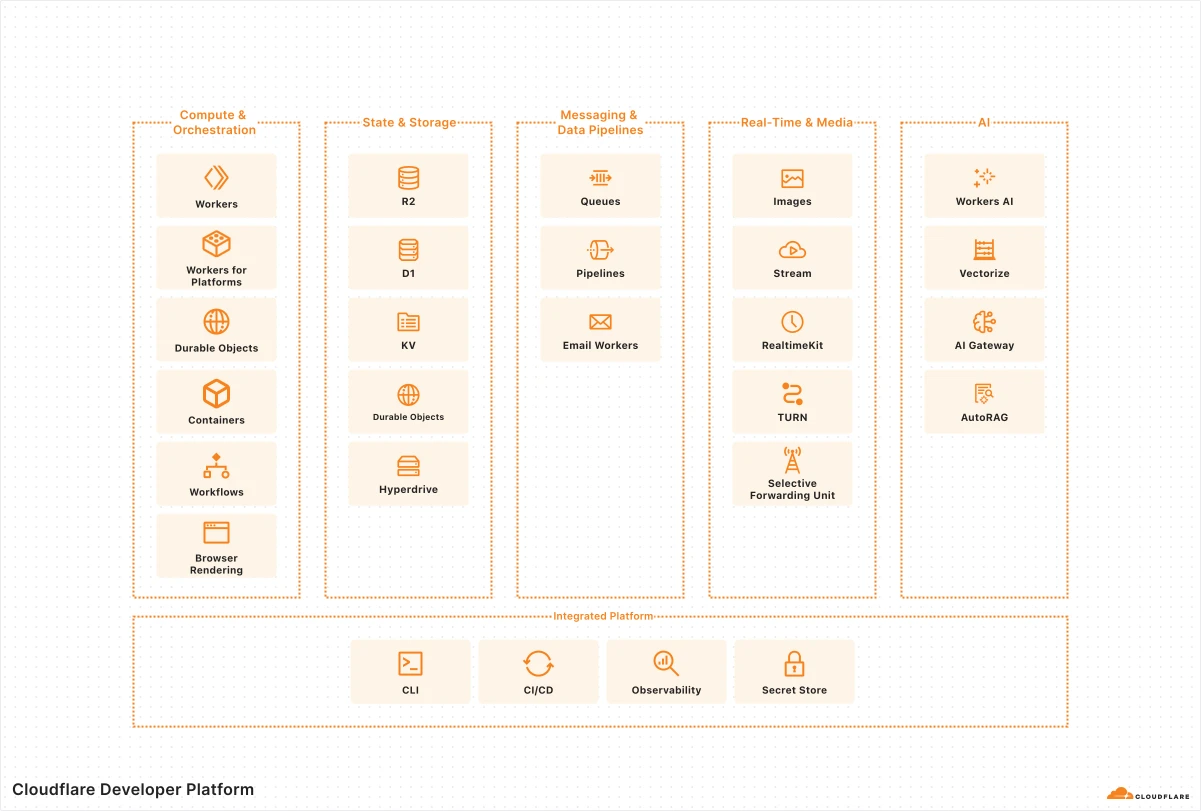
Hình 1: Cloudflare Developer Platform

Ứng dụng fullstack Fullstack applications Fullstack applications

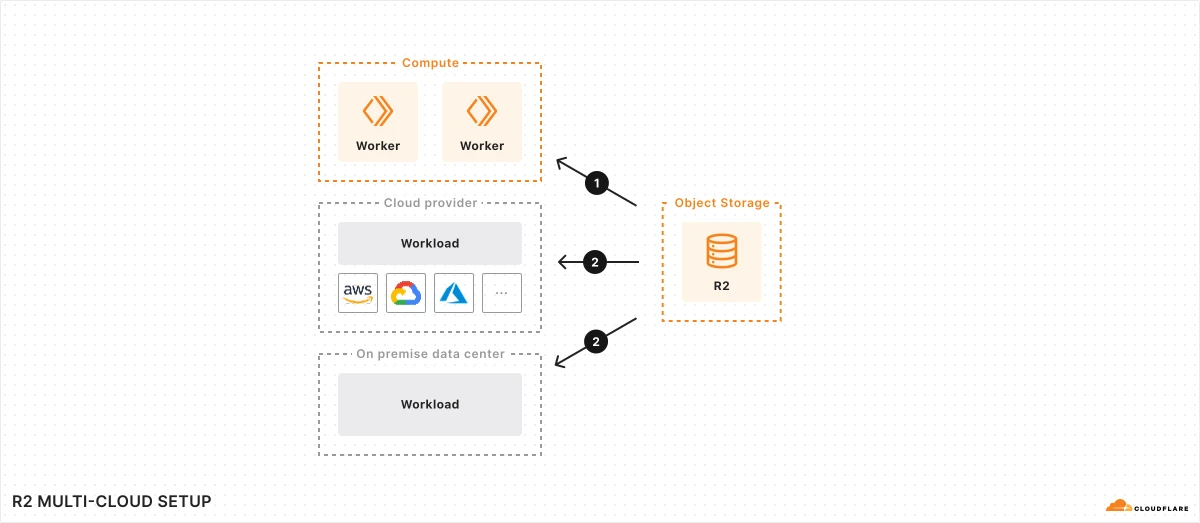
Ví dụ fullstack trên Developer Platform — Workers/Pages, storage và AI services trong một kiến trúc thực tế. A practical example of how these services come together in a real fullstack application architecture. A practical example of how these services come together in a real fullstack application architecture.

Thuật ngữ: Concepts: Concepts: Workers · Pages · D1 · R2 · KV · Durable Objects

Sơ đồ chính thức ↗ Official diagram ↗ Official diagram ↗ · Serverless Serverless Serverless

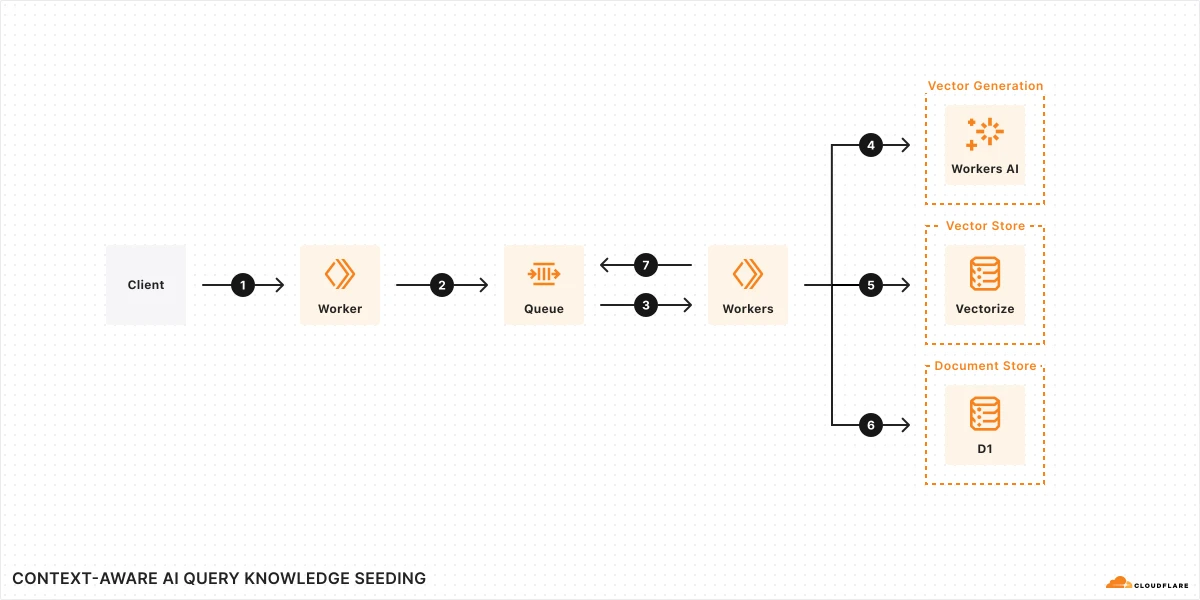
Hình 1: Nạp tri thức (knowledge seeding)

Retrieval Augmented Generation (RAG) Retrieval Augmented Generation (RAG) Retrieval Augmented Generation (RAG)

RAG kết hợp retrieval (Vectorize/KV) với Workers AI để chatbot trả lời chính xác hơn — seeding knowledge và query path tách biệt. RAG combines retrieval with generative models for better text. It uses external knowledge to create factual, relevant responses, improving coherence and accuracy in NLP tasks like chatbots. RAG combines retrieval with generative models for better text. It uses external knowledge to create factual, relevant responses, improving coherence and accuracy in NLP tasks like chatbots.

Thuật ngữ: Concepts: Concepts: RAG · Vectorize · Workers AI · Knowledge seeding · Embeddings

Sơ đồ chính thức ↗ Official diagram ↗ Official diagram ↗ · AI Artificial Intelligence (AI) Artificial Intelligence (AI)

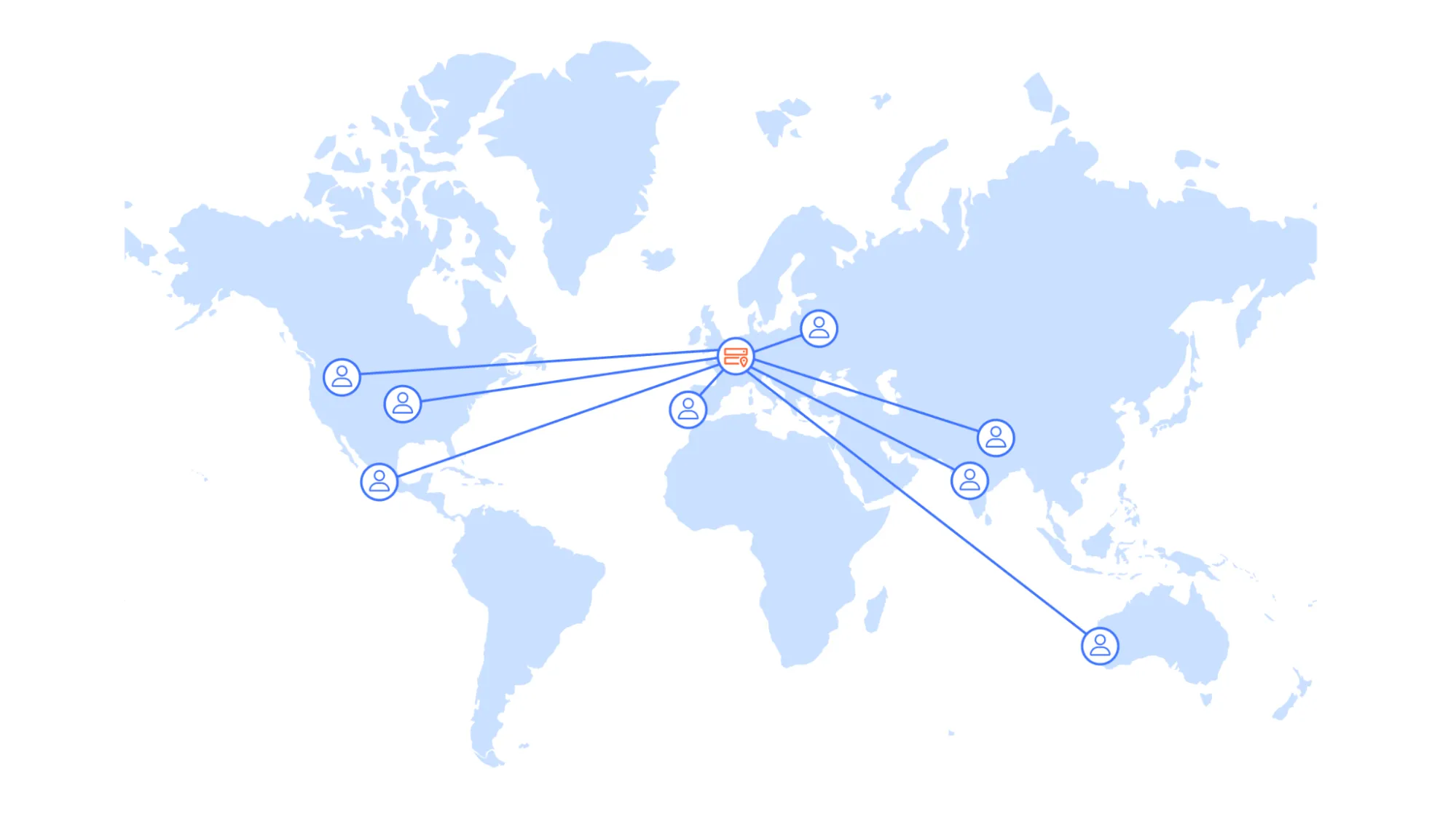
Hình 1: Kiến trúc truyền thống một vùng

API serverless toàn cầu Serverless global APIs Serverless global APIs

Ví dụ kiến trúc API serverless trên Cloudflare — compute và data product (Workers, D1, R2) tương tác thế nào. An example architecture of a serverless API on Cloudflare and aims to illustrate how different compute and data products could interact with each other. An example architecture of a serverless API on Cloudflare and aims to illustrate how different compute and data products could interact with each other.

Thuật ngữ: Concepts: Concepts: Workers · D1 · R2 · Global API · Edge compute

Sơ đồ chính thức ↗ Official diagram ↗ Official diagram ↗ · Serverless Serverless Serverless

Sau lộ trình bạn sẽ What you will achieve អ្វីដែលអ្នកនឹងសម្រេច

  • C3 + wrangler login/dev/deploy — URL *.workers.dev sống C3 + wrangler login/dev/deploy — a live *.workers.dev URL C3 + wrangler login/dev/deploy — a live *.workers.dev URL
  • wrangler.jsonc + wrangler secret — không key trong git wrangler.jsonc + wrangler secret — no keys in git wrangler.jsonc + wrangler secret — no keys in git
  • Chọn KV vs D1 vs R2; migration D1 local và remote Choose KV vs D1 vs R2; D1 migrations local and remote Choose KV vs D1 vs R2; D1 migrations local and remote
  • Pages Git + preview PR khi đó là site framework (compat) Pages Git + PR previews when that is a framework site (compat) Pages Git + PR previews when that is a framework site (compat)
  • wrangler tail; Turnstile verify server-side trước INSERT D1 wrangler tail; Turnstile verified server-side before D1 INSERT wrangler tail; Turnstile verified server-side before D1 INSERT
  • Workers AI + AI Gateway; RAG có ACL; agent tools hẹp Workers AI + AI Gateway; RAG with ACL; narrow agent tools Workers AI + AI Gateway; RAG with ACL; narrow agent tools

Khái niệm cần nắm Key concepts គោលគំនិតសំខាន់

  • Workers
  • C3
  • Wrangler
  • Pages
  • KV
  • D1
  • R2
  • Durable Objects
  • Workers AI
  • AI Gateway
  • Vectorize
  • MCP
  • Agents SDK
  • Sandbox SDK

Lỗi thường gặp Common mistakes កំហុសញឹកញាប់

Sai thư mục build output trên Pages Wrong Pages build output directory Wrong Pages build output directory

Astro dùng `dist`, Create React App dùng `build` — sai output khiến site trắng hoặc 404. Kiểm tra build log trước khi merge. Astro uses `dist`, CRA uses `build` — wrong output causes blank sites or 404s. Check build logs before merging. Astro uses `dist`, CRA uses `build` — wrong output causes blank sites or 404s. Check build logs before merging.

Chọn nhầm storage (KV cho dữ liệu quan hệ) Wrong storage choice (KV for relational data) Wrong storage choice (KV for relational data)

KV không phù hợp giao dịch cần consistency. Dùng D1 cho bảng SQL; R2 cho file; KV cho flags/config. KV is wrong for consistency-critical transactions. Use D1 for SQL tables; R2 for files; KV for flags/config. KV is wrong for consistency-critical transactions. Use D1 for SQL tables; R2 for files; KV for flags/config.

Secret/API key lộ ở client Secrets/API keys exposed in the client Secrets/API keys exposed in the client

Chỉ `PUBLIC_*` được embed build. Token Turnstile secret, DB credentials phải ở Pages Functions/Worker env. Only `PUBLIC_*` belongs in the build. Turnstile secrets and DB credentials belong in Pages Functions/Worker env. Only `PUBLIC_*` belongs in the build. Turnstile secrets and DB credentials belong in Pages Functions/Worker env.

Không verify Turnstile server-side No server-side Turnstile verification No server-side Turnstile verification

Chỉ embed widget chưa đủ — attacker gửi POST trực tiếp tới API. Luôn verify token trước khi ghi D1. Embedding the widget is not enough — attackers POST directly to your API. Always verify tokens before writing to D1. Embedding the widget is not enough — attackers POST directly to your API. Always verify tokens before writing to D1.

Bỏ qua observability khi debug edge Skipping observability when debugging edge code Skipping observability when debugging edge code

Worker/Pages Function lỗi khó thấy trên server truyền thống. Dùng `wrangler tail`, logs và error handling rõ ràng. Worker/Pages Function errors are invisible like traditional servers. Use `wrangler tail`, logs, and explicit error handling. Worker/Pages Function errors are invisible like traditional servers. Use `wrangler tail`, logs, and explicit error handling.

App mới bắt đầu bằng Pages Functions Starting a new app with Pages Functions Starting a new app with Pages Functions

On-ramp 2026 là C3 + Worker. Pages Functions hợp site Git hiện có (như hub này), không phải template API mới. The 2026 on-ramp is C3 + Worker. Pages Functions fit existing Git sites (like this hub), not a new API template. The 2026 on-ramp is C3 + Worker. Pages Functions fit existing Git sites (like this hub), not a new API template.

Nội dung từng phần Module-by-module content ខ្លឹមសារតាមផ្នែក

Bắt buộc Required ចាំបាច់ ~15 phút ~15 min ~15 នាទី 1 bài 1 lessons 1 មេរៀន

Phần 0: Kiến trúc và quy trình Part 0: Architecture and workflow Part 0: Architecture and workflow

Worker-first cho app mới; Pages cho Git site; AI sau storage và secret. Worker-first for new apps; Pages for Git sites; AI after storage and secrets. Worker-first សម្រាប់ app ថ្មី; Pages សម្រាប់ Git site; AI បន្ទាប់ពី storage និង secret។

  1. 1

    Kiến trúc Developer Platform 2026 Developer Platform architecture 2026 ស្ថាបត្យកម្ម Developer Platform 2026

    User → Worker hoặc Pages → bindings → AI Gateway. Hub này là ví dụ Pages; project mới dùng C3. User → Worker or Pages → bindings → AI Gateway. This hub is a Pages example; new projects use C3. User → Worker ឬ Pages → binding → AI Gateway។ Hub នេះជាឧទាហរណ៍ Pages; project ថ្មីប្រើ C3។

    Hướng dẫn chi tiết → Detailed guide → មគ្គុទេសក៍លម្អិត →
Bắt buộc Required ចាំបាច់ ~55 phút ~55 min ~55 នាទី 2 bài 2 lessons 2 មេរៀន

Phần 1: Worker đầu tiên với C3 và Wrangler Part 1: First Worker with C3 and Wrangler ផ្នែក 1: Worker ដំបូងជាមួយ C3 និង Wrangler

Account, npm create cloudflare, wrangler login/dev/deploy, rồi secret và wrangler.jsonc. Account, npm create cloudflare, wrangler login/dev/deploy, then secrets and wrangler.jsonc. Account, npm create cloudflare, wrangler login/dev/deploy បន្ទាប់មក secret និង wrangler.jsonc។

  1. 1

    C3, wrangler login và deploy Hello World C3, wrangler login, and deploy Hello World C3, wrangler login និង deploy Hello World

    Hello World, Worker only, TypeScript. Checkpoint: localhost:8787 và *.workers.dev. Hello World, Worker only, TypeScript. Checkpoint: localhost:8787 and *.workers.dev. Hello World, Worker only, TypeScript។ Checkpoint: localhost:8787 និង *.workers.dev។

    Hướng dẫn chi tiết → Detailed guide → មគ្គុទេសក៍លម្អិត →
  2. 2

    wrangler.jsonc, vars và wrangler secret wrangler.jsonc, vars, and wrangler secret wrangler.jsonc, vars និង wrangler secret

    File config là source of truth. Secret không nằm trong vars hay PUBLIC_*. The config file is the source of truth. Secrets do not live in vars or PUBLIC_*. ឯកសារ config គឺជាប្រភពពិត។ Secret មិនរស់នៅក្នុង vars ឬ PUBLIC_*។

    Hướng dẫn chi tiết → Detailed guide → មគ្គុទេសក៍លម្អិត →
Khuyến nghị Recommended ណែនាំ ~55 phút ~55 min ~55 នាទី 2 bài 2 lessons 2 មេរៀន

Phần 2: Pages (tương thích Git site) Part 2: Pages (Git site compatibility) ផ្នែក 2: Pages (ភាពត្រូវគ្នានែ Git site)

Deploy framework từ Git, preview PR, Functions khi logic gắn site — không phải on-ramp mặc định. Deploy a framework from Git, PR previews, Functions when logic belongs with the site — not the default on-ramp. Deploy framework ពី Git, preview PR, Functions ពេល logic ស្ថិតជាមួយ site — មិនមែន on-ramp លំនំាដើម។

  1. 1

    Pages từ Git: build command và output dist Pages from Git: build command and dist output Pages ពី Git: build command និង output dist

    Connect Git, npm run build, output dist. Preview mỗi PR. Đọc guide migrate sang Workers khi sẵn sàng. Connect Git, npm run build, output dist. Preview per PR. Read the migrate-to-Workers guide when ready. Connect Git, npm run build, output dist។ Preview ក្នុងមួយ PR។ អានមគ្គុទេសក៍ migrate-to-Workers ពេលរួចរាល់។

    Hướng dẫn chi tiết → Detailed guide → មគ្គុទេសក៍លម្អិត →
  2. 2

    Pages Functions /api/* và khi nào tách Worker Pages Functions /api/* and when to split a Worker Pages Functions /api/* និងពេលណាត្រូវបំបែក Worker

    Cùng Workers runtime. Tách Worker khi service không gắn UI tĩnh. Same Workers runtime. Split a Worker when the service is not tied to static UI. runtime Workers ដូចគ្នា។ បំបែក Worker ពេល service មិនចងភ្ជាប់នឹង UI ឋិតិវន្ត។

    Hướng dẫn chi tiết → Detailed guide → មគ្គុទេសក៍លម្អិត →
Bắt buộc Required ចាំបាច់ ~75 phút ~75 min ~75 នាទី 3 bài 3 lessons 3 មេរៀន

Phần 3: Chọn storage đúng Part 3: Pick the right storage ផ្នែក 3: ជ្រើសរើស storage ត្រឹមត្រូវ

KV, D1 và R2 — khi nào dùng cái nào. KV, D1, and R2 — when to use each. KV, D1 និង R2 — ពេលប្រើមួយណា។

  1. 1

    KV cho config và cache nhẹ KV for config and light cache KV សម្រាប់ config និង cache ស្រាល

    Lưu feature flags, session token ngắn, rate limit counter. Không dùng KV cho giao dịch tài chính cần consistency cao. Store feature flags, short session tokens, rate limit counters. Avoid KV for financial transactions needing strong consistency. រក្សាទុក feature flag, session token ខ្លី, កុងទ័រ rate limit។ ជៀស KV សម្រាប់ប្រតិបត្តិការហិរញ្ញវត្ថុដែលត្រូវការ consistency រឹងមំា។

    Hướng dẫn chi tiết → Detailed guide → មគ្គុទេសក៍លម្អិត →
  2. 2

    D1 cho dữ liệu có schema D1 for structured data D1 សម្រាប់ទិន្នន័យមានរចនាសម្ព័ន្ធ

    Workshop signup, quiz results, user preferences — bảng SQL nhỏ. Chạy migration với `wrangler d1 migrations`. Workshop signups, quiz results, user prefs — small SQL tables. Run migrations with `wrangler d1 migrations`. ការចុះឈ្មោះ workshop, លទ្ធផល quiz, preference អ្នកប្រើ — តារាង SQL តូច។ រត់ migration ដោយ `wrangler d1 migrations`។

    Hướng dẫn chi tiết → Detailed guide → មគ្គុទេសក៍លម្អិត →
  3. 3

    R2 cho file và tài liệu R2 for files and assets R2 សម្រាប់ឯកសារ និង asset

    PDF, slides, upload user — object storage. Có thể phục vụ public hoặc signed URL sau này. PDFs, slides, user uploads — object storage. Serve public or via signed URLs later. PDF, slide, upload អ្នកប្រើ — object storage។ បម្រើសាធារណៈ ឬតាម signed URL ក្រោយ។

    Hướng dẫn chi tiết → Detailed guide → មគ្គុទេសក៍លម្អិត →
Khuyến nghị Recommended ណែនាំ ~45 phút ~45 min ~45 នាទី 2 bài 2 lessons 2 មេរៀន

Phần 4: Vận hành và bước tiếp Part 4: Operate and level up ផ្នែក 4: ដំណើរការ និង ឡើងកម្រិត

Analytics, bảo vệ form, và hướng AI. Analytics, form protection, and AI next steps. Analytics, ការពារ form និងជំហាន AI ក្រោយ។

  1. 1

    Web Analytics và log Workers Web Analytics and Worker logs Web Analytics និង log Worker

    Bật Cloudflare Web Analytics cho traffic. Dùng `wrangler tail` hoặc observability khi debug API. Enable Cloudflare Web Analytics for traffic. Use `wrangler tail` or observability when debugging APIs. បើក Cloudflare Web Analytics សម្រាប់ traffic។ ប្រើ `wrangler tail` ឬ observability ពេល debug API។

    Hướng dẫn chi tiết → Detailed guide → មគ្គុទេសក៍លម្អិត →
  2. 2

    Turnstile cho form public Turnstile for public forms Turnstile សម្រាប់ form សាធារណៈ

    Chống bot trên đăng ký workshop, contact form. Verify token server-side trước khi ghi D1. Stop bots on workshop signup and contact forms. Verify tokens server-side before writing to D1. បញ្ឈប់ bot លើការចុះឈ្មោះ workshop និង form ទំនាក់ទំនង។ ផ្ទៀងផ្ទាត់ token ខាង server មុនពេលសរសេរទៅ D1។

    Hướng dẫn chi tiết → Detailed guide → មគ្គុទេសក៍លម្អិត →
Khuyến nghị Recommended ណែនាំ ~110 phút ~110 min ~110 នាទី 5 bài 5 lessons 5 មេរៀន

Phần 5: AI trên Developer Platform Part 5: AI on the Developer Platform ផ្នែក 5: AI លើ Developer Platform

Từ inference đầu tiên đến AI security, RAG và agent có tools/skills. From first inference to AI security, RAG, and agents with tools and skills. ពី inference ដំបូងទៅសុវត្ថិភាព AI, RAG និង agent ដែលមាន tool និង skill។

  1. 1

    Inference đầu tiên với Workers AI First inference with Workers AI inference ដំបូងជាមួយ Workers AI

    Thêm AI binding vào Worker, gọi model từ server-side và trả response tối thiểu. Bắt đầu bằng một task rõ ràng trước khi thêm chat UI hoặc nhiều provider. Add an AI binding to a Worker, call a model server-side, and return a minimal response. Start with one clear task before adding a chat UI or multiple providers. បន្ថែម AI binding ទៅ Worker, ហៅ model ខាង server ហើយត្រឡប់ response តិចបំផុត។ ចាប់ផ្តើមដោយ task ច្បាស់មួយមុនពេលបន្ថែម chat UI ឬ provider ច្រើន។

    Hướng dẫn chi tiết → Detailed guide → មគ្គុទេសក៍លម្អិត →
  2. 2

    Adopt AI có kiểm soát với AI Gateway Adopt AI deliberately with AI Gateway ប្រើ AI ដោយចេតនាជាមួយ AI Gateway

    Đặt AI Gateway giữa app và model provider để quan sát request, cache khi phù hợp và thay provider mà không làm lộ credential ở client. Place AI Gateway between your app and model providers to observe requests, cache where appropriate, and change providers without exposing credentials in the client. ដាក់ AI Gateway ចន្លោះ app និង model provider ដើម្បីសង្កេត request, cache នៅកន្លែងសមស្រប និងផ្លាស់ប្តូរ provider ដោយមិនលាតត្រដាង credential នៅ client។

    Hướng dẫn chi tiết → Detailed guide → មគ្គុទេសក៍លម្អិត →
  3. 3

    Baseline bảo mật cho ứng dụng AI AI application security baseline baseline សុវត្ថិភាពកម្មវិធី AI

    Giữ key ở Worker secrets, xác thực người dùng trước endpoint AI, rate limit input, validate tool input và áp dụng guardrails cho data/response nhạy cảm. Keep keys in Worker secrets, authenticate users before AI endpoints, rate-limit input, validate tool input, and apply guardrails to sensitive data and responses. រក្សា key ក្នុង Worker secret, ផ្ទៀងផ្ទាត់អ្នកប្រើមុន endpoint AI, rate-limit input, validate tool input និងអនុវត្ត guardrail លើទិន្នន័យ និង response រសើប។

    Hướng dẫn chi tiết → Detailed guide → មគ្គុទេសក៍លម្អិត →
  4. 4

    RAG với Vectorize và storage RAG with Vectorize and storage RAG ជាមួយ Vectorize និង storage

    Tách luồng ingest và query: lưu tài liệu trong R2, tạo embeddings vào Vectorize, retrieve context có nguồn trước khi gọi model. Đừng coi vector search là quyền truy cập dữ liệu. Separate ingestion from queries: store documents in R2, create embeddings in Vectorize, and retrieve sourced context before calling the model. Do not treat vector search as data authorization. បំបែក ingestion ពី query៖ រក្សាទុកឯកសារក្នុង R2, បង្កើត embedding ក្នុង Vectorize ហើយទាញ context មានប្រភពមុនពេលហៅ model។ កុំចាត់ vector search ជាការអនុញ្ញាតទិន្នន័យ។

    Hướng dẫn chi tiết → Detailed guide → មគ្គុទេសក៍លម្អិត →
  5. 5

    Agents: tools, skills và quyền hạn tối thiểu Agents: tools, skills, and least privilege Agent៖ tool, skill និង least privilege

    Dùng Agents SDK cho state/session khi cần. Mỗi tool cần schema input rõ ràng, authorization ở server và scope nhỏ; skill là hướng dẫn/versioned knowledge, không phải quyền truy cập bí mật. Use the Agents SDK for state and sessions when needed. Give every tool a clear input schema, server-side authorization, and narrow scope; skills are versioned guidance and knowledge, not secret access. ប្រើ Agents SDK សម្រាប់ state និង session ពេលត្រូវការ។ ផ្តល់ឱ្យ tool រាល់មួយនូវ input schema ច្បាស់, authorization ខាង server និង scope តូចចង្អៀត; skill គឺណែនាំ និងចំណេះដឹងមាន version មិនមែនជាការចូល secret។

    Hướng dẫn chi tiết → Detailed guide → មគ្គុទេសក៍លម្អិត →
Tùy chọn Optional ស្រេចចិត្ត ~30 phút ~30 min ~30 នាទី 1 bài 1 lessons 1 មេរៀន

Phần 6: Durable Objects, Queues, Workflows, Hyperdrive Part 6: Durable Objects, Queues, Workflows, Hyperdrive ផ្នែក 6: Durable Objects, Queues, Workflows, Hyperdrive

Optional — chọn đúng một sản phẩm sau khi Worker + storage ổn. Thường cần Workers Paid. Optional — pick exactly one product after Worker + storage are stable. Often needs Workers Paid. ស្រេចចិត្ត — ជ្រើសរើសផលិតផលតែមួយបន្ទាប់ពី Worker + storage មានស្ថិរភាព។ ជាញឹកញាប់ត្រូវការ Workers Paid។

  1. 1

    Khi nào thêm DO, Queue, Workflow hoặc Hyperdrive When to add DO, Queue, Workflow, or Hyperdrive ពេលណាត្រូវបន្ថែម DO, Queue, Workflow, ឬ Hyperdrive

    DO: state theo object. Queues: việc nền. Workflows: pipeline dài. Hyperdrive: Postgres/MySQL bên ngoài — không thay D1. DO: per-object state. Queues: background work. Workflows: long pipelines. Hyperdrive: external Postgres/MySQL — not a D1 replacement. DO៖ state តាម object។ Queues៖ ការងារផ្ទៃក្រោយ។ Workflows៖ pipeline វែង។ Hyperdrive៖ Postgres/MySQL ខាងក្រៅ — មិនមែនជំនួស D1។

    Hướng dẫn chi tiết → Detailed guide → មគ្គុទេសក៍លម្អិត →
Tham chiếu Reference ឯកសារយោង Tham chiếu Reference ឯកសារយោង 2 bài 2 lessons 2 មេរៀន

Phần 7: Tham chiếu — golden rules và sổ tay Part 7: Reference — golden rules and runbook ផ្នែក 7: ឯកសារយោង — golden rules និង runbook

10 rule và lệnh wrangler / path dashboard khi đã hiểu luồng. 10 rules and wrangler commands / dashboard paths once you know the flow. 10 rules និង wrangler commands / dashboard paths ពេលអ្នកដឹង flow រួច។

  1. 1

    10 golden rules Developer Platform 10 Developer Platform golden rules 10 golden rules Developer Platform

    Worker-first; secret qua wrangler secret; chọn storage đúng; verify Turnstile; vector ≠ ACL. Worker-first; secrets via wrangler secret; pick storage correctly; verify Turnstile; vectors ≠ ACL. Worker-first; secrets តាម wrangler secret; ជ្រើស storage ឲ្យត្រឹមត្រូវ; verify Turnstile; vectors ≠ ACL។

    Hướng dẫn chi tiết → Detailed guide → មគ្គុទេសក៍លម្អិត →
  2. 2

    Sổ tay lệnh (C3 / wrangler / Pages) Command runbook (C3 / wrangler / Pages) Command runbook (C3 / wrangler / Pages)

    create cloudflare → login/dev/deploy → secret put → kv/d1/r2 → tail → Pages Git dist. create cloudflare → login/dev/deploy → secret put → kv/d1/r2 → tail → Pages Git dist. create cloudflare → login/dev/deploy → secret put → kv/d1/r2 → tail → Pages Git dist.

    Hướng dẫn chi tiết → Detailed guide → មគ្គុទេសក៍លម្អិត →

Công cụ hỗ trợ vận hành Operational tools Operational tools

Công cụ thực hành áp dụng ngay khi vận hành và xử lý sự cố. Hands-on tools to apply while operating and handling incidents. Hands-on tools to apply while operating and handling incidents.

tool

Workers learning path Workers learning path Workers learning path

On-ramp chính thức: C3, Wrangler, concepts. Official on-ramp: C3, Wrangler, concepts. on-ramp ផ្លូវការ៖ C3, Wrangler, concepts។

tool

Workers get started Workers get started Workers get started

Guide Hello World — account, deploy, wrangler dev. Hello World guide — account, deploy, wrangler dev. មគ្គុទេសក៍ Hello World — account, deploy, wrangler dev។

tool

Migrate from Pages Migrate from Pages Migrate from Pages

Khi site Git sẵn sàng chuyển sang Workers + static assets — đọc, không copy vội. When a Git site is ready to move to Workers + static assets — read it; do not paste blindly. ពេល Git site រួចរាល់ផ្លាស់ប្តូរទៅ Workers + static assets — អានវា; កុំចម្លងដោយមិនអាន។

tool

Developer Labs (hands-on) Developer Labs (hands-on) Developer Labs (hands-on)

4 track guided trên hub: Workers, MCP, Agents SDK, Sandbox SDK — ship project thật. Four guided tracks on this hub: Workers, MCP, Agents SDK, Sandbox SDK — ship a real project. Four guided tracks on this hub: Workers, MCP, Agents SDK, Sandbox SDK — ship a real project.

Trình tự học gợi ý Suggested learning order លំដាប់សិក្សាណែនាំ

  1. Đọc kiến trúc: app mới = Worker; Git site = Pages Read the architecture: new app = Worker; Git site = Pages Read the architecture: new app = Worker; Git site = Pages
  2. C3 Hello World, wrangler login/dev/deploy — *.workers.dev C3 Hello World, wrangler login/dev/deploy — *.workers.dev C3 Hello World, wrangler login/dev/deploy — *.workers.dev
  3. wrangler.jsonc + wrangler secret (không PUBLIC_* cho key) wrangler.jsonc + wrangler secret (no PUBLIC_* for keys) wrangler.jsonc + wrangler secret (no PUBLIC_* for keys)
  4. Chọn KV / D1 / R2; apply migration D1 local và remote Choose KV / D1 / R2; apply D1 migrations local and remote Choose KV / D1 / R2; apply D1 migrations local and remote
  5. Nếu có framework Git: Pages + preview; Functions chỉ khi gắn site If you have a Git framework: Pages + preview; Functions only when tied to the site If you have a Git framework: Pages + preview; Functions only when tied to the site
  6. wrangler tail; Turnstile siteverify trước ghi D1 wrangler tail; Turnstile siteverify before D1 writes wrangler tail; Turnstile siteverify before D1 writes
  7. Workers AI một task; AI Gateway; RAG/agent khi boundary rõ Workers AI one task; AI Gateway; RAG/agent when boundaries are clear Workers AI one task; AI Gateway; RAG/agent when boundaries are clear
  8. Thực hành labs.cloudflare.dev: Workers (01) → MCP (02) → Agents (03) → Sandbox (04) Practice on labs.cloudflare.dev: Workers (01) → MCP (02) → Agents (03) → Sandbox (04) Practice on labs.cloudflare.dev: Workers (01) → MCP (02) → Agents (03) → Sandbox (04)
  9. Optional: một trong DO / Queues / Workflows / Hyperdrive Optional: one of DO / Queues / Workflows / Hyperdrive Optional: one of DO / Queues / Workflows / Hyperdrive

labs.cloudflare.dev

Lab thực hành (nguồn bổ sung) Hands-on labs (supplementary) Lab អនុវត្ត (ប្រភពបន្ថែម)

23 bài lab guided từ labs.cloudflare.dev — Workers, MCP, Agents SDK, Sandbox SDK — đọc từng bước ngay trên hub. Bổ sung lộ trình, không thay docs hay bài học trong track. 23 guided labs from labs.cloudflare.dev — Workers, MCP, Agents SDK, Sandbox SDK — follow each step on this hub. Complements this track; it does not replace docs or the in-track lessons. Lab guided 23 ពី labs.cloudflare.dev — Workers, MCP, Agents SDK, Sandbox SDK — ធ្វើតាមជំហាននីមួយៗនៅលើ hub នេះ។ បំពេញផ្លូវសិក្សា មិនជំនួស docs ឬមេរៀនក្នុង track។

  1. 01 Cloudflare Workers Cloudflare Workers Cloudflare Workers Ship Bookmark API Ship a Bookmark API Ship Bookmark API
  2. 02 Model Context Protocol Model Context Protocol Model Context Protocol Ship MCP server + AI assistant Ship an MCP server + AI assistant Ship MCP server + AI assistant
  3. 03 Agents SDK Agents SDK Agents SDK Ship agent có state Ship a stateful agent Ship agent មាន state
  4. 04 Sandbox SDK Sandbox SDK Sandbox SDK Ship AI code executor an toàn Ship a secure AI code executor Ship AI code executor សុវត្ថិភាព
Mở lab trên hub Open labs on this hub បើក lab នៅលើ hub នេះ labs.cloudflare.dev Discord

4 track · 23 labs guided 4 tracks · 23 guided labs 4 track · 23 lab មានការណែនាំ

7 labs 7 labs 7 labs

Cloudflare Workers Cloudflare Workers Cloudflare Workers

Ship Bookmark API Ship a Bookmark API Ship Bookmark API

Routing, KV, D1 và Workers AI — xây Bookmark API từ zero rồi deploy. Routing, KV, D1, and Workers AI — build a Bookmark API from scratch, then deploy. Routing, KV, D1 និង Workers AI — សង់ Bookmark API ពីសូន្យ បន្ទាប់មក deploy។

  • HTTP APIs
  • KV
  • D1
  • Workers AI
  1. 1

    Bắt đầu: auth, C3, đọc code, test Getting started: auth, C3, read the code, test ចាប់ផ្តើម៖ auth, C3, អាន code, test

    Đăng nhập Cloudflare, tạo project Bookmark API, hiểu file, chạy local. Sign in to Cloudflare, create the Bookmark API project, read the files, run locally. ចូល Cloudflare បង្កើត project Bookmark API អាន file រត់ local។

  2. 2

    Routes và CRUD Routes and CRUD Routes និង CRUD

    Type Bookmark, router, handler create/list/get/delete — test luôn error case. Bookmark type, router, create/list/get/delete handlers — including error cases. Type Bookmark, router, handler create/list/get/delete — រួមទាំងករណី error។

  3. 3

    KV lưu bền Persistent KV storage ការផ្ទុក KV ជាប់

    Tạo namespace KV, đổi handler sang binding, kiểm tra data còn sau restart. Create a KV namespace, switch handlers to the binding, confirm data survives restart. បង្កើត namespace KV ប្តូរ handler ទៅ binding ពិនិត្យថា data នៅក្រោយ restart។

  4. 4

    D1 + cache KV D1 + KV cache D1 + cache KV

    Schema SQL, tag, filter; KV làm cache đọc — đo cache hit. SQL schema, tags, filters; KV as a read cache — check cache hits. Schema SQL, tag, filter; KV ជា cache អាន — ពិនិត្យ cache hit។

  5. 5

    Tóm tắt bằng Workers AI AI-powered summaries សង្ខេបដោយ Workers AI

    AI binding, cột summary trên D1, generate khi tạo bookmark. AI binding, a D1 summary column, generate on bookmark create. AI binding, ជួរឈរ summary លើ D1, generate ពេលបង្កើត bookmark។

  6. 6

    AI Gateway AI Gateway AI Gateway

    Đưa inference qua Gateway — cache, rate limit, xem analytics dashboard. Route inference through Gateway — cache, rate limit, read dashboard analytics. បញ្ជូន inference តាម Gateway — cache, rate limit, មើល analytics dashboard។

  7. 7

    Deploy production Deploy to production Deploy ទៅ production

    Tạo resource remote, wrangler deploy, wrangler tail, rollback khi cần. Create remote resources, wrangler deploy, wrangler tail, roll back if needed. បង្កើត resource remote, wrangler deploy, wrangler tail, rollback ពេលចាំបាច់។

Ghép với lộ trình hub Fits this hub path សមនឹងផ្លូវ hub នេះ

Sau Phần 1 (Worker + Wrangler) và Phần 3 (KV/D1). Lab AI + Gateway khớp Phần 5. After Part 1 (Worker + Wrangler) and Part 3 (KV/D1). The AI + Gateway labs match Part 5. បន្ទាប់ពីផ្នែក 1 (Worker + Wrangler) និងផ្នែក 3 (KV/D1)។ Lab AI + Gateway សមនឹងផ្នែក 5។

Mở 7 bài lab Open 7 lab articles បើក 7 អត្ថបទ lab
7 labs 7 labs 7 labs

Model Context Protocol Model Context Protocol Model Context Protocol

Ship MCP server + AI assistant Ship an MCP server + AI assistant Ship MCP server + AI assistant

Remote MCP trên Workers: tool có type, Zod, API ngoài và KV. Remote MCP on Workers: typed tools, Zod, external APIs, and KV. Remote MCP លើ Workers៖ tool មាន type, Zod, API ខាងក្រៅ និង KV។

  • Custom Tools
  • Zod
  • External APIs
  • KV
  1. 1

    Tạo MCP server và Inspector Create the MCP server and Inspector បង្កើត MCP server និង Inspector

    Scaffold server trên Workers, test kết nối bằng MCP Inspector. Scaffold the server on Workers, test the connection with MCP Inspector. Scaffold server លើ Workers test ការភ្ជាប់ដោយ MCP Inspector។

  2. 2

    Tool tùy chỉnh Custom tools Tool ផ្ទាល់ខ្លួន

    Thêm tool (random number) có schema — gọi và xem response typed. Add a typed tool (random number) — call it and inspect the typed response. បន្ថែម tool មាន type (លេខចៃដន្យ) — ហៅ និងមើល response typed។

  3. 3

    Tích hợp API ngoài External API integration ភ្ជាប់ API ខាងក្រៅ

    Gọi drand (hoặc API tương đương) từ tool — validate input bằng Zod. Call drand (or an equivalent API) from a tool — validate input with Zod. ហៅ drand (ឬ API សមមូល) ពី tool — validate input ដោយ Zod។

  4. 4

    Deploy lên Workers Deploy to Workers Deploy ទៅ Workers

    wrangler deploy, thử trên AI Playground. wrangler deploy, then try it in the AI Playground. wrangler deploy បន្ទាប់មកសាកលើ AI Playground។

  5. 5

    KV cho tool KV for tools KV សម្រាប់ tool

    Namespace KV + tool đọc/ghi — state không mất giữa session. KV namespace + read/write tools — state survives across sessions. Namespace KV + tool អាន/សរសេរ — state នៅរវាង session។

  6. 6

    Todo bền trên KV Persistent todo app កម្មវិធី todo ជាប់លើ KV

    Bộ tool todo (add/list/done) — deploy và kiểm tra persistence. Todo tools (add/list/done) — deploy and confirm persistence. ឈុត tool todo (add/list/done) — deploy និងពិនិត្យ persistence។

  7. 7

    Bạn đã là MCP builder You're an MCP Builder Now អ្នកជា MCP builder ហើយ

    Nhìn lại pattern MCP, gợi ý tool tiếp theo, dùng AI để ship server mới. Review the MCP pattern, pick a next tool, use AI to ship another server. មើល pattern MCP ជ្រើស tool បន្ទាប់ ប្រើ AI ដើម្បី ship server ថ្មី។

Ghép với lộ trình hub Fits this hub path សមនឹងផ្លូវ hub នេះ

Sau Phần 5 (tools/agent) và khi đã quen KV ở Phần 3. Luyện schema + authorization phía server. After Part 5 (tools/agents) and once KV from Part 3 is familiar. Practice schemas and server-side authorization. បន្ទាប់ពីផ្នែក 5 (tools/agent) និងពេលស្គាល់ KV ពីផ្នែក 3។ ហាត់ schema + authorization ខាង server។

Mở 7 bài lab Open 7 lab articles បើក 7 អត្ថបទ lab
2 labs 2 labs 2 labs

Agents SDK Agents SDK Agents SDK

Ship agent có state Ship a stateful agent Ship agent មាន state

Agent stateful: memory, schedule task, WebSocket realtime. A stateful agent: memory, scheduled tasks, and realtime WebSockets. Agent មាន state៖ memory, កំណត់ពេល task, WebSocket realtime។

  • Agents SDK
  • State
  • Scheduling
  • WebSockets
  1. 1

    Agent starter: tools và schedule Agent starter: tools and scheduling Agent starter៖ tools និងការកំណត់ពេល

    Tạo agent, xem tool có sẵn, đọc cách schedule task. Create an agent, inspect the bundled tools, read how tasks are scheduled. បង្កើត agent មើល tool ភ្ជាប់មក អានវិធីកំណត់ពេល task។

  2. 2

    Clone repo Agents và build Clone the Agents repo and build Clone repo Agents និង build

    Clone source, npm install, build — sẵn sàng sửa tool / memory. Clone the source, npm install, build — ready to change tools or memory. Clone source, npm install, build — រួចរាល់កែ tool / memory។

Ghép với lộ trình hub Fits this hub path សមនឹងផ្លូវ hub នេះ

Sau bài Agents ở Phần 5. Phần 6 (Durable Objects) giải thích state theo object phía sau SDK. After the Agents lesson in Part 5. Part 6 (Durable Objects) explains the per-object state behind the SDK. បន្ទាប់ពីមេរៀន Agents នៅផ្នែក 5។ ផ្នែក 6 (Durable Objects) ពន្យល់ state តាម object ខាងក្រោយ SDK។

Mở 2 bài lab Open 2 lab articles បើក 2 អត្ថបទ lab
7 labs 7 labs 7 labs

Sandbox SDK Sandbox SDK Sandbox SDK

Ship AI code executor an toàn Ship a secure AI code executor Ship AI code executor សុវត្ថិភាព

Chạy code trong container cô lập, preview live, gắn Workers AI — từ zero. Run code in isolated containers, live preview, Workers AI — from scratch. រត់ code ក្នុង container បំបែក preview ផ្ទាល់ ភ្ជាប់ Workers AI — ពីសូន្យ។

  • Secure Execution
  • AI Code Generation
  • Containers
  • Workers AI
  1. 1

    Project sandbox đầu tiên First sandbox project Project sandbox ដំបូង

    Scaffold, đọc cấu trúc, chạy local, exec lệnh đầu tiên. Scaffold, read the layout, run locally, exec the first command. Scaffold អានរចនាសម្ព័ន្ធ រត់ local exec ពាក្យបញ្ជាដំបូង។

  2. 2

    exec() và file exec() and files exec() និង file

    API exec(), thao tác file, endpoint tùy chỉnh, xử lý lỗi. The exec() API, file ops, a custom endpoint, and error handling. API exec() ប្រតិបត្តិការ file endpoint ផ្ទាល់ខ្លួន និងដោះស្រាយ error។

  3. 3

    Code executor Code executor Code executor

    Context chạy code, runCode(), nhận input động, bắt exception. A code context, runCode(), dynamic input, catch execution errors. Context រត់ code, runCode(), input ថាមវន្ត ចាប់ exception។

  4. 4

    Sinh code bằng Workers AI AI-powered code generation AI-powered code generation

    AI binding + endpoint /vibe — pipeline generate → execute. AI binding + /vibe endpoint — generate → execute pipeline. AI binding + endpoint /vibe — pipeline generate → execute។

  5. 5

    Live preview Live app preview Live app preview

    Cài deps, start server trong sandbox, expose port, stream log. Install deps, start a server in the sandbox, expose a port, stream logs. ដំឡើង deps start server ក្នុង sandbox expose port stream log។

  6. 6

    Bảo mật sandbox Sandbox security សុវត្ថិភាព sandbox

    Validate input, isolate theo user, env/secret, auth — sandbox không phải ACL. Validate input, per-user isolation, env/secrets, auth — a sandbox is not an ACL. Validate input បំបែកតាម user env/secret auth — sandbox មិនមែន ACL។

  7. 7

    Deploy và lifecycle Deploy and lifecycle Deploy និង lifecycle

    Deploy, cleanup sandbox, config production, monitor. Deploy, clean up sandboxes, production config, monitor. Deploy cleanup sandbox កំណត់ production monitor។

Ghép với lộ trình hub Fits this hub path សមនឹងផ្លូវ hub នេះ

Sau Phần 5 (AI) và Phần 4 (vận hành/secret). Lab bảo mật khớp golden rules: secret không lên client. After Part 5 (AI) and Part 4 (operate/secrets). The security labs match the golden rules: secrets stay off the client. បន្ទាប់ពីផ្នែក 5 (AI) និងផ្នែក 4 (ដំណើរការ/secret)។ Lab សុវត្ថិភាពសមនឹងច្បាប់៖ secret មិនឡើង client។

Mở 7 bài lab Open 7 lab articles បើក 7 អត្ថបទ lab

Ví dụ triển khai (trong lộ trình này) Deployment examples (this path only) Deployment examples (this path only)

Tutorial và guide từ Cloudflare Resources — chỉ hiển thị nội dung phù hợp lộ trình Developer Platform. Mỗi bài học gợi ý 4 ví dụ riêng. Tutorials and guides from Cloudflare Resources — only content matched to the Developer Platform path. Each lesson suggests four examples. Tutorials and guides from Cloudflare Resources — only content matched to the Developer Platform path. Each lesson suggests four examples.

84 / 244
Sơ đồ kiến trúcDeveloper Platform

A/B-testing using Workers

/reference-architecture/diagrams/serverless/a-b-testing-using-workers

Tìm hiểu thêm
Tài liệu mở rộng (tùy chọn) Optional extended reading Optional extended reading Mở Expand Expand GitHub, Reference Architecture, CloudSecOp, demo script — không bắt buộc. Lab guided nằm phía trên (Developer Labs). GitHub, Reference Architecture, CloudSecOp, demo scripts — not required. Guided labs sit above (Developer Labs). GitHub, Reference Architecture, CloudSecOp, demo scripts — not required. Guided labs sit above (Developer Labs).

Tài nguyên chính thức (Resource Hub) Official resources (Resource Hub) Official resources (Resource Hub)

Liên kết từ Cloudflare Resource Hub — docs, community, case studies phù hợp track này. Links from the Cloudflare Resource Hub — docs, community, and case studies for this track. Links from the Cloudflare Resource Hub — docs, community, and case studies for this track.

Build & triển khai Build & deploy Build & deploy Gợi ý Recommended Recommended

AI Gateway AI Gateway AI Gateway

Quản trị request AI đa provider — observability, cache và kiểm soát chi phí. Govern multi-provider AI requests — observability, caching, and cost control. Govern multi-provider AI requests — observability, caching, and cost control.

Mở trên Cloudflare Open on Cloudflare Open on Cloudflare
Học & tài liệu Learn & docs Learn & docs Gợi ý Recommended Recommended

Developer Documentation Developer Documentation Developer Documentation

Tài liệu sản phẩm, tutorial và ví dụ cho mọi dịch vụ Cloudflare. Product docs, tutorials, and examples for every Cloudflare service. Product docs, tutorials, and examples for every Cloudflare service.

Mở trên Cloudflare Open on Cloudflare Open on Cloudflare
Build & triển khai Build & deploy Build & deploy

API Reference API Reference API Reference

Endpoint, schema và chi tiết xác thực cho Cloudflare APIs. Endpoints, schemas, and auth details for Cloudflare APIs. Endpoints, schemas, and auth details for Cloudflare APIs.

Mở trên Cloudflare Open on Cloudflare Open on Cloudflare
Học & tài liệu Learn & docs Learn & docs Trong hub In this hub In this hub Gợi ý Recommended Recommended

Reference Architectures Reference Architectures Reference Architectures

Pattern kiến trúc và best practices — SASE, CDN, Workers, Zero Trust. Architecture patterns and best practices — SASE, CDN, Workers, Zero Trust. Architecture patterns and best practices — SASE, CDN, Workers, Zero Trust.

Xem trong hub View in hub View in hub

Chủ đề Learning Center Learning Center topics Learning Center topics

Kiến trúc tham chiếu Reference Architecture Reference Architecture

Sơ đồ và tài liệu thiết kế chính thức từ Cloudflare Architecture Center — bổ sung lộ trình học trong hub. Official design diagrams and docs from the Cloudflare Architecture Center — complementing this track in the hub. Official design diagrams and docs from the Cloudflare Architecture Center — complementing this track in the hub.

Figure 1: Cloudflare Developer Platform
Sơ đồ kiến trúc Architecture diagram Architecture diagram Nổi bật Featured Featured Lộ trình: Track: Track: Developer Platform

Ứng dụng fullstack trên Workers Fullstack applications on Workers Fullstack applications on Workers

Ví dụ kiến trúc fullstack thực tế — Workers, storage, compute phối hợp. A practical fullstack architecture — Workers, storage, and compute together. A practical fullstack architecture — Workers, storage, and compute together.

Figure 1: Knowledge seeding
Sơ đồ kiến trúc Architecture diagram Architecture diagram Lộ trình: Track: Track: Developer Platform

Sơ đồ kiến trúc RAG RAG architecture diagram RAG architecture diagram

Retrieval Augmented Generation — kết hợp retrieval và generative models trên Cloudflare. Retrieval Augmented Generation — retrieval plus generative models on Cloudflare. Retrieval Augmented Generation — retrieval plus generative models on Cloudflare.

Figure 1:  Traditional single-region architecture
Sơ đồ kiến trúc Architecture diagram Architecture diagram Lộ trình: Track: Track: Developer Platform

API serverless toàn cầu Serverless global APIs Serverless global APIs

Kiến trúc API serverless toàn cầu — Workers, D1, R2 tương tác thế nào. Global serverless API architecture — how Workers, D1, and R2 interact. Global serverless API architecture — how Workers, D1, and R2 interact.

Ví dụ từ GitHub Cloudflare Examples from Cloudflare GitHub Examples from Cloudflare GitHub

Repo open source chính thức trên github.com/cloudflare — học bằng README và code mẫu. Official open source at github.com/cloudflare — learn from READMEs and sample code. Official open source at github.com/cloudflare — learn from READMEs and sample code.

Ví dụ 1: Worker đầu tiên với Wrangler Example 1: First Worker with Wrangler Example 1: First Worker with Wrangler

Bắt đầu từ workers-sdk và cloudflare-docs — tạo project, dev local, deploy. Start with workers-sdk and cloudflare-docs — create a project, dev locally, deploy. Start with workers-sdk and cloudflare-docs — create a project, dev locally, deploy.

Ví dụ 3: AI Agents trên edge Example 3: AI Agents on the edge Example 3: AI Agents on the edge

Fork agents hoặc vibesdk — thêm tool, binding D1/R2, deploy production nhỏ. Fork agents or vibesdk — add a tool, D1/R2 bindings, deploy a small production app. Fork agents or vibesdk — add a tool, D1/R2 bindings, deploy a small production app.

Pinned Pinned Pinned Workers & Platform Workers & Platform Workers & Platform TypeScript ★ 4,100

cloudflare/workers-sdk

Home của Wrangler — CLI deploy và dev Workers, Pages, D1, R2. Home of Wrangler — CLI to develop and deploy Workers, Pages, D1, R2. Home of Wrangler — CLI to develop and deploy Workers, Pages, D1, R2.

Gợi ý học / thử: Try this: Try this:

Clone repo → đọc README Wrangler → chạy `npm create cloudflare@latest` theo hướng dẫn trong docs. Clone the repo → read the Wrangler README → run `npm create cloudflare@latest` as documented. Clone the repo → read the Wrangler README → run `npm create cloudflare@latest` as documented.

Mở trên GitHub Open on GitHub Open on GitHub
Pinned Pinned Pinned Hạ tầng & Core Infrastructure & Core Infrastructure & Core C++ ★ 8,300

cloudflare/workerd

JavaScript/Wasm runtime chạy Cloudflare Workers — V8 isolates tại edge. The JavaScript/Wasm runtime behind Cloudflare Workers — V8 isolates at the edge. The JavaScript/Wasm runtime behind Cloudflare Workers — V8 isolates at the edge.

Gợi ý học / thử: Try this: Try this:

Đọc kiến trúc runtime để hiểu cold start, limit CPU/subrequest khác với Node server. Read runtime architecture to understand cold starts and CPU/subrequest limits vs Node. Read runtime architecture to understand cold starts and CPU/subrequest limits vs Node.

Mở trên GitHub Open on GitHub Open on GitHub
Pinned Pinned Pinned Workers & Platform Workers & Platform Workers & Platform Rust ★ 3,500

cloudflare/workers-rs

Viết Workers 100% Rust qua WebAssembly. Write Cloudflare Workers in 100% Rust via WebAssembly. Write Cloudflare Workers in 100% Rust via WebAssembly.

Gợi ý học / thử: Try this: Try this:

Làm ví dụ “Hello Worker” bằng Rust nếu team bạn ưu tiên Rust thay vì JS/TS. Build a “Hello Worker” in Rust if your team prefers Rust over JS/TS. Build a “Hello Worker” in Rust if your team prefers Rust over JS/TS.

Mở trên GitHub Open on GitHub Open on GitHub
AI & Agents AI & Agents AI & Agents TypeScript ★ 5,000

cloudflare/agents

Build và deploy AI Agents trên Cloudflare (Durable Objects, WebSocket, tools). Build and deploy AI Agents on Cloudflare (Durable Objects, WebSocket, tools). Build and deploy AI Agents on Cloudflare (Durable Objects, WebSocket, tools).

Gợi ý học / thử: Try this: Try this:

Fork template agents → thêm 1 tool gọi D1 → deploy lên Workers — bài lab AI cơ bản. Fork the agents template → add one D1 tool → deploy to Workers — basic AI lab. Fork the agents template → add one D1 tool → deploy to Workers — basic AI lab.

Mở trên GitHub Open on GitHub Open on GitHub

Đọc thêm — kinh nghiệm thực tế (CloudSecOp) Further reading — field notes (CloudSecOp) Further reading — field notes (CloudSecOp)

Bài viết từ cloudsecop.net — bổ sung lộ trình hub với context triển khai production, không thay tài liệu chính thức Cloudflare. Posts from cloudsecop.net — complement this track with production deployment context; not a replacement for official Cloudflare docs. Posts from cloudsecop.net — complement this track with production deployment context; not a replacement for official Cloudflare docs.

Chuỗi bài học Article series Article series

Cloudflare Developer Platform Handbook Cloudflare Developer Platform Handbook Cloudflare Developer Platform Handbook

20 bài từ Workers runtime tới migration AWS — viết từ kinh nghiệm vận hành blog production trên stack Cloudflare. 20 posts from Workers runtime to AWS migration — written from running a production blog on Cloudflare. 20 posts from Workers runtime to AWS migration — written from running a production blog on Cloudflare.

20 bài · kinh nghiệm triển khai thực tế 20 posts · real deployment experience 20 posts · real deployment experience

Xem toàn bộ chuỗi View full series View full series
Phần 1 Part 1 Part 1 9 phút đọc 9 min read 9 min read

Cloudflare developer platform là gì, và vì sao khác Lambda What the Cloudflare developer platform is — and why it differs from Lambda What the Cloudflare developer platform is — and why it differs from Lambda

Mental model đầu tiên: Workers, D1, R2, KV, Queues, DOs, Workers AI, Vectorize — nền tảng edge-native so với Lambda. First mental model: Workers, D1, R2, KV, Queues, DOs, Workers AI, Vectorize — edge-native vs Lambda. First mental model: Workers, D1, R2, KV, Queues, DOs, Workers AI, Vectorize — edge-native vs Lambda.

  • Workers
  • mental model
Đọc trên CloudSecOp Read on CloudSecOp Read on CloudSecOp
Phần 2 Part 2 Part 2 7 phút đọc 7 min read 7 min read

Workers runtime mental model: lifecycle, context, limit Workers runtime mental model: lifecycle, context, limits Workers runtime mental model: lifecycle, context, limits

fetch handler, waitUntil, subrequest, CPU vs wall time, cold start — 6 ngộ nhận khi chuyển từ Node/Lambda. fetch handler, waitUntil, subrequests, CPU vs wall time, cold starts — six Node/Lambda misconceptions. fetch handler, waitUntil, subrequests, CPU vs wall time, cold starts — six Node/Lambda misconceptions.

  • Workers
Đọc trên CloudSecOp Read on CloudSecOp Read on CloudSecOp
Phần 3 Part 3 Part 3 8 phút đọc 8 min read 8 min read

Mental model 3 tầng binding: Request, Identity, Storage The 3-binding mental model: Request, Identity, Storage The 3-binding mental model: Request, Identity, Storage

Khung chọn storage đúng cho mọi Worker — áp dụng trực tiếp lên app production. A frame for picking the right storage on every Worker — applied to a live app. A frame for picking the right storage on every Worker — applied to a live app.

  • Workers
  • KV
  • D1
Đọc trên CloudSecOp Read on CloudSecOp Read on CloudSecOp
Phần 4 Part 4 Part 4 6 phút đọc 6 min read 6 min read

Wrangler và Miniflare dev loop: từ init tới deploy trong 30 phút Wrangler + Miniflare dev loop: init to deploy in 30 minutes Wrangler + Miniflare dev loop: init to deploy in 30 minutes

wrangler init, dev local, vitest, D1 migration, secret, deploy 300+ PoP — vòng đời từ folder trống. wrangler init, local dev, vitest, D1 migrations, secrets, deploy to 300+ PoPs. wrangler init, local dev, vitest, D1 migrations, secrets, deploy to 300+ PoPs.

  • Wrangler
  • Miniflare
Đọc trên CloudSecOp Read on CloudSecOp Read on CloudSecOp
Phần 5 Part 5 Part 5 6 phút đọc 6 min read 6 min read

KV deep-dive: cache toàn cầu, eventual consistency, vs D1 KV deep-dive: global cache, consistency, vs D1 KV deep-dive: global cache, consistency, vs D1

5 pattern đúng, 3 anti-pattern, gotcha consistency khi dùng KV ở production. Five good patterns, three anti-patterns, and real consistency gotchas. Five good patterns, three anti-patterns, and real consistency gotchas.

  • KV
Đọc trên CloudSecOp Read on CloudSecOp Read on CloudSecOp
Phần 6 Part 6 Part 6 6 phút đọc 6 min read 6 min read

D1 trong production: primary-replica, batch, và 7 gotcha D1 in production: primary-replica, batch, 7 gotchas D1 in production: primary-replica, batch, 7 gotchas

Sessions API, 5 query method, migration an toàn — bài học từ vận hành D1 thật. Sessions API, five query methods, safe migrations — lessons from real D1 ops. Sessions API, five query methods, safe migrations — lessons from real D1 ops.

  • D1
Đọc trên CloudSecOp Read on CloudSecOp Read on CloudSecOp

Bước tiếp theo Next step Next step

Áp dụng ngay qua tình huống thực tế và checklist. Apply what you learned via a use case and checklist. Apply what you learned via a use case and checklist.

Học xong hoặc muốn đổi hướng? Finished or want a different path? Finished or want a different path?

Ba lộ trình độc lập — mỗi lộ trình chỉ gồm bài học và tài liệu trong phạm vi đó. Chọn lộ trình khác khi sẵn sàng, không cần học song song. Three independent paths — each includes only lessons and materials for that scope. Switch when you are ready; no need to study paths in parallel. Three independent paths — each includes only lessons and materials for that scope. Switch when you are ready; no need to study paths in parallel.

Chưa chắc — làm bài chọn lộ trình Not sure — use the path selector Not sure — use the path selector · So sánh cả ba lộ trình Compare all three paths Compare all three paths