Làm đúng từng bước trên dashboard: zone chạy, HTTPS Full (strict), WAF log rồi block, cache không phá session.Click through the dashboard: a live zone, Full (strict) HTTPS, WAF log-then-block, cache that does not break sessions.ចុចតាម dashboard៖ zone កំពុងដំណើរការ, HTTPS Full (strict), WAF log-then-block, cache ដែលមិនបំបែក session។
Bật WAF managed rules ở chế độ log/simulate, xem Security Events, rồi mới Block.Turn on WAF managed rules in log/simulate, watch Security Events, then Block.បើក WAF managed rules ក្នុង log/Simulate, មើល Security Events, រួច Block។
~20 phút cấu hình + 24–48h quan sát~20 min setup + 24–48h watch~20 នាទី setup + 24–48h មើល
Kết thúc bạn sẽ cóYou'll finish withពេលបញ្ចប់អ្នកនឹងមាន
Managed ruleset bật; 24–48h log không false positive nặng trên /login và /api; quyết định Block có chủ đích.Managed ruleset on; 24–48h of logs without heavy false positives on /login and /api; a deliberate Block decision.Managed ruleset បើក; 24–48h នៃ logs ដោយគ្មាន false positives ធ្ងន់លើ /login និង /api; ការសម្រេច Block ដោយចេតនា។
Trước khi bắt đầuBefore you beginមុនពេលចាប់ផ្តើម
Hostname đã Proxied + HTTPS ổn (Phần 1–2). Biết path login/admin/API.Hostname is Proxied and HTTPS is healthy (Parts 1–2). You know login/admin/API paths.Hostname ជា Proxied និង HTTPS មានសុខភាព (Parts 1–2)។ អ្នកដឹង paths login/admin/API។
Gói / planPlanPlan
WAF managed cơ bản có trên Free/Pro với giới hạn. Ruleset đầy đủ và custom nâng cao tốt hơn ở Business/Enterprise.Basic managed WAF exists on Free/Pro with limits. Fuller rulesets and advanced custom rules are better on Business/Enterprise.WAF managed មូលដ្ឋានមានលើ Free/Pro ជាមួយដែនកំណត់។ Rulesets ពេញ និង custom rules កម្រិតខ្ពស់ល្អជាងលើ Business/Enterprise។
Làm theo từng bướcFollow alongធ្វើតាមជំហាន
1Security → WAF → Managed rules. Bật Cloudflare Managed Ruleset / OWASP (tên menu có thể là Streamlined WAF).Security → WAF → Managed rules. Enable the Cloudflare Managed Ruleset / OWASP (menu may say Streamlined WAF).Security → WAF → Managed rules។ បើក Cloudflare Managed Ruleset / OWASP (menu អាចនិយាយ Streamlined WAF)។
2Đặt action mặc định là Log / Simulate trong 24–48h — không Block ngay trên production lạ.Set the default action to Log / Simulate for 24–48h — do not Block immediately on an unfamiliar production site.កំណត់ default action ទៅ Log / Simulate សម្រាប់ 24–48h — កុំ Block ភ្លាមលើ production site ដែលមិនស្គាល់។
Checkpoint: Checkpoint: Checkpoint៖ Security Events bắt đầu có sự kiện. Lọc path /login, /admin, /api.Security Events starts showing events. Filter paths /login, /admin, /api.Security Events ចាប់ផ្តើមបង្ហាញ events។ Filter paths /login, /admin, /api។
3Sau baseline: chuyển rule ổn định sang Block. Thêm custom rule cho /admin nếu cần (country, AS, hoặc challenge).After a baseline: move stable rules to Block. Add a custom rule for /admin if needed (country, AS, or challenge).បន្ទាប់ពី baseline៖ ផ្លាស់ rules ស្ថិរភាពទៅ Block។ បន្ថែម custom rule សម្រាប់ /admin បើត្រូវការ (country, AS, ឬ challenge)។
4Review false positive: exception cho webhook/payment path nếu bị dính OWASP.Review false positives: exceptions for webhook/payment paths if OWASP hits them.ពិនិត្យ false positives៖ exceptions សម្រាប់ webhook/payment paths បើ OWASP បុកពួកវា។
Checkpoint: Checkpoint: Checkpoint៖ Một ngày không có ticket “checkout chết” trước khi Block rộng.A day without “checkout is dead” tickets before a wide Block.មួយថ្ងៃដោយគ្មាន tickets “checkout is dead” មុន Block ទូលំទូលាយ។
Cẩn thậnWatch outប្រុងប្រយ័ត្ន
Block toàn bộ managed rules ngày đầu — form và API hợp lệ dễ gãy.Blocking all managed rules on day one easily breaks legitimate forms and APIs.ការធ្វើ Block managed rules ទាំងអស់នៅ day one ងាយបំបែក forms និង APIs ស្របច្បាប់។
WAF không chạy nếu hostname còn grey-cloud.WAF does not run if the hostname is still grey-cloud.WAF មិនរត់បើ hostname នៅតែ grey-cloud។
MẹoTipsគន្លឹះ
Golden rule: log rồi block — giống Gateway/DLP trên track Cloudflare One.Golden rule: log then block — same idea as Gateway/DLP on the Cloudflare One track.Golden rule៖ log រួច block — គំនិតដូច Gateway/DLP លើ track Cloudflare One។
Nguồn sự thật: tài liệu chính thức Cloudflare Developers (diễn giải, không sao chép nguyên văn). Nhãn menu dashboard có thể đổi — chọn mục tương đương gần nhất.Source of truth: official Cloudflare Developer docs (paraphrased, not copied verbatim). Dashboard labels shift — follow the nearest equivalent.ប្រភពពិត: official Cloudflare Developer docs (paraphrased)។ Dashboard labels ផ្លាស់ — តាម equivalent ជិតបំផុត។
Triển khai Cloudflare Managed Ruleset ở mức Account khi có nhiều zone — ruleset đã được Cloudflare tinh chỉnh để giảm false positive. App mới có thể bắt đầu ở chế độ Log trước khi chuyển Default.Deploy the Cloudflare Managed Ruleset at the Account level when you have multiple zones — rulesets are pre-tuned to minimize false positives. New apps can start in Log mode before switching to Default.Deploy the Cloudflare Managed Ruleset at the Account level when you have multiple zones — rulesets are pre-tuned to minimize false positives. New apps can start in Log mode before switching to Default.
Ví dụ chính thức từ Cloudflare Resources — gợi ý theo chủ đề bài học trong lộ trình này.Official examples from Cloudflare Resources — matched to this lesson within this path.Official examples from Cloudflare Resources — matched to this lesson within this path.
Hướng dẫn thiết kếDesign guideមគ្គុទ្ទេសករណ៍រចនាApplication ServicesApplication ServicesApplication Services
Streamlined WAF deployment across zones and applicationsStreamlined WAF deployment across zones and applicationsStreamlined WAF deployment across zones and applications
Hướng dẫn này sẽ hướng dẫn bạn về cách tích hợp Cloudflare Turnstile, Tường lửa ứng dụng web (WAF), và Bot Management. Sự kết hợp này tạo ra một sự bảo vệ mạnh mẽ chống lại các mối đe dọa khác nhau, bao gồm các cuộc tấn công tự động và các nỗ lực đăng nhập độc hại.
This tutorial will guide you on how to integrate Cloudflare Turnstile, Web Application Firewall (WAF), and Bot Management. This combination creates a robust defense against various threats, including automated attacks and malicious login attempts.
Cloudflare API (tham khảo)Cloudflare API (reference)Cloudflare API (reference)
Dùng khi tự động hóa bước này qua script hoặc Terraform — cần API token phù hợp.Use when automating this step via script or Terraform — requires an appropriate API token.Use when automating this step via script or Terraform — requires an appropriate API token.
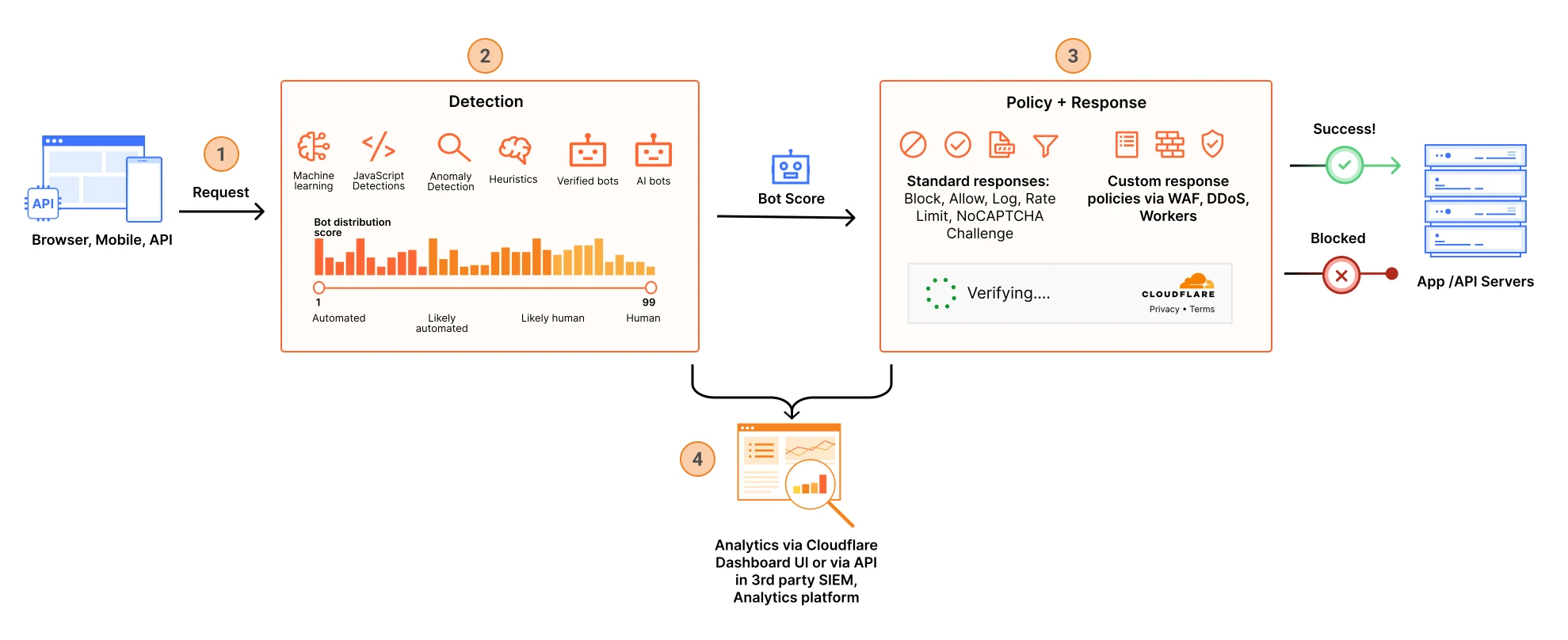
Luồng phát hiện, chấm điểm và xử lý bot traffic trên edge — nền tảng cho WAF, rate limit và Bot Management.Cloudflare has bot management capabilities to help identify and mitigate automated traffic to protect domains from bad bots.Cloudflare has bot management capabilities to help identify and mitigate automated traffic to protect domains from bad bots.
Thuật ngữ: Concepts: Concepts: Bot score · Super Bot Fight Mode · WAF · Rate limiting
Học xong hoặc muốn đổi hướng?Finished or want a different path?Finished or want a different path?
Ba lộ trình độc lập — mỗi lộ trình chỉ gồm bài học và tài liệu trong phạm vi đó. Chọn lộ trình khác khi sẵn sàng, không cần học song song.Three independent paths — each includes only lessons and materials for that scope. Switch when you are ready; no need to study paths in parallel.Three independent paths — each includes only lessons and materials for that scope. Switch when you are ready; no need to study paths in parallel.