Lộ trình đang học Current learning path Current learning path

Developer Platform Developer Platform Developer Platform

Deploy Hello World lên *.workers.dev, bind KV/D1/R2 đúng chỗ, secret không lên client — AI chỉ sau nền. Deploy Hello World to *.workers.dev, bind KV/D1/R2 correctly, keep secrets off the client — AI only after the spine. Deploy Hello World ទៅ *.workers.dev, bind KV/D1/R2 ឱ្យត្រឹមត្រូវ, កុំដាក់ secret នៅលើ client — AI តែបន្ទាប់ពីគ្រឹះ។

Về trang lộ trình Track home Track home

Phần 5: AI trên Developer Platform Part 5: AI on the Developer Platform ផ្នែក 5: AI លើ Developer Platform · Bài 2/5 Lesson 2/5 មេរៀន 2/5

Adopt AI có kiểm soát với AI Gateway Adopt AI deliberately with AI Gateway ប្រើ AI ដោយចេតនាជាមួយ AI Gateway

Ví dụ triển khai (Cloudflare Resources) Deployment examples (Cloudflare Resources) Deployment examples (Cloudflare Resources)

Ví dụ chính thức từ Cloudflare Resources — gợi ý theo chủ đề bài học trong lộ trình này. Official examples from Cloudflare Resources — matched to this lesson within this path. Official examples from Cloudflare Resources — matched to this lesson within this path.

Tutorial Tutorial Tutorial Cloudflare One Cloudflare One Cloudflare One

Tạo AI Gateway đầu tiên bằng cách sử dụng Workers AI Create your first AI Gateway using Workers AI បង្កើត AI Gateway ជាលើកដំបូងរបស់អ្នកដោយប្រើ Workers AI

Hướng dẫn này hướng dẫn bạn qua việc tạo AI Gateway đầu tiên của bạn bằng cách sử dụng Workers AI trên bảng điều khiển Cloudflare.

This tutorial guides you through creating your first AI Gateway using Workers AI on the Cloudflare dashboard.

វគ្គបណ្តុះបណ្តាលនេះជួយអ្នកធ្វើឱ្យការបង្កើត AI Gateway ជាលើកដំបូងរបស់អ្នកដោយប្រើ Workers AI នៅលើ Cloudflare ឧបករណ៍បញ្ជា។

Tìm hiểu thêm Learn more ស្វែងយល់បន្ថែម
Tutorial Tutorial Tutorial Cloudflare One Cloudflare One Cloudflare One

Cài đặt Workers AI với AI Gateway Set up Workers AI with AI Gateway ទាញយក Workers AI ជាមួយ AI Gateway

Hướng dẫn này sẽ hướng dẫn bạn qua việc thiết lập và triển khai dự án Workers AI. Bạn sẽ sử dụng Workers, một AI Gateway ràng buộc, và một mô hình ngôn ngữ lớn (LLM) để triển khai ứng dụng AI đầu tiên của bạn trên mạng toàn cầu Cloudflare.

This guide will walk you through setting up and deploying a Workers AI project. You will use Workers, an AI Gateway binding, and a large language model (LLM) to deploy your first AI-powered application on the Cloudflare global network.

វគ្គបណ្តុះបណ្តាលនេះនឹងដំណើរការអ្នកតាមរយៈការបង្កើតនិងដំឡើងគម្រោង Workers AI ។ អ្នកនឹងប្រើ Workers, a AI Gateway binding, and a large language model (LLM) to deploy your first AI-powered application on the Cloudflare global network ។

Tìm hiểu thêm Learn more ស្វែងយល់បន្ថែម
Tutorial Tutorial Tutorial Cloudflare One Cloudflare One Cloudflare One

Tạo và bảo mật một agent wrapper AI bằng cách sử dụng AI Gateway và Zero Trust Create and secure an AI agent wrapper using AI Gateway and Zero Trust ការបង្កើតនិងការសុវត្ថិភាព agent wrapper AI ដោយប្រើ AI Gateway និង Zero Trust

Hướng dẫn này giải thích cách sử dụng Cloudflare AI Gateway và Zero Trust để tạo ra một trang web đóng gói chức năng và an toàn cho một đại lý AI.

This tutorial explains how to use Cloudflare AI Gateway and Zero Trust to create a functional and secure website wrapper for an AI agent.

វគ្គបណ្តុះបណ្តាលនេះបង្ហាញពីរបៀបដើម្បីប្រើ Cloudflare AI Gateway និង Zero Trust ដើម្បីបង្កើតវគ្គបណ្តុះបណ្តាលគេហទំព័រដែលមានប្រសិទ្ធិភាពនិងសុវត្ថិភាពសម្រាប់អេក្រង់ AI ។

Tìm hiểu thêm Learn more ស្វែងយល់បន្ថែម
Tutorial Tutorial Tutorial Cloudflare One Cloudflare One Cloudflare One

Sử dụng Pruna P-video thông qua AI Gateway Use Pruna P-video through AI Gateway ការប្រើប្រាស់ Pruna P-video ដោយ AI Gateway

Tìm hiểu cách gọi prunaai/p-video trên Replicate thông qua AI Gateway

Learn how to call prunaai/p-video on Replicate through AI Gateway

តើធ្វើដូចម្តេចដើម្បីទូរស័ព្ទ prunaai/p-video នៅលើ Replicate ដោយ AI Gateway

Tìm hiểu thêm Learn more ស្វែងយល់បន្ថែម

Xem thêm ví dụ trong lộ trình → More examples in this path → More examples in this path →

labs.cloudflare.dev

Lab thực hành khớp bài này Hands-on labs for this lesson Hands-on labs for this lesson

Nguồn bổ sung chính thức — làm lab sau khi đọc bài, không thay bước trong hub. Official supplement — run the lab after this lesson; it does not replace the hub steps. Official supplement — run the lab after this lesson; it does not replace the hub steps.

  • 01 Cloudflare Workers Cloudflare Workers Cloudflare Workers

    Sau Phần 1 (Worker + Wrangler) và Phần 3 (KV/D1). Lab AI + Gateway khớp Phần 5. After Part 1 (Worker + Wrangler) and Part 3 (KV/D1). The AI + Gateway labs match Part 5. បន្ទាប់ពីផ្នែក 1 (Worker + Wrangler) និងផ្នែក 3 (KV/D1)។ Lab AI + Gateway សមនឹងផ្នែក 5។

    Mở 7 bài lab Open 7 lab articles Open 7 lab articles
  • 02 Model Context Protocol Model Context Protocol Model Context Protocol

    Sau Phần 5 (tools/agent) và khi đã quen KV ở Phần 3. Luyện schema + authorization phía server. After Part 5 (tools/agents) and once KV from Part 3 is familiar. Practice schemas and server-side authorization. បន្ទាប់ពីផ្នែក 5 (tools/agent) និងពេលស្គាល់ KV ពីផ្នែក 3។ ហាត់ schema + authorization ខាង server។

    Mở 7 bài lab Open 7 lab articles Open 7 lab articles
  • 03 Agents SDK Agents SDK Agents SDK

    Sau bài Agents ở Phần 5. Phần 6 (Durable Objects) giải thích state theo object phía sau SDK. After the Agents lesson in Part 5. Part 6 (Durable Objects) explains the per-object state behind the SDK. បន្ទាប់ពីមេរៀន Agents នៅផ្នែក 5។ ផ្នែក 6 (Durable Objects) ពន្យល់ state តាម object ខាងក្រោយ SDK។

    Mở 2 bài lab Open 2 lab articles Open 2 lab articles
  • 04 Sandbox SDK Sandbox SDK Sandbox SDK

    Sau Phần 5 (AI) và Phần 4 (vận hành/secret). Lab bảo mật khớp golden rules: secret không lên client. After Part 5 (AI) and Part 4 (operate/secrets). The security labs match the golden rules: secrets stay off the client. បន្ទាប់ពីផ្នែក 5 (AI) និងផ្នែក 4 (ដំណើរការ/secret)។ Lab សុវត្ថិភាពសមនឹងច្បាប់៖ secret មិនឡើង client។

    Mở 7 bài lab Open 7 lab articles Open 7 lab articles

Xem đủ 4 track lab trên hub → See all 4 lab tracks on this hub → See all 4 lab tracks on this hub → · labs.cloudflare.dev ↗

Tài liệu Cloudflare Developers Cloudflare Developer docs Cloudflare Developer docs

Sơ đồ kiến trúc tham chiếu (Cloudflare Docs) Architecture diagrams (Cloudflare Docs) Architecture diagrams (Cloudflare Docs)

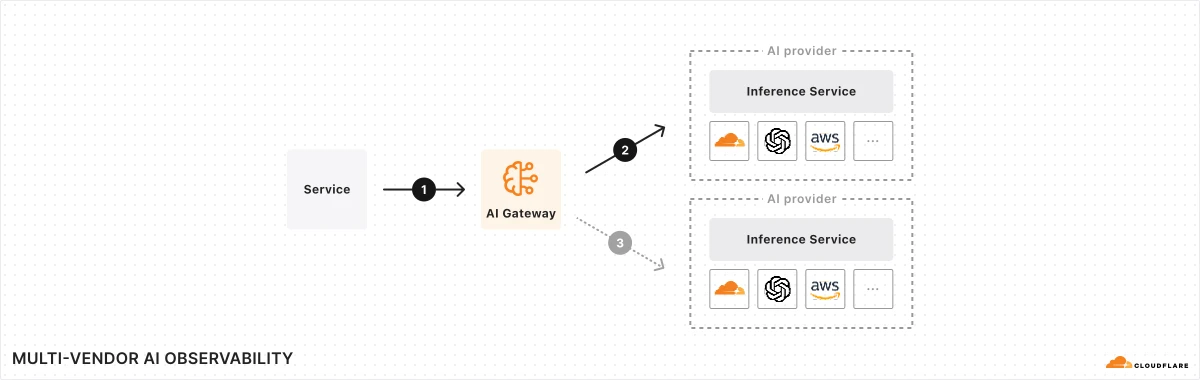
Kiến trúc AI đa nhà cung cấp

Quan sát và kiểm soát AI đa nhà cung cấp Multi-vendor AI observability and control Multi-vendor AI observability and control

Đưa rate limiting, cache và xử lý lỗi lên lớp proxy để áp cấu hình thống nhất cho nhiều dịch vụ và nhà cung cấp inference. By shifting features such as rate limiting, caching, and error handling to the proxy layer, organizations can apply unified configurations across services and inference service providers. By shifting features such as rate limiting, caching, and error handling to the proxy layer, organizations can apply unified configurations across services and inference service providers.

Sơ đồ chính thức ↗ Official diagram ↗ Official diagram ↗ · AI Artificial Intelligence (AI) Artificial Intelligence (AI)

Sản phẩm liên quan Related products Related products

Học xong hoặc muốn đổi hướng? Finished or want a different path? Finished or want a different path?

Ba lộ trình độc lập — mỗi lộ trình chỉ gồm bài học và tài liệu trong phạm vi đó. Chọn lộ trình khác khi sẵn sàng, không cần học song song. Three independent paths — each includes only lessons and materials for that scope. Switch when you are ready; no need to study paths in parallel. Three independent paths — each includes only lessons and materials for that scope. Switch when you are ready; no need to study paths in parallel.

Chưa chắc — làm bài chọn lộ trình Not sure — use the path selector Not sure — use the path selector · So sánh cả ba lộ trình Compare all three paths Compare all three paths