Lộ trình đang học Current learning path Current learning path

Developer Platform Developer Platform Developer Platform

Deploy Hello World lên *.workers.dev, bind KV/D1/R2 đúng chỗ, secret không lên client — AI chỉ sau nền. Deploy Hello World to *.workers.dev, bind KV/D1/R2 correctly, keep secrets off the client — AI only after the spine. Deploy Hello World ទៅ *.workers.dev, bind KV/D1/R2 ឱ្យត្រឹមត្រូវ, កុំដាក់ secret នៅលើ client — AI តែបន្ទាប់ពីគ្រឹះ។

Về trang lộ trình Track home Track home

Phần 5: AI trên Developer Platform Part 5: AI on the Developer Platform ផ្នែក 5: AI លើ Developer Platform · Bài 4/5 Lesson 4/5 មេរៀន 4/5

RAG với Vectorize và storage RAG with Vectorize and storage RAG ជាមួយ Vectorize និង storage

Lưu ý (best practices) Note (best practices) Note (best practices)

Dùng metadata tenant/ACL để filter retrieval và giữ source document tách khỏi vector index. Retrieval phù hợp không đồng nghĩa người gọi được phép đọc document đó. Use tenant or ACL metadata to filter retrieval and keep source documents separate from the vector index. A relevant retrieval does not mean the caller is allowed to read that document. Use tenant or ACL metadata to filter retrieval and keep source documents separate from the vector index. A relevant retrieval does not mean the caller is allowed to read that document.

Nguồn: Source: Source: Vectorize — Get started Vectorize — Get started Vectorize — Get started ↗

Ví dụ triển khai (Cloudflare Resources) Deployment examples (Cloudflare Resources) Deployment examples (Cloudflare Resources)

Ví dụ chính thức từ Cloudflare Resources — gợi ý theo chủ đề bài học trong lộ trình này. Official examples from Cloudflare Resources — matched to this lesson within this path. Official examples from Cloudflare Resources — matched to this lesson within this path.

Tutorial Tutorial Tutorial Developer Platform Developer Platform Developer Platform

Xây dựng Retrieval Augmented Generation (RAG) AI Build a Retrieval Augmented Generation (RAG) AI បង្កើត Retrieval Augmented Generation (RAG) AI

Xây dựng ứng dụng AI đầu tiên của bạn với Cloudflare AI. Hướng dẫn này sử dụng Workers AI, Vectorize, D1 và Cloudflare Workers.

Build your first AI app with Cloudflare AI. This guide uses Workers AI, Vectorize, D1, and Cloudflare Workers.

បង្កើតកម្មវិធី AI ដំបូងរបស់អ្នកជាមួយ Cloudflare AI ។ ការណែនាំនេះប្រើ Workers AI, Vectorize, D1 និង Cloudflare Workers។

Tìm hiểu thêm Learn more ស្វែងយល់បន្ថែម
Sơ đồ kiến trúc Reference architecture diagram គំនូសស្ថាបត្យកម្មយោង Chung / đa lĩnh vực Cross-cutting ឆ្លងកាត់ / ពហុវិស័យ

Retrieval Augmented Generation (RAG) Retrieval Augmented Generation (RAG) Retrieval Augmented Generation (RAG)

RAG kết hợp retrieval (Vectorize/KV) với Workers AI để chatbot trả lời chính xác hơn — seeding knowledge và query path tách biệt.

RAG combines retrieval with generative models for better text. It uses external knowledge to create factual, relevant responses, improving coherence and accuracy in NLP tasks like chatbots.

RAG combines retrieval with generative models for better text. It uses external knowledge to create factual, relevant responses, improving coherence and accuracy in NLP tasks like chatbots.

Tìm hiểu thêm Learn more ស្វែងយល់បន្ថែម
Tutorial Tutorial Tutorial Developer Platform Developer Platform Developer Platform

Độ bền dữ liệu với R2 Data persistence with R2 ទិន្នន័យ persistence ជាមួយ R2

Mount R2 buckets as local file system pathways to persist data across sandbox lifecycles.

Mount R2 buckets as local filesystem paths to persist data across sandbox lifecycles.

កញ្ចប់ R2 ជាផ្លូវប្រព័ន្ធឯកសារផ្ទាល់ខ្លួនដើម្បីរក្សាទុកទិន្នន័យតាមរយៈជីវិត sandbox ។

Tìm hiểu thêm Learn more ស្វែងយល់បន្ថែម
Tutorial Tutorial Tutorial Developer Platform Developer Platform Developer Platform

Sử dụng R2 làm lưu trữ tài sản tĩnh với Cloudflare Pages Use R2 as static asset storage with Cloudflare Pages ការប្រើប្រាស់ R2 ដូចជាការផ្ទុកសម្ភារៈស្ថានជាមួយ Cloudflare Pages

Hướng dẫn này sẽ dạy cho bạn cách sử dụng R2 như là một thùng lưu trữ tài sản tĩnh cho ứng dụng Pages của bạn.

This tutorial will teach you how to use R2 as a static asset storage bucket for your Pages app.

វគ្គបណ្តុះបណ្តាលនេះនឹងបង្ហាញអ្នកពីរបៀបដើម្បីប្រើ R2 ជាការបណ្តុះបណ្តុះបណ្តុះបណ្តុះបណ្តុះបណ្តុះបណ្តុះបណ្តុះបណ្តុះបណ្តុះបណ្តុះបណ្តុះបណ្តាលសម្រាប់កម្មវិធី Pages របស់អ្នក។

Tìm hiểu thêm Learn more ស្វែងយល់បន្ថែម

Xem thêm ví dụ trong lộ trình → More examples in this path → More examples in this path →

labs.cloudflare.dev

Lab thực hành khớp bài này Hands-on labs for this lesson Hands-on labs for this lesson

Nguồn bổ sung chính thức — làm lab sau khi đọc bài, không thay bước trong hub. Official supplement — run the lab after this lesson; it does not replace the hub steps. Official supplement — run the lab after this lesson; it does not replace the hub steps.

  • 01 Cloudflare Workers Cloudflare Workers Cloudflare Workers

    Sau Phần 1 (Worker + Wrangler) và Phần 3 (KV/D1). Lab AI + Gateway khớp Phần 5. After Part 1 (Worker + Wrangler) and Part 3 (KV/D1). The AI + Gateway labs match Part 5. បន្ទាប់ពីផ្នែក 1 (Worker + Wrangler) និងផ្នែក 3 (KV/D1)។ Lab AI + Gateway សមនឹងផ្នែក 5។

    Mở 7 bài lab Open 7 lab articles Open 7 lab articles
  • 02 Model Context Protocol Model Context Protocol Model Context Protocol

    Sau Phần 5 (tools/agent) và khi đã quen KV ở Phần 3. Luyện schema + authorization phía server. After Part 5 (tools/agents) and once KV from Part 3 is familiar. Practice schemas and server-side authorization. បន្ទាប់ពីផ្នែក 5 (tools/agent) និងពេលស្គាល់ KV ពីផ្នែក 3។ ហាត់ schema + authorization ខាង server។

    Mở 7 bài lab Open 7 lab articles Open 7 lab articles
  • 03 Agents SDK Agents SDK Agents SDK

    Sau bài Agents ở Phần 5. Phần 6 (Durable Objects) giải thích state theo object phía sau SDK. After the Agents lesson in Part 5. Part 6 (Durable Objects) explains the per-object state behind the SDK. បន្ទាប់ពីមេរៀន Agents នៅផ្នែក 5។ ផ្នែក 6 (Durable Objects) ពន្យល់ state តាម object ខាងក្រោយ SDK។

    Mở 2 bài lab Open 2 lab articles Open 2 lab articles
  • 04 Sandbox SDK Sandbox SDK Sandbox SDK

    Sau Phần 5 (AI) và Phần 4 (vận hành/secret). Lab bảo mật khớp golden rules: secret không lên client. After Part 5 (AI) and Part 4 (operate/secrets). The security labs match the golden rules: secrets stay off the client. បន្ទាប់ពីផ្នែក 5 (AI) និងផ្នែក 4 (ដំណើរការ/secret)។ Lab សុវត្ថិភាពសមនឹងច្បាប់៖ secret មិនឡើង client។

    Mở 7 bài lab Open 7 lab articles Open 7 lab articles

Xem đủ 4 track lab trên hub → See all 4 lab tracks on this hub → See all 4 lab tracks on this hub → · labs.cloudflare.dev ↗

Tài liệu Cloudflare Developers Cloudflare Developer docs Cloudflare Developer docs

Sơ đồ kiến trúc tham chiếu (Cloudflare Docs) Architecture diagrams (Cloudflare Docs) Architecture diagrams (Cloudflare Docs)

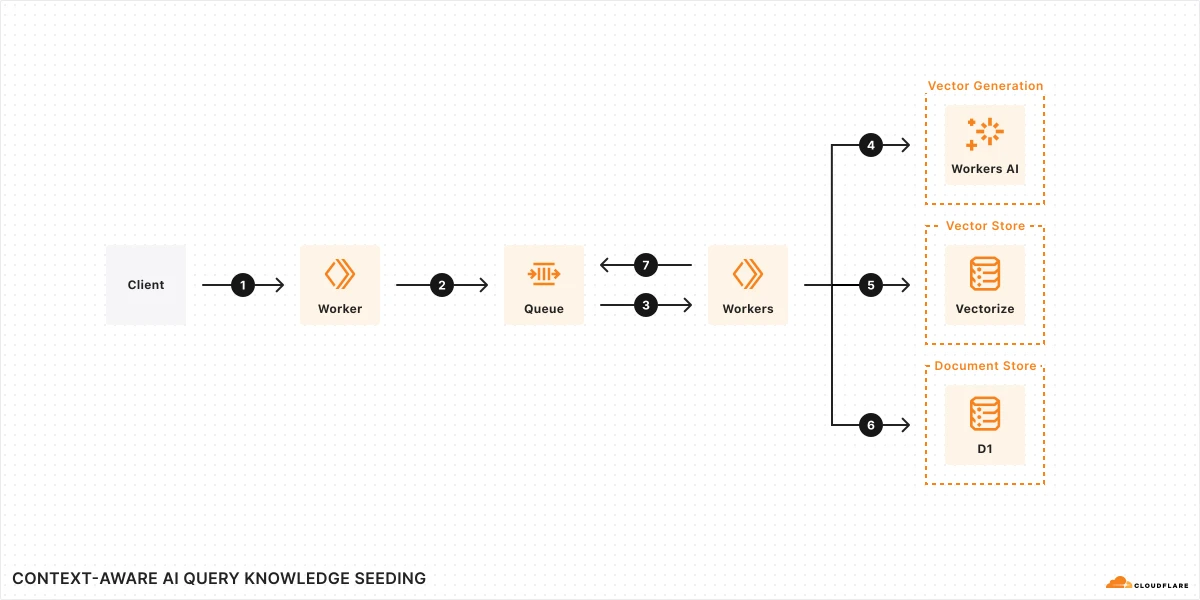
Hình 1: Nạp tri thức (knowledge seeding)

Retrieval Augmented Generation (RAG) Retrieval Augmented Generation (RAG) Retrieval Augmented Generation (RAG)

RAG kết hợp retrieval (Vectorize/KV) với Workers AI để chatbot trả lời chính xác hơn — seeding knowledge và query path tách biệt. RAG combines retrieval with generative models for better text. It uses external knowledge to create factual, relevant responses, improving coherence and accuracy in NLP tasks like chatbots. RAG combines retrieval with generative models for better text. It uses external knowledge to create factual, relevant responses, improving coherence and accuracy in NLP tasks like chatbots.

Thuật ngữ: Concepts: Concepts: RAG · Vectorize · Workers AI · Knowledge seeding · Embeddings

Sơ đồ chính thức ↗ Official diagram ↗ Official diagram ↗ · AI Artificial Intelligence (AI) Artificial Intelligence (AI)

Sản phẩm liên quan Related products Related products

Học xong hoặc muốn đổi hướng? Finished or want a different path? Finished or want a different path?

Ba lộ trình độc lập — mỗi lộ trình chỉ gồm bài học và tài liệu trong phạm vi đó. Chọn lộ trình khác khi sẵn sàng, không cần học song song. Three independent paths — each includes only lessons and materials for that scope. Switch when you are ready; no need to study paths in parallel. Three independent paths — each includes only lessons and materials for that scope. Switch when you are ready; no need to study paths in parallel.

Chưa chắc — làm bài chọn lộ trình Not sure — use the path selector Not sure — use the path selector · So sánh cả ba lộ trình Compare all three paths Compare all three paths