Lộ trình đang học Current learning path Current learning path

Developer Platform Developer Platform Developer Platform

Deploy Hello World lên *.workers.dev, bind KV/D1/R2 đúng chỗ, secret không lên client — AI chỉ sau nền. Deploy Hello World to *.workers.dev, bind KV/D1/R2 correctly, keep secrets off the client — AI only after the spine. Deploy Hello World ទៅ *.workers.dev, bind KV/D1/R2 ឱ្យត្រឹមត្រូវ, កុំដាក់ secret នៅលើ client — AI តែបន្ទាប់ពីគ្រឹះ។

Về trang lộ trình Track home Track home

Phần 3: Chọn storage đúng Part 3: Pick the right storage ផ្នែក 3: ជ្រើសរើស storage ត្រឹមត្រូវ · Bài 2/3 Lesson 2/3 មេរៀន 2/3

D1 cho dữ liệu có schema D1 for structured data D1 សម្រាប់ទិន្នន័យមានរចនាសម្ព័ន្ធ

Lưu ý (best practices) Note (best practices) Note (best practices)

Tạo index cho cột thường dùng trong WHERE (email, user_id) hoặc ràng buộc UNIQUE. Chỉ index cột được query thường xuyên — index cũng cần ghi khi bảng thay đổi. Create indexes on columns used in WHERE clauses (email, user_id) or UNIQUE constraints. Index only frequently queried columns — indexes are updated on every table write. Create indexes on columns used in WHERE clauses (email, user_id) or UNIQUE constraints. Index only frequently queried columns — indexes are updated on every table write.

Nguồn: Source: Source: D1 — Use indexes D1 — Use indexes D1 — Use indexes ↗

Ví dụ triển khai (Cloudflare Resources) Deployment examples (Cloudflare Resources) Deployment examples (Cloudflare Resources)

Ví dụ chính thức từ Cloudflare Resources — gợi ý theo chủ đề bài học trong lộ trình này. Official examples from Cloudflare Resources — matched to this lesson within this path. Official examples from Cloudflare Resources — matched to this lesson within this path.

Tutorial Tutorial Tutorial Developer Platform Developer Platform Developer Platform

Tạo ứng dụng Personal Directory Build a Staff Directory Application បង្កើតកម្មវិធីថតឯកសារបុគ្គលិក

Tạo một thư mục nhân viên bằng cách sử dụng D1. Người dùng access thông tin nhân viên; quản trị viên thêm nhân viên mới trong ứng dụng.

Build a staff directory using D1. Users access employee info; admins add new employees within the app.

បង្កើតបញ្ជីបុគ្គលិកដោយប្រើ D1 ។ អ្នកប្រើប្រាស់ access ព័ត៌មានបុគ្គលិក; អ្នកគ្រប់គ្រងបន្ថែមបុគ្គលិកថ្មីនៅក្នុងកម្មវិធី។

Tìm hiểu thêm Learn more ស្វែងយល់បន្ថែម
Tutorial Tutorial Tutorial Developer Platform Developer Platform Developer Platform

Truy vấn D1 sử dụng Prisma ORM Query D1 using Prisma ORM កម្រង D1 ដោយប្រើ Prisma ORM

Hướng dẫn này cho bạn thấy làm thế nào để thiết lập và triển khai một Cloudflare Worker đang truy cập vào một cơ sở dữ liệu D1 từ đầu.

This tutorial shows you how to set up and deploy a Cloudflare Worker that is accessing a D1 database from scratch.

វគ្គបណ្តុះបណ្តាលនេះបង្ហាញអ្នកពីរបៀបដើម្បីបង្កើតនិងដំឡើង Cloudflare Worker ដែលបានចូលទៅក្នុងទិន្នន័យ D1 ពីរ។

Tìm hiểu thêm Learn more ស្វែងយល់បន្ថែម
Tutorial Tutorial Tutorial Developer Platform Developer Platform Developer Platform

Tạo toàn bộ danh sách ứng dụng Jamstack Build a todo list Jamstack application បង្កើតបញ្ជីការងារត្រូវធ្វើ Jamstack

Hướng dẫn này giải thích cách xây dựng ứng dụng danh sách todo bằng cách sử dụng HTML, CSS và JavaScript.

This tutorial explains how to build a todo list application using HTML, CSS, and JavaScript.

ការបង្រៀននេះពន្យល់ពីរបៀបបង្កើតកម្មវិធីបញ្ជីការងារត្រូវធ្វើដោយប្រើ HTML, CSS និង JavaScript ។

Tìm hiểu thêm Learn more ស្វែងយល់បន្ថែម
Tutorial Tutorial Tutorial Developer Platform Developer Platform Developer Platform

Di chuyển từ Netlify sang Workers Migrate from Netlify to Workers ការផ្លាស់ប្តូរពី Netlify ទៅ Workers

Di chuyển ứng dụng Netlify của bạn sang Cloudflare Workers. Bạn nên có một dự án hiện có được triển khai trên Netlified mà bạn muốn lưu trữ trên Workers.

Migrate your Netlify application to Cloudflare Workers. You should already have an existing project deployed on Netlified that you would like to host on Workers.

ទាញយកកម្មវិធី Netlify របស់អ្នកទៅ Cloudflare Workers ។ អ្នកគួរតែមានគម្រោងដែលមាននៅលើ Netlified ដែលអ្នកចង់រៀបចំនៅលើ Workers ។

Tìm hiểu thêm Learn more ស្វែងយល់បន្ថែម

Xem thêm ví dụ trong lộ trình → More examples in this path → More examples in this path →

labs.cloudflare.dev

Lab thực hành khớp bài này Hands-on labs for this lesson Hands-on labs for this lesson

Nguồn bổ sung chính thức — làm lab sau khi đọc bài, không thay bước trong hub. Official supplement — run the lab after this lesson; it does not replace the hub steps. Official supplement — run the lab after this lesson; it does not replace the hub steps.

  • 01 Cloudflare Workers Cloudflare Workers Cloudflare Workers

    Sau Phần 1 (Worker + Wrangler) và Phần 3 (KV/D1). Lab AI + Gateway khớp Phần 5. After Part 1 (Worker + Wrangler) and Part 3 (KV/D1). The AI + Gateway labs match Part 5. បន្ទាប់ពីផ្នែក 1 (Worker + Wrangler) និងផ្នែក 3 (KV/D1)។ Lab AI + Gateway សមនឹងផ្នែក 5។

    Mở 7 bài lab Open 7 lab articles Open 7 lab articles
  • 02 Model Context Protocol Model Context Protocol Model Context Protocol

    Sau Phần 5 (tools/agent) và khi đã quen KV ở Phần 3. Luyện schema + authorization phía server. After Part 5 (tools/agents) and once KV from Part 3 is familiar. Practice schemas and server-side authorization. បន្ទាប់ពីផ្នែក 5 (tools/agent) និងពេលស្គាល់ KV ពីផ្នែក 3។ ហាត់ schema + authorization ខាង server។

    Mở 7 bài lab Open 7 lab articles Open 7 lab articles

Xem đủ 4 track lab trên hub → See all 4 lab tracks on this hub → See all 4 lab tracks on this hub → · labs.cloudflare.dev ↗

Tài liệu Cloudflare Developers Cloudflare Developer docs Cloudflare Developer docs

Cloudflare API (tham khảo) Cloudflare API (reference) Cloudflare API (reference)

Dùng khi tự động hóa bước này qua script hoặc Terraform — cần API token phù hợp. Use when automating this step via script or Terraform — requires an appropriate API token. Use when automating this step via script or Terraform — requires an appropriate API token.

developers.cloudflare.com/api ↗

Sơ đồ kiến trúc tham chiếu (Cloudflare Docs) Architecture diagrams (Cloudflare Docs) Architecture diagrams (Cloudflare Docs)

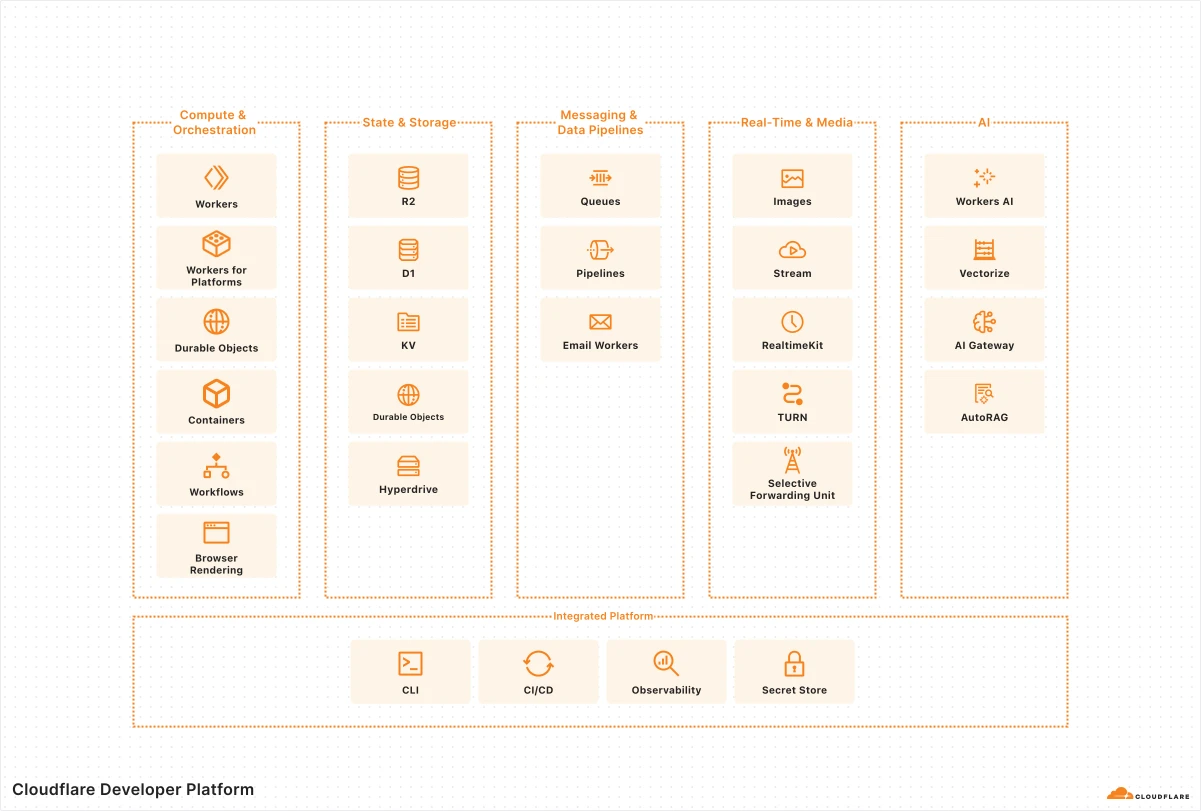
Hình 1: Cloudflare Developer Platform

Ứng dụng fullstack Fullstack applications Fullstack applications

Ví dụ fullstack trên Developer Platform — Workers/Pages, storage và AI services trong một kiến trúc thực tế. A practical example of how these services come together in a real fullstack application architecture. A practical example of how these services come together in a real fullstack application architecture.

Thuật ngữ: Concepts: Concepts: Workers · Pages · D1 · R2 · KV · Durable Objects

Sơ đồ chính thức ↗ Official diagram ↗ Official diagram ↗ · Serverless Serverless Serverless

Sản phẩm liên quan Related products Related products

Học xong hoặc muốn đổi hướng? Finished or want a different path? Finished or want a different path?

Ba lộ trình độc lập — mỗi lộ trình chỉ gồm bài học và tài liệu trong phạm vi đó. Chọn lộ trình khác khi sẵn sàng, không cần học song song. Three independent paths — each includes only lessons and materials for that scope. Switch when you are ready; no need to study paths in parallel. Three independent paths — each includes only lessons and materials for that scope. Switch when you are ready; no need to study paths in parallel.

Chưa chắc — làm bài chọn lộ trình Not sure — use the path selector Not sure — use the path selector · So sánh cả ba lộ trình Compare all three paths Compare all three paths