Lộ trình đang học Current learning path Current learning path

Developer Platform Developer Platform Developer Platform

Deploy Hello World lên *.workers.dev, bind KV/D1/R2 đúng chỗ, secret không lên client — AI chỉ sau nền. Deploy Hello World to *.workers.dev, bind KV/D1/R2 correctly, keep secrets off the client — AI only after the spine. Deploy Hello World ទៅ *.workers.dev, bind KV/D1/R2 ឱ្យត្រឹមត្រូវ, កុំដាក់ secret នៅលើ client — AI តែបន្ទាប់ពីគ្រឹះ។

Về trang lộ trình Track home Track home

Phần 3: Chọn storage đúng Part 3: Pick the right storage ផ្នែក 3: ជ្រើសរើស storage ត្រឹមត្រូវ · Bài 3/3 Lesson 3/3 មេរៀន 3/3

R2 cho file và tài liệu R2 for files and assets R2 សម្រាប់ឯកសារ និង asset

Lưu ý (best practices) Note (best practices) Note (best practices)

Truy cập R2 qua binding `env.MY_BUCKET` — không dùng REST API từ Worker. Binding không cần network hop hay authentication. Access R2 via the `env.MY_BUCKET` binding — do not use the REST API from a Worker. Bindings require no network hop or authentication. Access R2 via the `env.MY_BUCKET` binding — do not use the REST API from a Worker. Bindings require no network hop or authentication.

Nguồn: Source: Source: Workers Best Practices Workers Best Practices Workers Best Practices ↗

Ví dụ triển khai (Cloudflare Resources) Deployment examples (Cloudflare Resources) Deployment examples (Cloudflare Resources)

Ví dụ chính thức từ Cloudflare Resources — gợi ý theo chủ đề bài học trong lộ trình này. Official examples from Cloudflare Resources — matched to this lesson within this path. Official examples from Cloudflare Resources — matched to this lesson within this path.

Tutorial Tutorial Tutorial Developer Platform Developer Platform Developer Platform

Đăng nhập và lưu các sự kiện tải lên trong R2 với thông báo sự kiện Log and store upload events in R2 with event notifications សៀវភៅនិងផ្ទុកប្រវត្តិសាស្រ្តទាញយកនៅ R2 ជាមួយនឹងការប្រកាសប្រវត្តិសាស្រ្ត

Ví dụ này cung cấp hướng dẫn từng bước về cách sử dụng thông báo sự kiện để thu thập và lưu trữ nhật ký tải lên R2 trong một thùng chứa riêng biệt.

This example provides a step-by-step guide on using event notifications to capture and store R2 upload logs in a separate bucket.

គំរូនេះផ្តល់នូវដំណោះស្រាយដំណោះស្រាយដំណោះស្រាយដំណោះស្រាយដំណោះស្រាយដំណោះស្រាយដំណោះស្រាយដំណោះស្រាយដំណោះស្រាយដំណោះស្រាយដំណោះស្រាយដំណោះស្រាយដំណោះស្រាយដំណោះស្រាយដំណោះស្រាយដំណោះស្រាយដំណោះស្រាយដំណោះស្រាយដំណោះស្រាយដំណោះស្រាយដំណោះស្រាយដំណោះស្រាយដំណោះស្រាយដំណោះស្រាយដំណោះស្រាយដំណោះស្រាយដំណោះស្រាយ R2 ។

Tìm hiểu thêm Learn more ស្វែងយល់បន្ថែម
Tutorial Tutorial Tutorial Developer Platform Developer Platform Developer Platform

An toàn access và tải lên tài sản với Cloudflare R2 Securely access and upload assets with Cloudflare R2 ការពារ access និងទាញយកឧបករណ៍ជាមួយ Cloudflare R2

Hướng dẫn này giải thích cách tạo một dự án dựa trên TypeScript Cloudflare Workers có thể an toàn access tập tin từ và tải lên các tập tin vào một CloudFlare R2 bucket.

This tutorial explains how to create a TypeScript-based Cloudflare Workers project that can securely access files from and upload files to a CloudFlare R2 bucket.

វគ្គបណ្តុះបណ្តាលនេះបង្ហាញពីរបៀបដើម្បីបង្កើតគម្រោង TypeScript-based Cloudflare Workers ដែលអាចសុវត្ថិភាព access ឯកសារពីនិងទាញយកឯកសារទៅ CloudFlare R2 bucket ។

Tìm hiểu thêm Learn more ស្វែងយល់បន្ថែម
Tutorial Tutorial Tutorial Developer Platform Developer Platform Developer Platform

Sử dụng thông báo sự kiện để tóm tắt tệp PDF khi tải lên Use event notification to summarize PDF files on upload ការប្រើប្រាស់ការប្រកាសប្រកាសប្រកាសប្រកាសដើម្បីបញ្ជាក់ឯកសារ PDF នៅលើការផ្ទុក

Sử dụng thông báo sự kiện để tóm tắt tệp PDF khi tải lên. Sử dụng Workers AI để tóm tắt PDF và lưu tóm tắt dưới dạng tệp văn bản.

Use event notification to summarize PDF files on upload. Use Workers AI to summarize the PDF and store the summary as a text file.

ប្រព័ន្ធ ប្រតិបត្តិការ ប្រតិបត្តិការ ប្រតិបត្តិការ ប្រតិបត្តិការ ប្រតិបត្តិការ ប្រតិបត្តិការ ប្រតិបត្តិការ ប្រតិបត្តិការ ប្រតិបត្តិការ ប្រតិបត្តិការ ប្រតិបត្តិការ ប្រតិបត្តិការ ប្រតិបត្តិការ ប្រតិបត្តិការ ប្រតិបត្តិការ ប្រតិបត្តិការ ប្រតិបត្តិការ ប្រតិបត្តិការ ប្រតិបត្តិការ ប្រើ Workers AI ដើម្បីបញ្ចប់ PDF និងផ្ទុកបញ្ចប់ជាឯកសារសៀវភៅ។

Tìm hiểu thêm Learn more ស្វែងយល់បន្ថែម
Tutorial Tutorial Tutorial Application Services Application Services Application Services

Chuyển đổi người dùng tải lên images trước khi tải lên R2 Transform user-uploaded images before uploading to R2 ការផ្លាស់ប្តូរ images ដែលបានទាញយកដោយអ្នកប្រើមុនពេលទាញយកទៅ R2

Thiết lập liên kết để kết nối Images, R2 và Tài sản với Nhân viên của bạn

Set up bindings to connect Images, R2, and Assets to your Worker

ទាញយក Images, R2 និង Assets ដើម្បីបណ្តុះបណ្តាលរបស់អ្នក

Tìm hiểu thêm Learn more ស្វែងយល់បន្ថែម

Xem thêm ví dụ trong lộ trình → More examples in this path → More examples in this path →

labs.cloudflare.dev

Lab thực hành khớp bài này Hands-on labs for this lesson Hands-on labs for this lesson

Nguồn bổ sung chính thức — làm lab sau khi đọc bài, không thay bước trong hub. Official supplement — run the lab after this lesson; it does not replace the hub steps. Official supplement — run the lab after this lesson; it does not replace the hub steps.

  • 01 Cloudflare Workers Cloudflare Workers Cloudflare Workers

    Sau Phần 1 (Worker + Wrangler) và Phần 3 (KV/D1). Lab AI + Gateway khớp Phần 5. After Part 1 (Worker + Wrangler) and Part 3 (KV/D1). The AI + Gateway labs match Part 5. បន្ទាប់ពីផ្នែក 1 (Worker + Wrangler) និងផ្នែក 3 (KV/D1)។ Lab AI + Gateway សមនឹងផ្នែក 5។

    Mở 7 bài lab Open 7 lab articles Open 7 lab articles
  • 02 Model Context Protocol Model Context Protocol Model Context Protocol

    Sau Phần 5 (tools/agent) và khi đã quen KV ở Phần 3. Luyện schema + authorization phía server. After Part 5 (tools/agents) and once KV from Part 3 is familiar. Practice schemas and server-side authorization. បន្ទាប់ពីផ្នែក 5 (tools/agent) និងពេលស្គាល់ KV ពីផ្នែក 3។ ហាត់ schema + authorization ខាង server។

    Mở 7 bài lab Open 7 lab articles Open 7 lab articles

Xem đủ 4 track lab trên hub → See all 4 lab tracks on this hub → See all 4 lab tracks on this hub → · labs.cloudflare.dev ↗

Tài liệu Cloudflare Developers Cloudflare Developer docs Cloudflare Developer docs

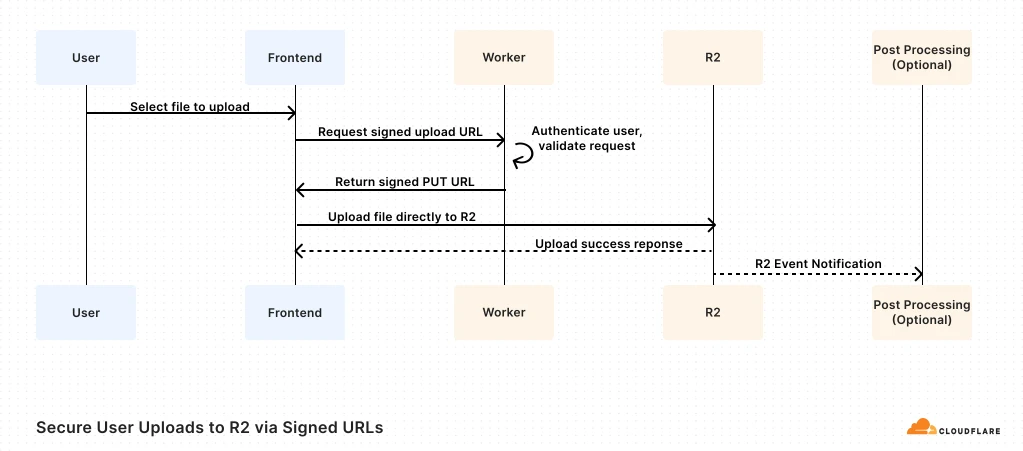
Sơ đồ kiến trúc tham chiếu (Cloudflare Docs) Architecture diagrams (Cloudflare Docs) Architecture diagrams (Cloudflare Docs)

Use Case 1: Secure User Uploads to R2 via Signed URLs

Lưu nội dung do người dùng tạo Storing user generated content Storing user generated content

Lưu nội dung do người dùng tạo (UGC) trên R2 — kiến trúc nhanh, an toàn, chi phí hợp lý. Store user-generated content in R2 for fast, secure, and cost-effective architecture. Store user-generated content in R2 for fast, secure, and cost-effective architecture.

Thuật ngữ: Concepts: Concepts: R2 · Workers · UGC · Object storage

Sơ đồ chính thức ↗ Official diagram ↗ Official diagram ↗ · Lưu trữ Storage Storage

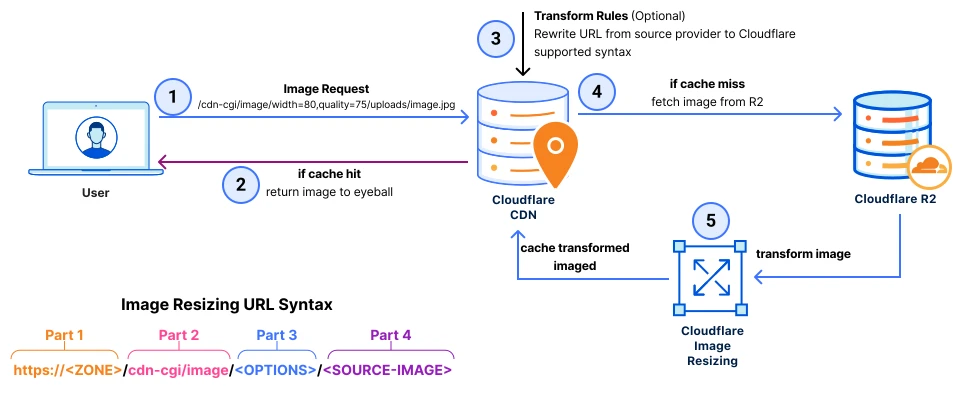
Hình 1: Cloudflare Image Resizing and R2

Tối ưu phân phối ảnh với Image Resizing và R2 Optimizing image delivery with Cloudflare image resizing and R2 Optimizing image delivery with Cloudflare image resizing and R2

Giải pháp tối ưu phân phối ảnh, mở rộng được và hiệu năng cao — Image Resizing kết hợp R2. Learn how to get a scalable, high-performance solution to optimizing image delivery. Learn how to get a scalable, high-performance solution to optimizing image delivery.

Thuật ngữ: Concepts: Concepts: Image Resizing · R2 · Transformations · Cache

Sơ đồ chính thức ↗ Official diagram ↗ Official diagram ↗ · Phân phối nội dung Content Delivery Content Delivery

Sản phẩm liên quan Related products Related products

Học xong hoặc muốn đổi hướng? Finished or want a different path? Finished or want a different path?

Ba lộ trình độc lập — mỗi lộ trình chỉ gồm bài học và tài liệu trong phạm vi đó. Chọn lộ trình khác khi sẵn sàng, không cần học song song. Three independent paths — each includes only lessons and materials for that scope. Switch when you are ready; no need to study paths in parallel. Three independent paths — each includes only lessons and materials for that scope. Switch when you are ready; no need to study paths in parallel.

Chưa chắc — làm bài chọn lộ trình Not sure — use the path selector Not sure — use the path selector · So sánh cả ba lộ trình Compare all three paths Compare all three paths