Lộ trình đang họcCurrent learning pathCurrent learning path
Cloudflare OneCloudflare OneCloudflare One
Bảo vệ users, access, SaaS và networks — follow-along từ tài khoản đến go-live.Secure users, access, SaaS, and networks — follow along from account to go-live.Secure users, access, SaaS, and networks — follow along from account to go-live.
Phần 1: Kiến trúc và tài khoảnPart 1: Architecture and accountPart 1: Architecture and account
·
Bài 1/3 Lesson 1/3 មេរៀន 1/3
Kiến trúc và quy trình onboardingArchitecture & workflowArchitecture & workflow
Kiến trúc & quy trình
Bản đồ trực quan của toàn bộ dự án: cái gì bạn đang xây (kiến trúc tham chiếu) và thứ tự bạn xây (quy trình onboarding). Mỗi khối được gắn với mô-đun (M1, M2, …) phụ trách, để bạn nhảy thẳng sang phần hướng dẫn.
Kiến trúc tham chiếu
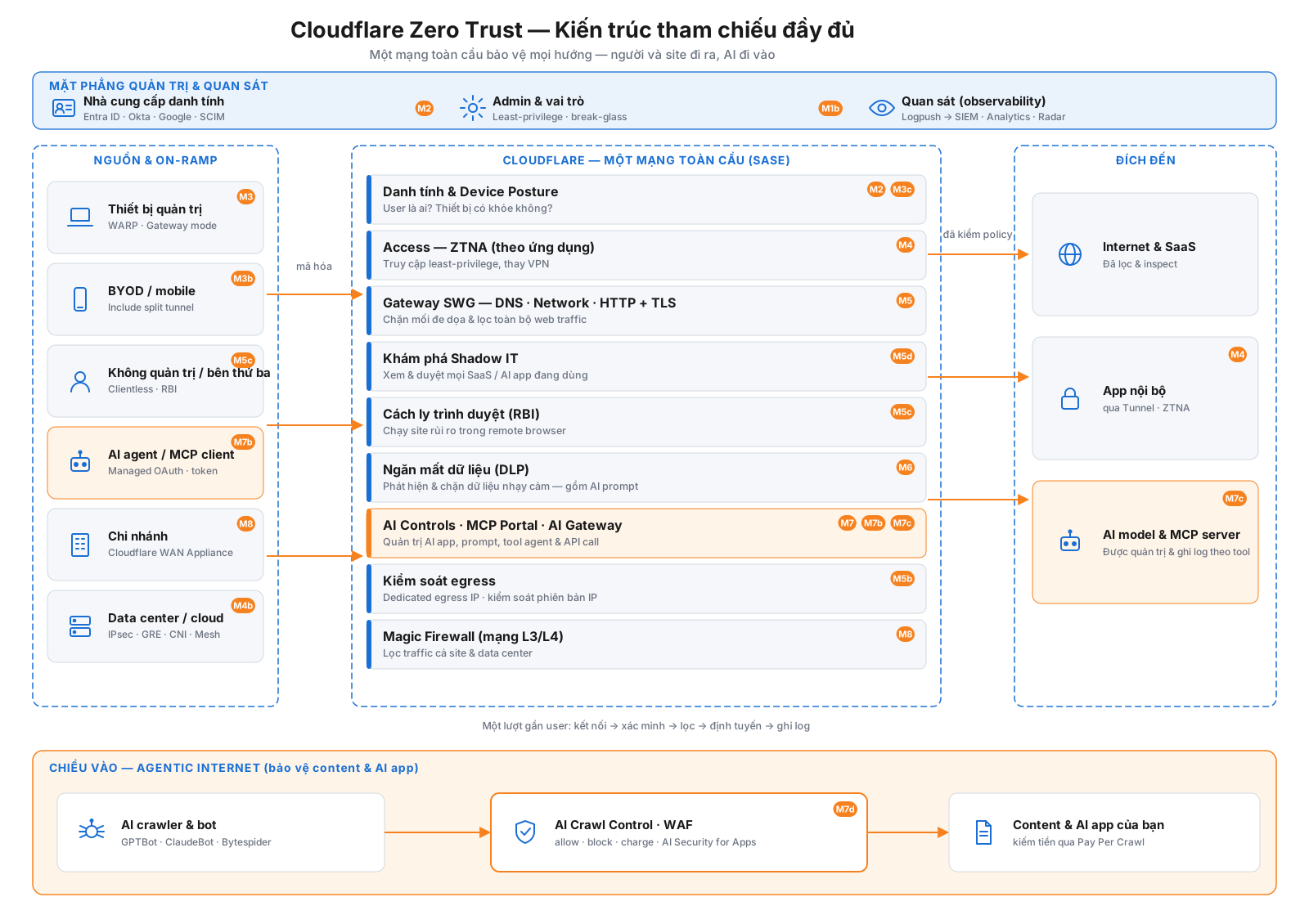
Bức tranh đầy đủ của những gì bạn đang xây. Nó bảo vệ cả hai chiều: người, thiết bị và chi nhánh của bạn đi ra (xương sống chính), và AI crawler đi vào nội dung của bạn (làn phía dưới) — tất cả trên một mạng toàn cầu, với mặt phẳng quản trị chạy ngang phía trên.
Kiến trúc tham chiếu đầy đủ — mặt phẳng quản trị (trên), xương sống Zero Trust chiều ra (giữa), và làn Agentic Internet chiều vào (dưới). Huy hiệu gắn từng khối với mô-đun tương ứng.
Cách đọc sơ đồ
Trên — Mặt phẳng quản trị & quan sát: các kiểm soát xuyên suốt — identity providers của bạn (Entra ID / Okta / Google + SCIM, M2), quản trị viên & vai trò (least-privilege + break-glass, M1b), và quan sát (Logpush → SIEM, Analytics, Radar).
Trái — Nguồn & on-ramp: mọi thứ kết nối tới Cloudflare — thiết bị được quản lý (WARP), BYOD, không quản lý/clientless, AI agent / MCP client, chi nhánh (Cloudflare WAN Appliance), và trung tâm dữ liệu/cloud (IPsec · GRE · CNI · Mesh).
Giữa — Một mạng toàn cầu của Cloudflare (SASE): mỗi request đi qua toàn bộ lớp bảo mật trong một lượt gần người dùng — danh tính & posture, ZTNA (Access), Gateway SWG, phát hiện Shadow IT, Browser Isolation, DLP, AI Controls · MCP Portals · AI Gateway, kiểm soát egress, và Magic Firewall.
Phải — Đích: internet & SaaS, ứng dụng nội bộ của bạn (qua Tunnel/ZTNA), và AI model & MCP server — tất cả được truy cập an toàn.
Dưới — Chiều vào (Agentic Internet): chiều còn lại — AI crawler & bot đánh vào nội dung công khai của bạn, được quản trị bởi AI Crawl Control · WAF · AI Security for Apps (allow / block / charge), để bạn thậm chí có thể kiếm tiền từ truy cập bằng Pay Per Crawl (M7d).
Quy trình onboarding
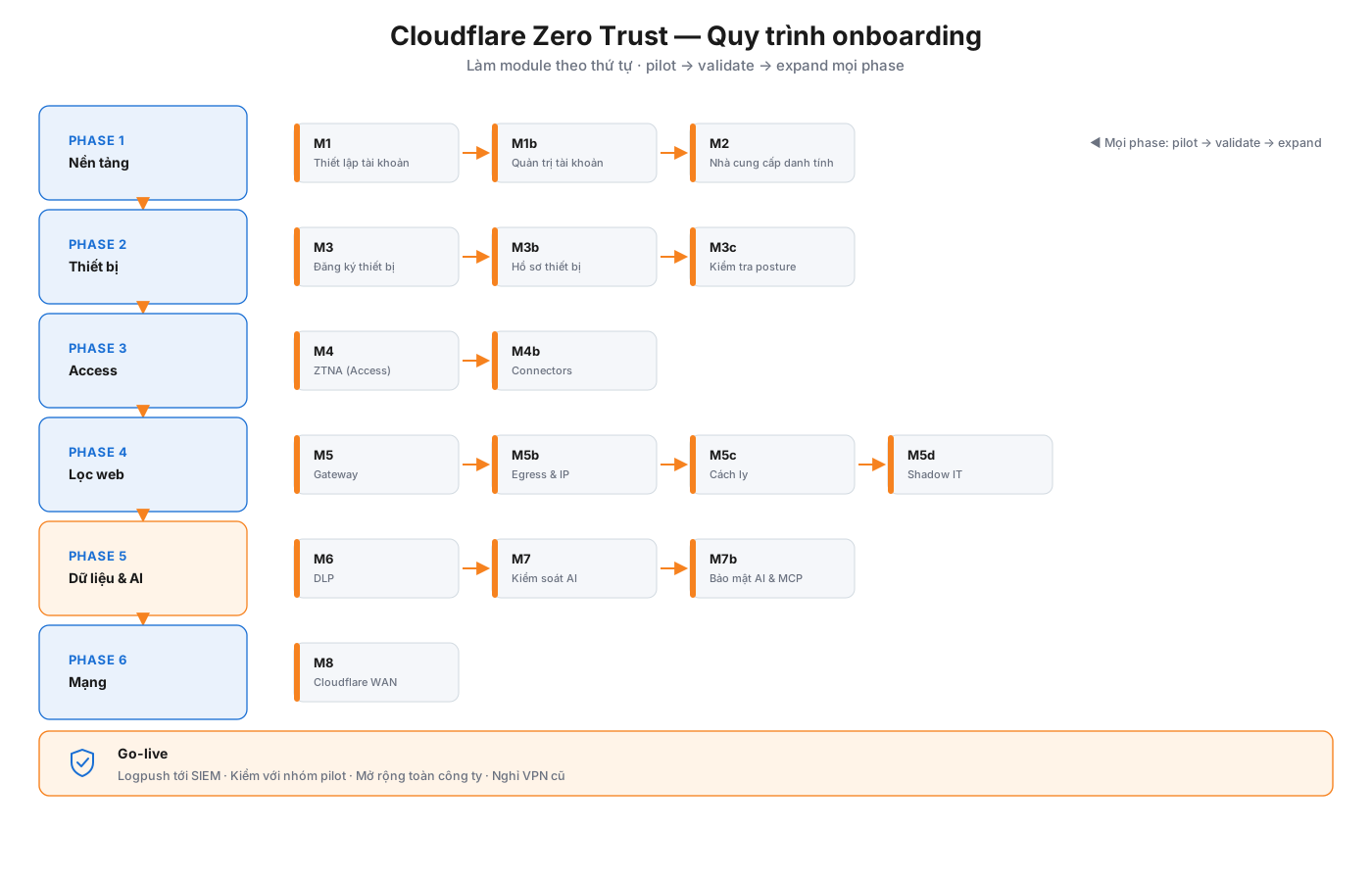
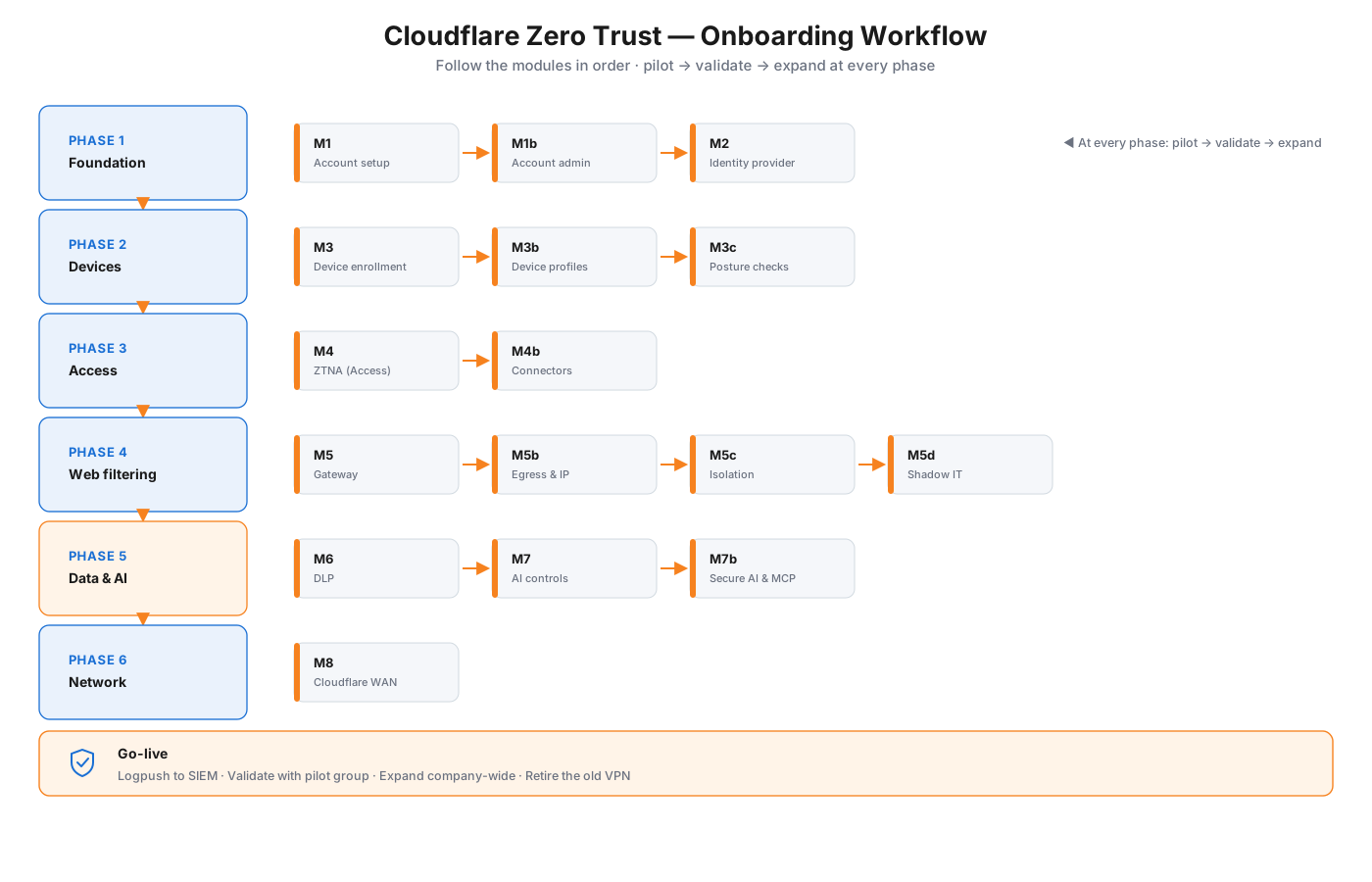
Thứ tự triển khai. Mỗi phase xây trên phase trước, và quy tắc vàng áp dụng xuyên suốt: pilot → validate → expand.
Quy trình onboarding — sáu phase từ nền tảng tài khoản đến kết nối mạng, rồi go-live.
Các phase
Foundation — tài khoản, quản trị viên, danh tính (M1 · M1b · M2)
Devices — đăng ký Cloudflare One Client, hồ sơ thiết bị, posture (M3 · M3b · M3c)
Access — xuất bản ứng dụng nội bộ sau ZTNA, kết nối mạng (M4 · M4b)
Web filtering — Gateway, kiểm soát egress/IP, Browser Isolation, Shadow IT (M5 · M5b · M5c · M5d)
Data & AI — DLP, kiểm soát AI, bảo mật AI & MCP (M6 · M7 · M7b)
Network — kết nối văn phòng và trung tâm dữ liệu bằng Cloudflare WAN (M8)
Sau đó go-live: truyền log tới SIEM, xác nhận với nhóm pilot, mở rộng toàn công ty, và gỡ VPN cũ.
Bảo mật AI & MCP — defense in depth
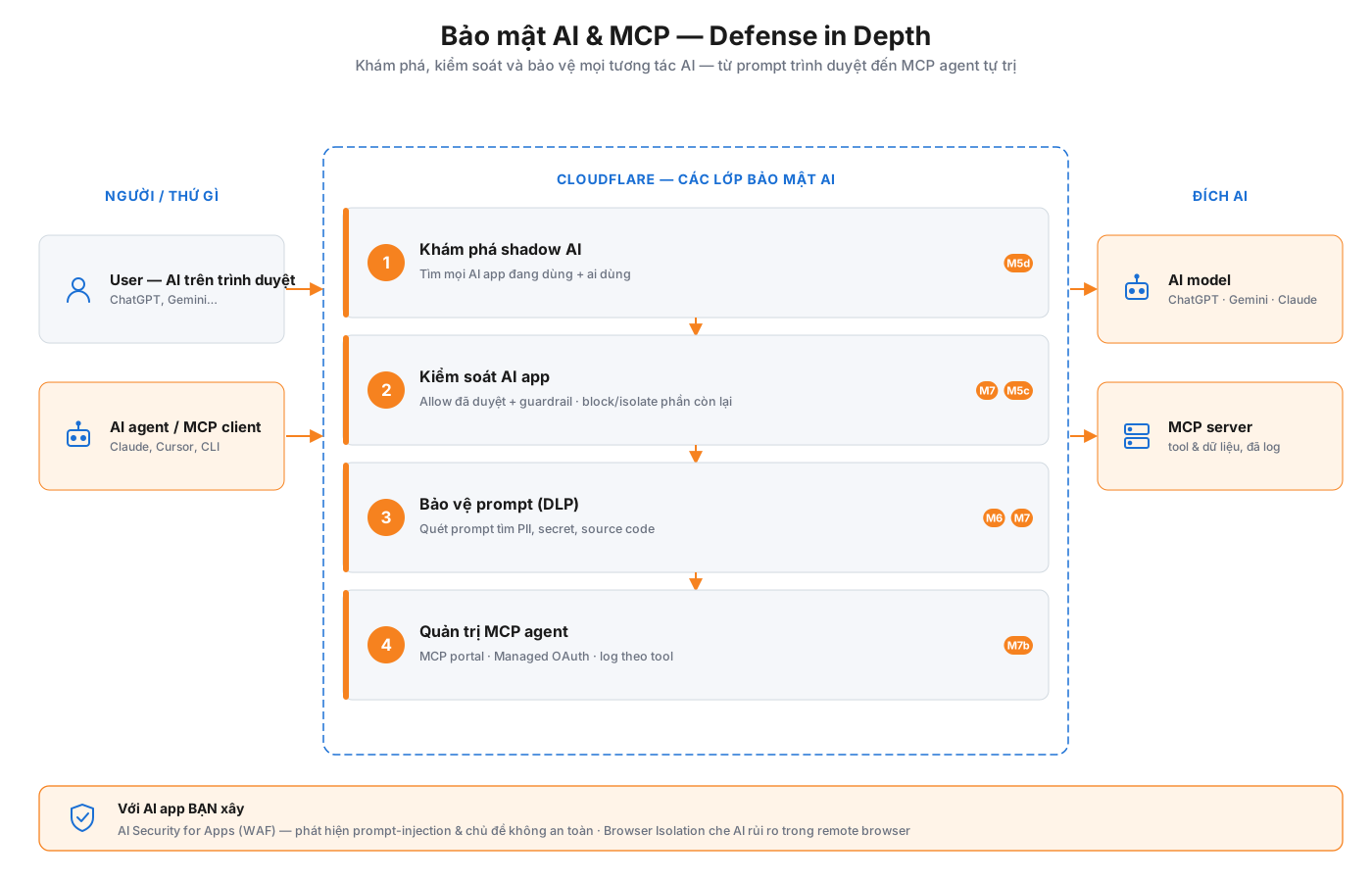
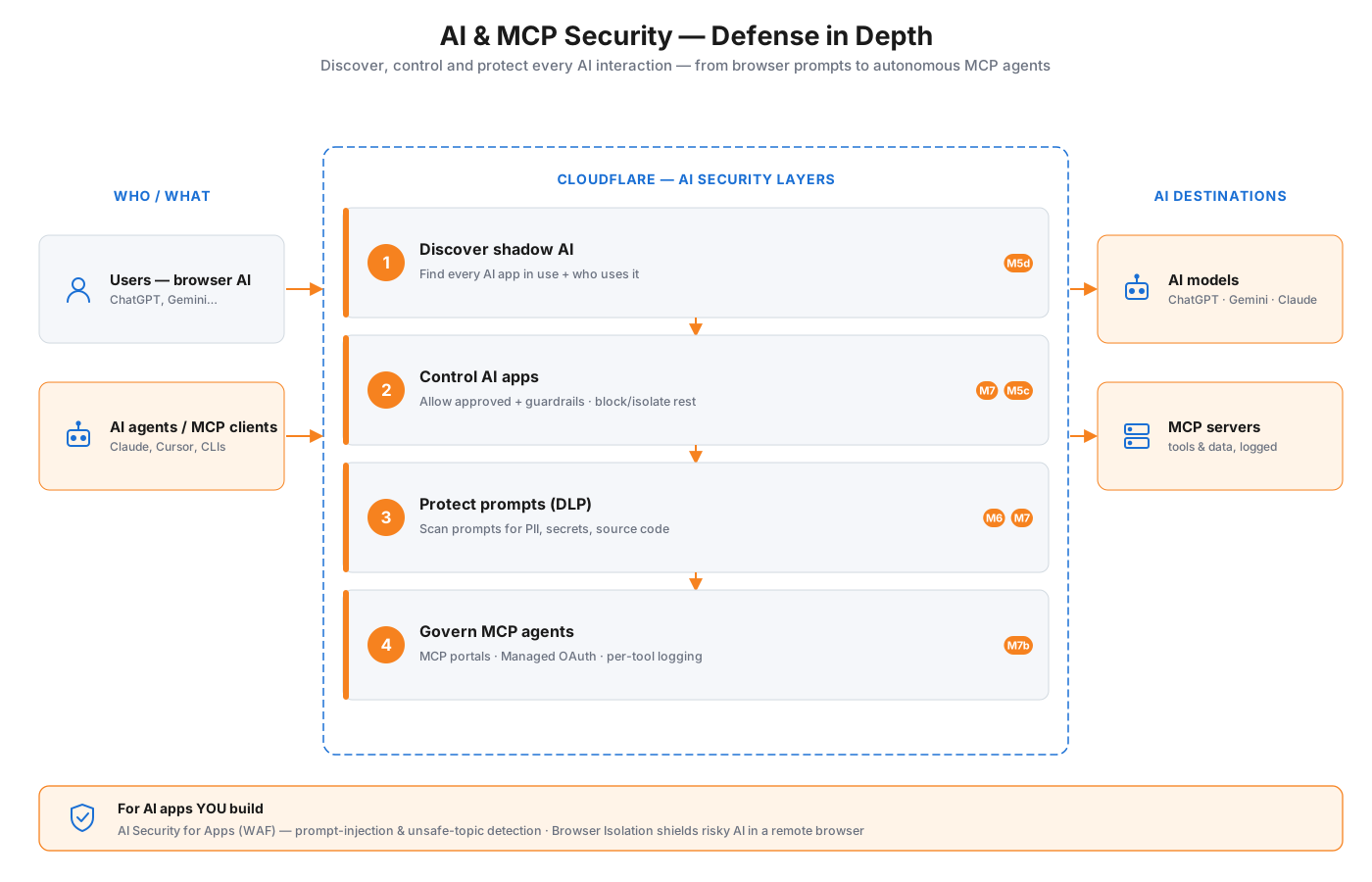
Quản trị AI là một phần hạng nhất của nền tảng này, không phải phần phụ. Khi nhân viên dùng công cụ AI và các MCP agent tự hành kết nối tới hệ thống của bạn, Cloudflare áp dụng bốn lớp cho mọi tương tác AI — khám phá những gì đang được dùng, kiểm soát ứng dụng, bảo vệ nội dung đưa vào prompt, và quản trị chính các agent — cùng một lớp WAF riêng cho các ứng dụng AI bạn xây.
Bảo mật AI & MCP — bốn lớp defense-in-depth giữa user/agent và nhà cung cấp AI, cộng AI Security for Apps (WAF) cho AI mà bạn xây.
Bốn lớp
Discover shadow AI — tìm mọi ứng dụng AI đang dùng và ai đang dùng (M5d)
Control AI apps — cho phép công cụ đã duyệt với guardrail; chặn hoặc cách ly phần còn lại (M7 · M5c)
Protect prompts — DLP quét những gì người dùng gõ vào AI để tìm PII, secret và mã nguồn (M6 · M7)
Govern MCP agents — MCP portal đặt agent sau Access với Managed OAuth và ghi log theo từng công cụ (M7b)
Và với các ứng dụng AI bạn xây và công khai, AI Security for Apps (WAF) bổ sung phát hiện prompt-injection và chủ đề không an toàn. Hướng dẫn đầy đủ: Mô-đun 5d · Mô-đun 7 · Mô-đun 7b.
A visual map of the whole project: what you're building (the reference architecture) and the order you build it in (the onboarding workflow). Every box is tagged with the module (M1, M2, …) that covers it, so you can jump straight to the how-to.
Reference architecture
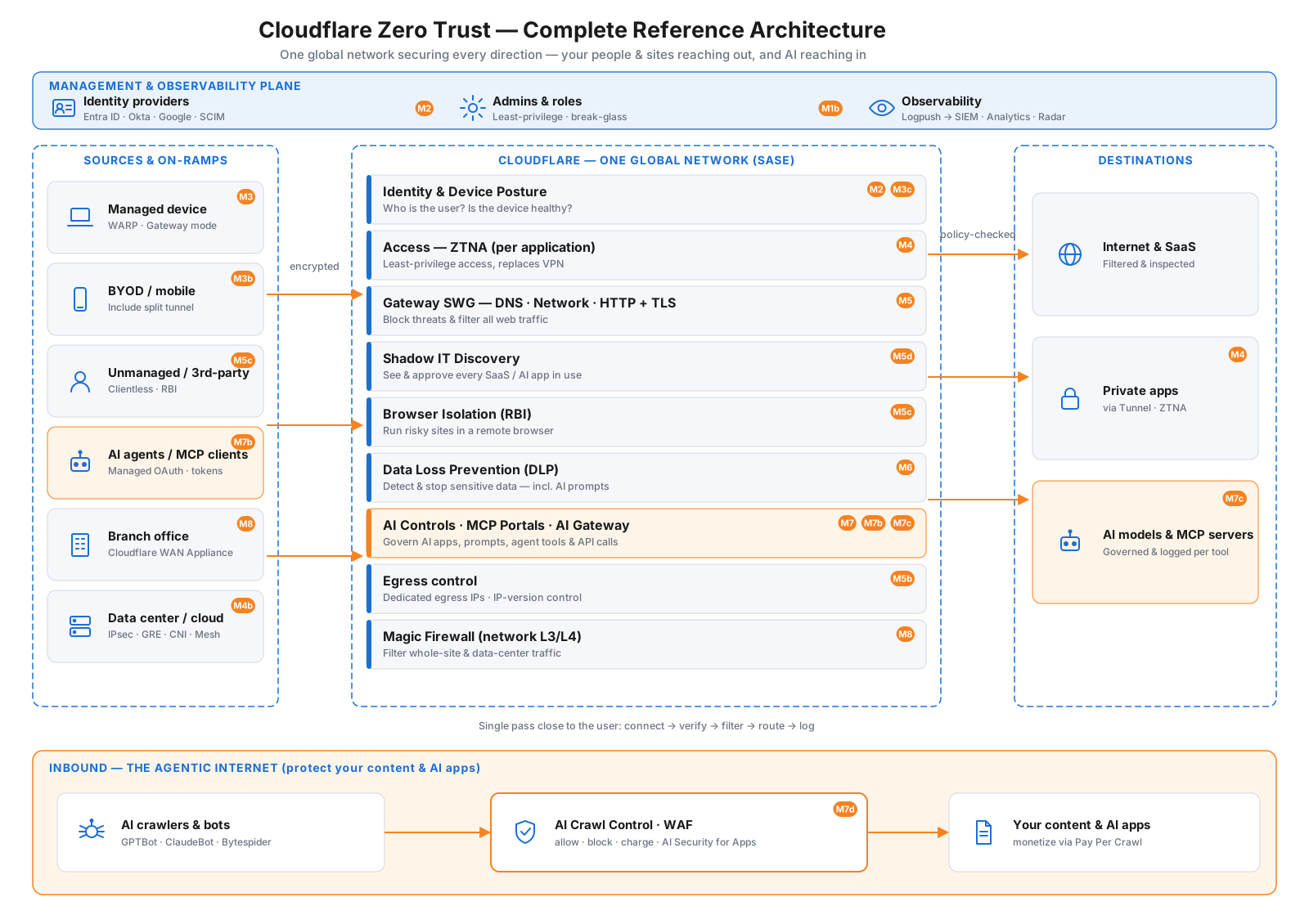
The complete picture of what you're building. It secures both directions: your people, devices, and sites reaching out (the main spine), and AI crawlers reaching in to your content (the bottom lane) — all on one global network, with a management plane across the top.
Complete reference architecture — management plane (top), outbound Zero Trust spine (middle), and the inbound Agentic Internet lane (bottom). Badges map each element to its module.
How to read it
Top — Management & observability plane: the cross-cutting controls — your identity providers (Entra ID / Okta / Google + SCIM, M2), admins & roles (least-privilege + break-glass, M1b), and observability (Logpush → SIEM, Analytics, Radar).
Left — Sources & on-ramps: everything that connects to Cloudflare — managed devices (WARP), BYOD, unmanaged/clientless, AI agents / MCP clients, branch offices (Cloudflare WAN Appliance), and data centers/cloud (IPsec · GRE · CNI · Mesh).
Center — Cloudflare's one global network (SASE): each request passes through the full security stack in a single pass close to the user — identity & posture, ZTNA (Access), Gateway SWG, Shadow IT discovery, Browser Isolation, DLP, AI Controls · MCP Portals · AI Gateway, egress control, and Magic Firewall.
Right — Destinations: the internet & SaaS, your private apps (via Tunnel/ZTNA), and AI models & MCP servers — all reached securely.
Bottom — Inbound (the Agentic Internet): the other direction — AI crawlers & bots hitting your public content, governed by AI Crawl Control · WAF · AI Security for Apps (allow / block / charge), so you can even monetize access with Pay Per Crawl (M7d).
Onboarding workflow
The order to deploy in. Each phase builds on the last, and the golden rule applies throughout: pilot → validate → expand.
Onboarding workflow — six phases from account foundation to network connectivity, then go-live.
The phases
Foundation — account, admins, identity (M1 · M1b · M2)
Devices — enroll the Cloudflare One Client, device profiles, posture (M3 · M3b · M3c)
Web filtering — Gateway, egress/IP control, Browser Isolation, Shadow IT (M5 · M5b · M5c · M5d)
Data & AI — DLP, AI controls, secure AI & MCP (M6 · M7 · M7b)
Network — connect offices and data centers with Cloudflare WAN (M8)
Then go-live: stream logs to your SIEM, validate with a pilot group, expand company-wide, and retire the old VPN.
AI & MCP security — defense in depth
Governing AI is a first-class part of this platform, not an afterthought. As employees adopt AI tools and autonomous MCP agents connect to your systems, Cloudflare applies four layers to every AI interaction — discover what's used, control the apps, protect what goes into prompts, and govern the agents themselves — with a separate WAF layer for the AI apps you build.
AI & MCP security — four defense-in-depth layers between users/agents and AI providers, plus AI Security for Apps (WAF) for the AI you build.
The four layers
Discover shadow AI — find every AI app in use and who's using it (M5d)
Control AI apps — allow approved tools with guardrails; block or isolate the rest (M7 · M5c)
Protect prompts — DLP scans what users type into AI for PII, secrets, and source code (M6 · M7)
Govern MCP agents — MCP portals put agents behind Access with Managed OAuth and per-tool logging (M7b)
And for AI applications you build and expose, AI Security for Apps (WAF) adds prompt-injection and unsafe-topic detection. Full walkthroughs: Module 5d · Module 7 · Module 7b.
Ưu tiên một hoặc hai use case (thay VPN, rồi SWG) và layer phần còn lại. Rollout SASE thất bại thường vì bật mọi thứ cùng lúc.Prioritize one or two use cases (VPN replacement, then SWG) and layer the rest. Failed SASE rollouts usually turn everything on at once.Prioritize one or two use cases (VPN replacement, then SWG) and layer the rest. Failed SASE rollouts usually turn everything on at once.
Ví dụ chính thức từ Cloudflare Resources — gợi ý theo chủ đề bài học trong lộ trình này.Official examples from Cloudflare Resources — matched to this lesson within this path.Official examples from Cloudflare Resources — matched to this lesson within this path.
Kiến trúc tham chiếuReference architectureស្ថាបត្យកម្មយោងCloudflare OneCloudflare OneCloudflare One
Reference Architecture using Cloudflare SASE with MicrosoftReference Architecture using Cloudflare SASE with MicrosoftReference Architecture using Cloudflare SASE with Microsoft
Sơ đồ kiến trúcReference architecture diagramគំនូសស្ថាបត្យកម្មយោងCloudflare OneCloudflare OneCloudflare One
Zero Trust và hạ tầng desktop ảo (VDI)Zero Trust and Virtual Desktop InfrastructureZero Trust and Virtual Desktop Infrastructure
Hướng dẫn dùng Zero Trust với VDI — cải thiện so với remote access web app truyền thống, bảo mật cao hơn.
This document provides a reference and guidance for using Cloudflare's Zero Trust services. It offers a vast improvement over remote access to web applications with greater security.
This document provides a reference and guidance for using Cloudflare's Zero Trust services. It offers a vast improvement over remote access to web applications with greater security.
Hướng dẫn này giải thích cách sử dụng Cloudflare AI Gateway và Zero Trust để tạo ra một trang web đóng gói chức năng và an toàn cho một đại lý AI.
This tutorial explains how to use Cloudflare AI Gateway and Zero Trust to create a functional and secure website wrapper for an AI agent.
វគ្គបណ្តុះបណ្តាលនេះបង្ហាញពីរបៀបដើម្បីប្រើ Cloudflare AI Gateway និង Zero Trust ដើម្បីបង្កើតវគ្គបណ្តុះបណ្តាលគេហទំព័រដែលមានប្រសិទ្ធិភាពនិងសុវត្ថិភាពសម្រាប់អេក្រង់ AI ។
Với cuộc gọi MCAS API, bạn có thể quản lý một danh mục URL có chứa các URL bị chặn. Sử dụng đầu ra để tạo danh sách tên máy chủ có thể được sử dụng bởi chính sách Gateway HTTP để chặn chúng.
With an MCAS API call, you can manage a URL category that contains the blocked URLs. Use the output to create a Hostname List that can be used by Gateway HTTP policies to block them.
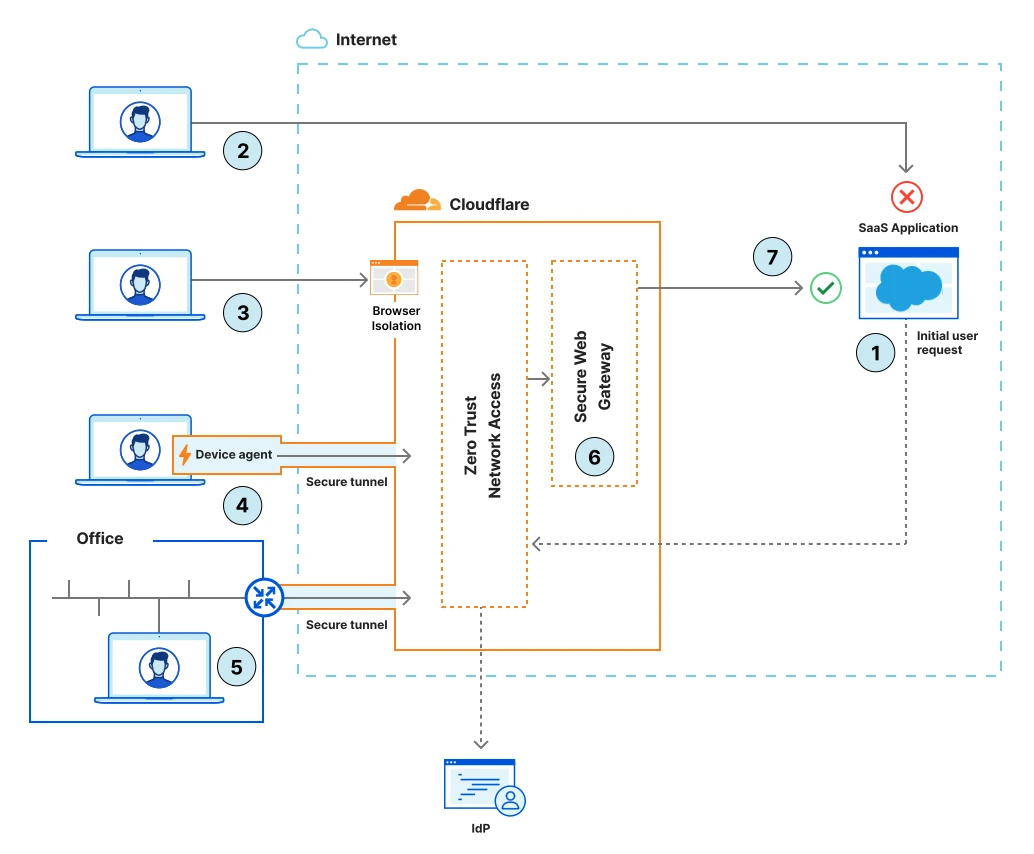
Truy cập SaaS an toàn với SASESecure access to SaaS applications with SASESecure access to SaaS applications with SASE
Zero Trust cho SaaS: policy theo identity, device posture và network context qua Cloudflare One.Cloudflare's SASE platform offers the ability to bring a more Zero Trust orientated approach to securing SaaS applications. Centralized policies, based on device posture, identity attributes and granular network location can be applied across one or many Saas applications.Cloudflare's SASE platform offers the ability to bring a more Zero Trust orientated approach to securing SaaS applications. Centralized policies, based on device posture, identity attributes and granular network location can be applied across one or many Saas applications.
Học xong hoặc muốn đổi hướng?Finished or want a different path?Finished or want a different path?
Ba lộ trình độc lập — mỗi lộ trình chỉ gồm bài học và tài liệu trong phạm vi đó. Chọn lộ trình khác khi sẵn sàng, không cần học song song.Three independent paths — each includes only lessons and materials for that scope. Switch when you are ready; no need to study paths in parallel.Three independent paths — each includes only lessons and materials for that scope. Switch when you are ready; no need to study paths in parallel.